What is Vydora AI?
Vydora AI is a cloud-based AI video creation platform designed for faceless videos, avatar-style videos, YouTube content, social clips, affiliate promotions, and niche-based video campaigns. It combines research, writing, production, optimization, and monetization support inside one workflow so users do not need to jump between separate tools for scripts, voices, visuals, SEO metadata, and video assembly.
The platform starts from a topic, keyword, or niche idea and helps shape it into a video asset. It can suggest content angles, build scripts for different formats, create scenes, add AI voices, support avatar-based delivery, generate ranking-focused titles and descriptions, and prepare thumbnail hooks. For creators trying to grow a channel, affiliates building traffic around offers, or agencies producing content for clients, the practical value is speed plus direction: Vydora AI gives the video a production path and a monetization angle before the upload stage.
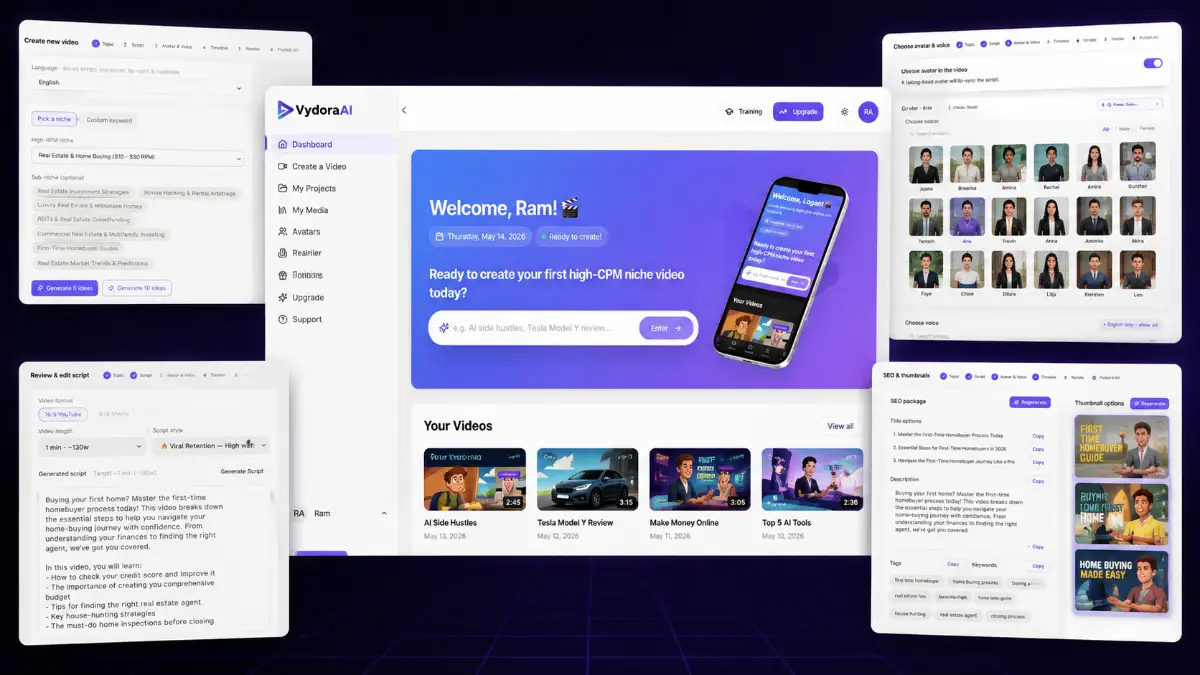
How it works (3 simple steps)
- Step 1 — Pick the market and content direction: Choose a niche, enter a keyword, or target a topic you want to cover. Vydora AI reviews the opportunity from the perspective of buyer intent, competition, and ranking potential, then suggests video ideas that are more suitable for traffic and monetization.
- Step 2 — Build the video with AI assistance: Generate the script, scenes, visual flow, AI voiceover, avatar or faceless presentation style, hooks, and structure. The process is meant to replace the usual blank-page problem, recording setup, and manual edit timeline with a guided production sequence.
- Step 3 — Prepare the upload for discovery and revenue: Use the SEO tools to create titles, descriptions, tags, hashtags, and thumbnail concepts. Once the video is published, it can support YouTube traffic, affiliate promotions, ad revenue, lead generation, or client content campaigns.
See how Vydora AI works
Step-by-step walkthrough from my YouTube channel

Key features that matter
Vydora AI is useful because it focuses on the full publishing cycle rather than one isolated task. A video channel does not grow from scripts alone, and it does not monetize from pretty visuals alone. You need a niche, an angle, a video people click, content that holds attention, metadata that gives the platform context, and an offer or revenue path after the viewer arrives. Vydora AI tries to compress those moving parts into a workflow that beginners can follow and experienced marketers can scale.
- AI niche and topic discovery: find high-CPM markets and video ideas by checking buyer intent, ranking potential, and competition signals before choosing what to create.
- Ranking predictor: evaluate topic opportunities so you can avoid producing random videos with little search or monetization value.
- AI script generation: create scripts for several content formats, including authority videos, story-driven content, viral-style videos, listicles, and monetization-focused videos.
- Faceless video creation: produce videos without appearing on camera, setting up lights, recording yourself, or manually editing every scene.
- Avatar-style videos: use AI avatars when a presenter-led video fits the niche, offer, or channel style better than a purely faceless format.
- Automated scene creation: convert the script into visual sections, scenes, transitions, and a structured video flow instead of building the edit manually.
- AI voiceover engine: add human-like voiceovers designed to support watch time, clarity, and a more polished viewer experience.
- SEO optimization tools: generate titles, descriptions, tags, and hashtags that give each video a better starting point for YouTube discovery.
- Thumbnail and CTR support: create thumbnail hooks and visual ideas that help the video compete for clicks in search, suggested videos, and social feeds.
- High-CPM monetization workflow: build content around niches and topics that can support ad revenue, affiliate offers, product recommendations, and buyer-focused traffic.
- Character and style consistency: keep avatars, visual direction, and branding aligned across scenes and campaigns with the character lock system.
- Multilingual creation: generate content in 100+ languages, making it easier to test international audiences without rebuilding every asset from scratch.
- Affiliate-friendly content structure: shape videos so product mentions, calls to action, and buyer education feel more natural within the video flow.
- Commercial license: create videos for clients, local businesses, coaches, agencies, affiliates, or content brands and keep the revenue from your services.
- Scalable production: publish more consistently by reducing the workload across research, scripting, voice, visuals, optimization, and final assembly.
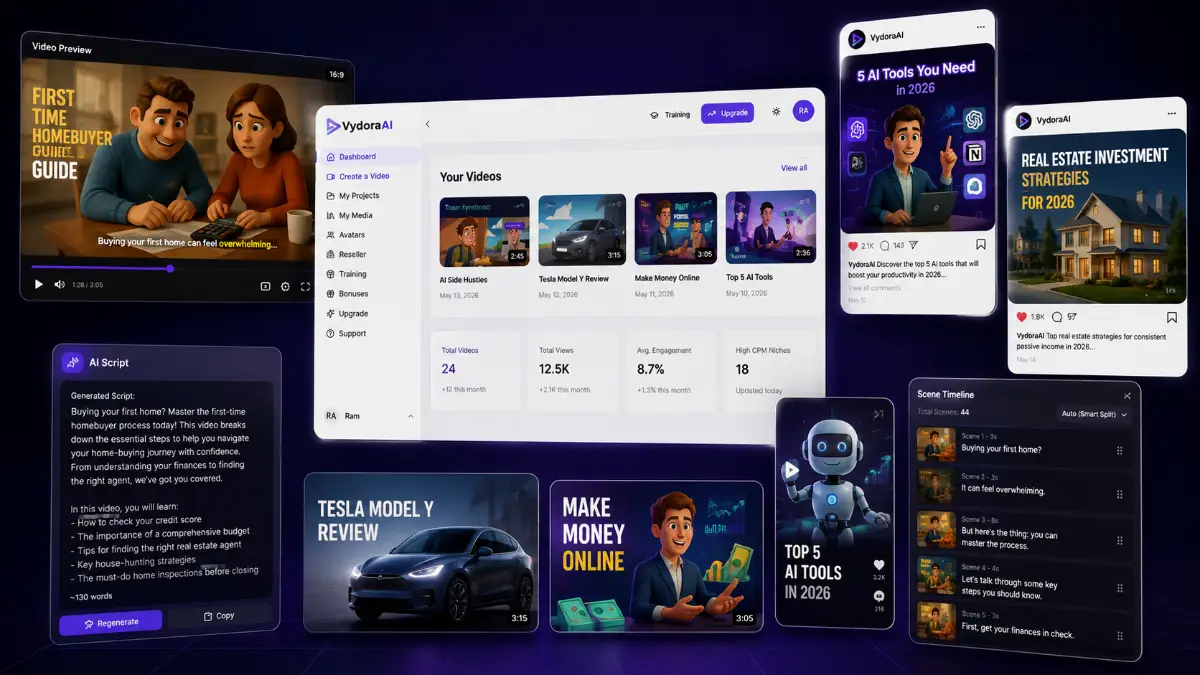
Pros & Cons (realistic)
Pros
- Strong fit for faceless creators: the workflow removes the need for filming, camera confidence, voice recording, and traditional editing skills.
- Research and production stay connected: niche ideas, scripts, video scenes, SEO assets, and monetization direction are handled in the same process instead of being scattered across tools.
- Useful for affiliate content: buyer-intent topics and high-CPM niches make sense for product reviews, comparisons, tutorials, list videos, and recommendation-style channels.
- Good agency angle: businesses need video content, and Vydora AI can help package video creation, SEO video assets, and content campaigns as a client service.
- Multilingual output increases testing options: creators can explore non-English markets or repurpose winning content into other languages faster.
Cons
- Ranking is never automatic: SEO tools help with structure, but YouTube performance still depends on topic demand, retention, CTR, competition, and publishing consistency.
- AI scripts need editorial review: facts, claims, affiliate disclosures, niche details, and product recommendations should be checked before publishing.
- Generic videos may blend in: faceless content works better when the hook, visual style, pacing, and opinion angle feel distinct.
- The best upgrades depend on volume: casual users may not need Pro, MasterMode, or Reseller unless they plan to publish frequently, work with clients, or sell access.
My personal angle (how I’d use it)
- For affiliate review traffic: I would build short videos around product comparisons, problem-aware searches, “best tools for” keywords, and tutorial topics where the viewer is already close to a buying decision.
- For content clusters: I would choose one niche, create a group of related videos, and connect them through similar visuals, consistent avatars, recurring CTAs, and a clear affiliate or lead capture path.
- For local client services: I would offer video packages to real estate agents, coaches, clinics, restaurants, gyms, or service businesses that want educational content but do not have time to film.
- For international experiments: I would take a proven English video angle, translate and adapt it for another language, then test whether lower-competition markets produce easier traction.
Bonuses
Vydora AI becomes more powerful when it is connected to a real publishing plan: which niche to enter, which videos to create first, how to position the offer, what CTA to use, and how to turn views into commissions, leads, or client revenue. For the full Tool Review Central bonus list and delivery details, use the internal page below:
Bonus details
See what’s included and how delivery works after purchase.
Quick buying decision (what I’d pick)
If I wanted the broadest Vydora AI setup, I would look at the Vydora AI Bundle first because it groups the Front End, Pro, MasterMode, StreetSpeak AI, ClickAgent, Reseller, bonuses, tutorials, and knowledge-base access into one package. The Front-End is the simplest entry point for testing the core faceless and avatar video workflow at the lowest price. Pro is the logical upgrade for higher publishing volume, more avatars, more voices, longer videos, and fewer usage limits. MasterMode is better suited for teams, agencies, commercial work, faster rendering, and longer 1080p videos. StreetSpeak AI adds a separate street-interview style content angle for attention-driven videos. ClickAgent supports product promotion through AI selling rooms. Reseller is only for buyers who want to sell Vydora AI accounts as a software business rather than just use the tool for content.
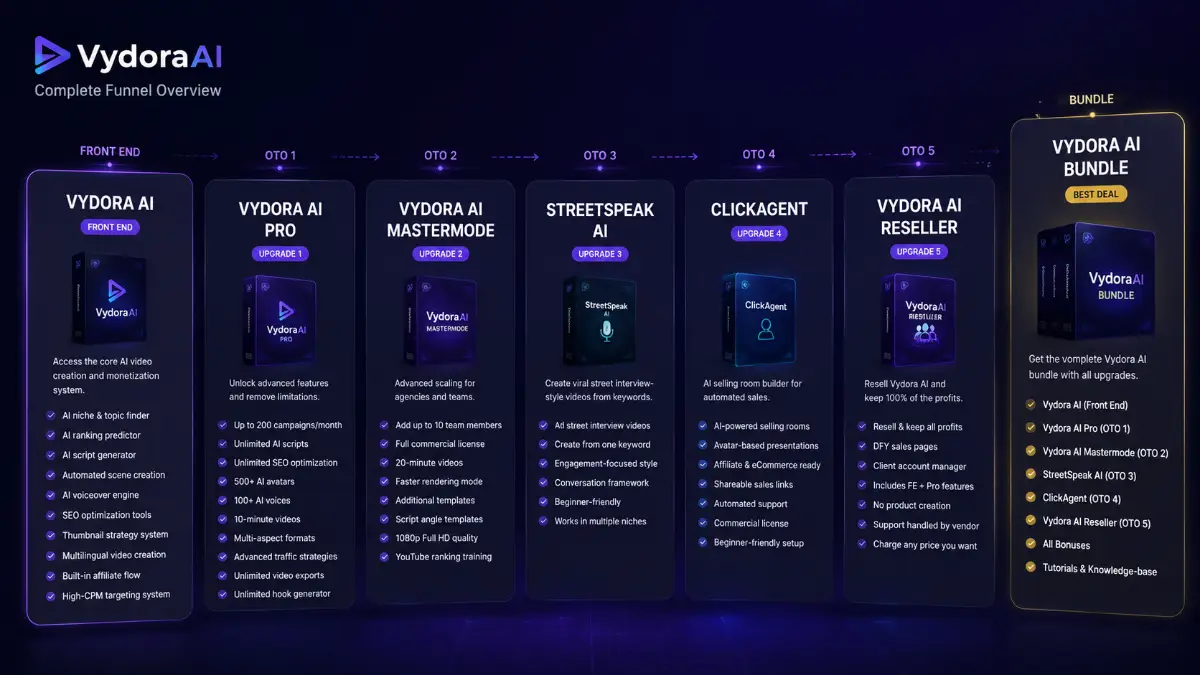
Pricing & funnel breakdown
| Offer | Price | Best for |
|---|---|---|
| Bundle — Vydora AI Bundle | $297 | Best overall route for buyers who want the full Vydora AI stack in one purchase. Includes Vydora AI Front End, Vydora AI Pro, Vydora AI MasterMode, StreetSpeak AI, ClickAgent, Vydora AI Reseller, all bonuses, tutorials, and knowledge-base access. |
| Front-End — Vydora AI | $27-$37 | Main entry package for creating faceless and avatar-style AI videos. Includes AI niche and topic discovery, ranking predictor, AI script generation, multiple script styles, automated scene creation, AI voiceovers, SEO optimization, thumbnail strategy, full video assembly, multilingual creation, affiliate monetization flow, and high-CPM targeting. |
| Upsell 1 — Vydora AI Pro | $67 | For users who want fewer limits and more publishing capacity. Adds up to 200 campaigns monthly, unlimited AI scripts, unlimited SEO optimization, unlimited hook generation, unlimited video exports, 500+ AI avatars, 100+ AI voices, 10-minute videos, multi-aspect formats, and viral traffic strategies. |
| Upsell 2 — Vydora AI MasterMode | $97 | Built for advanced creators, agencies, and teams. Includes up to 10 team members, full commercial license, videos up to 20 minutes, faster rendering, extra templates, more script angle templates, 1080p HD output, and YouTube ranking strategy training. |
| Upsell 3 — StreetSpeak AI | $47 | Additional AI tool for creating realistic street interview-style videos from a single keyword. Useful for engagement-driven content, conversation-based marketing, viral attention, clicks, and multi-niche short-form or social content angles. |
| Upsell 4 — ClickAgent | $47 | AI-powered selling room builder for promoting products and services with avatars. Includes shareable sales links, avatar-based product presentations, affiliate and eCommerce offer support, automated sales and support experiences, beginner-friendly setup, and commercial license. |
| Upsell 5 — Vydora AI Reseller | $297-$397 | For marketers and agencies who want to resell Vydora AI accounts and keep 100% of the profits. Includes DFY sales pages, marketing assets, client account management, Vydora AI plus Pro features, vendor-handled support, and flexible client pricing. |
Direct links (bundle first)
Open in a new tab. These are affiliate links.
FAQ
Is Vydora AI only for YouTube?
No. YouTube is the clearest use case because the platform includes ranking-focused titles, descriptions, tags, hashtags, and thumbnail ideas. However, the videos can also support social platforms, affiliate campaigns, client content, niche pages, short-form distribution, and repurposed video marketing workflows.
Do I need to appear on camera?
No. Vydora AI is designed around faceless and avatar-style video creation. You can build videos using AI-generated scripts, scenes, visuals, avatars, and voiceovers without filming yourself or recording your own voice.
Which upgrades are most relevant for scaling content?
Pro is the first upgrade to consider if you want more campaigns, more exports, more avatars, more voices, and longer videos. MasterMode is more suitable for team workflows, agency usage, longer HD content, and commercial client delivery. Reseller is a different path entirely because it is for selling Vydora AI accounts rather than just creating videos.
Do you have a bonus page?
Yes — bonus info is here: /vydora-ai-bonus/.
About the reviewer

Samuel Marco
I publish practical reviews of AI software and online business tools, focusing on real workflows, buyer use cases, monetization potential, pricing decisions, and whether a tool can realistically help someone save time, increase output, or package a service around it.
Final verdict
Vydora AI is aimed at creators and marketers who want to publish video content without handling the entire production process manually. It brings together niche research, buyer-intent topic discovery, AI scripts, faceless videos, avatar videos, voiceovers, automated scenes, SEO metadata, thumbnail direction, multilingual output, affiliate-friendly content structure, commercial use, and scalable publishing. That combination is valuable for anyone trying to build a YouTube channel, support affiliate campaigns, create videos for clients, or test content in high-CPM niches. The main caution is that automation does not replace editorial judgment: the strongest results will still come from good topics, sharp hooks, accurate information, engaging pacing, and consistent publishing. For beginners who want to avoid camera work and for marketers who want a faster way to produce monetization-focused videos, Vydora AI has a clear content production and traffic-building angle.
Want a faster way to create faceless and avatar-style videos with AI scripts, voiceovers, visuals, SEO titles, thumbnail ideas, and monetization-focused content angles?
The Bundle gives the widest setup. Front-End is the easiest starting point. Pro raises production limits, MasterMode adds team and commercial scaling, StreetSpeak AI gives you a street-interview content format, ClickAgent supports AI selling rooms, and Reseller is for selling Vydora AI access as a software offer.