What is ViralRevenueAI?
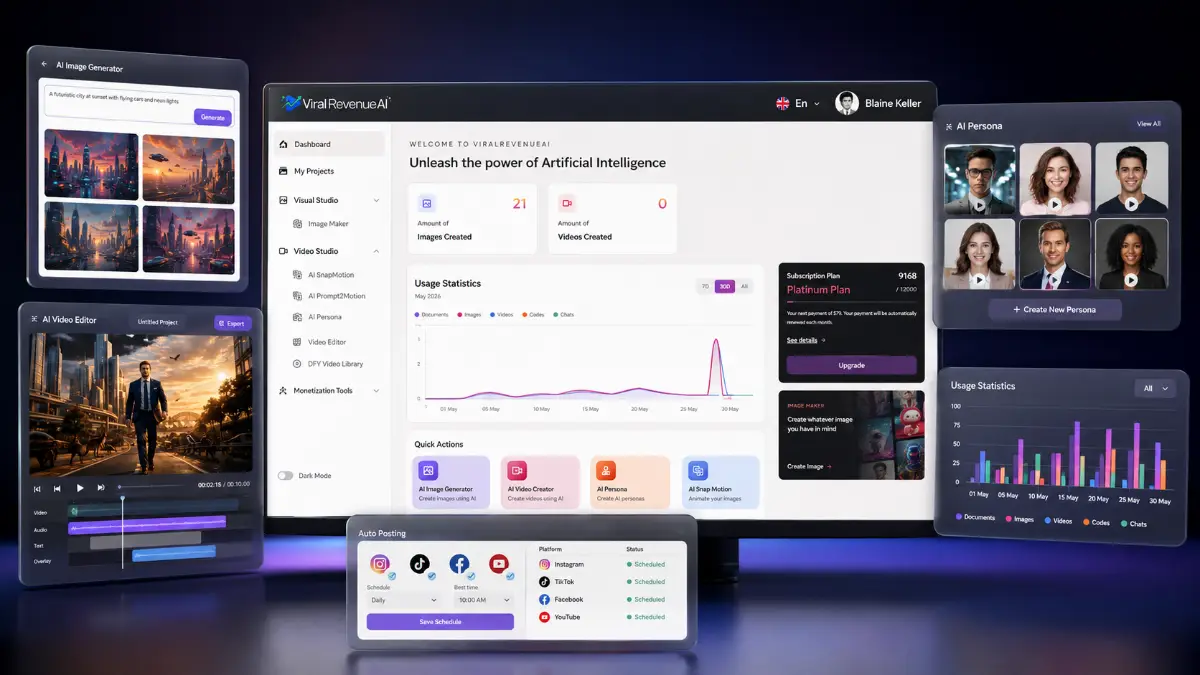
ViralRevenueAI is an AI video creation and social media automation platform built for marketers, content creators, affiliates, agencies, and businesses that need more social video output without dealing with complex editing software. It can generate AI-powered videos, talking avatar clips, faceless reels, promotional videos, and visual content from simple prompts or uploaded images.
The platform is positioned as a content production and publishing hub. You can research trends, improve prompts, generate images, animate static visuals, create persona-style videos, edit clips, schedule posts, publish across major social channels, and manage engagement from one place. That makes ViralRevenueAI more useful for users who want an operating workflow, not just another isolated AI generator.
How it works (3 simple steps)
- Step 1 — Create your content: Start with a prompt, upload an image, or build an AI persona video. ViralRevenueAI can turn those inputs into motion clips, talking avatar content, social videos, promotional assets, and faceless media in a few clicks.
- Step 2 — Edit and optimize: Use the built-in editor to refine the clip, adjust the format, improve the prompt, add platform-ready polish, and use trend research to shape content around topics people are already engaging with.
- Step 3 — Automate and grow: Schedule and publish content across Facebook, Instagram, TikTok, and YouTube from the same dashboard. The automation features help keep publishing consistent while reducing the repetitive work behind social growth.
See how ViralRevenueAI works
Step-by-step walkthrough from my YouTube channel.

Key features that matter
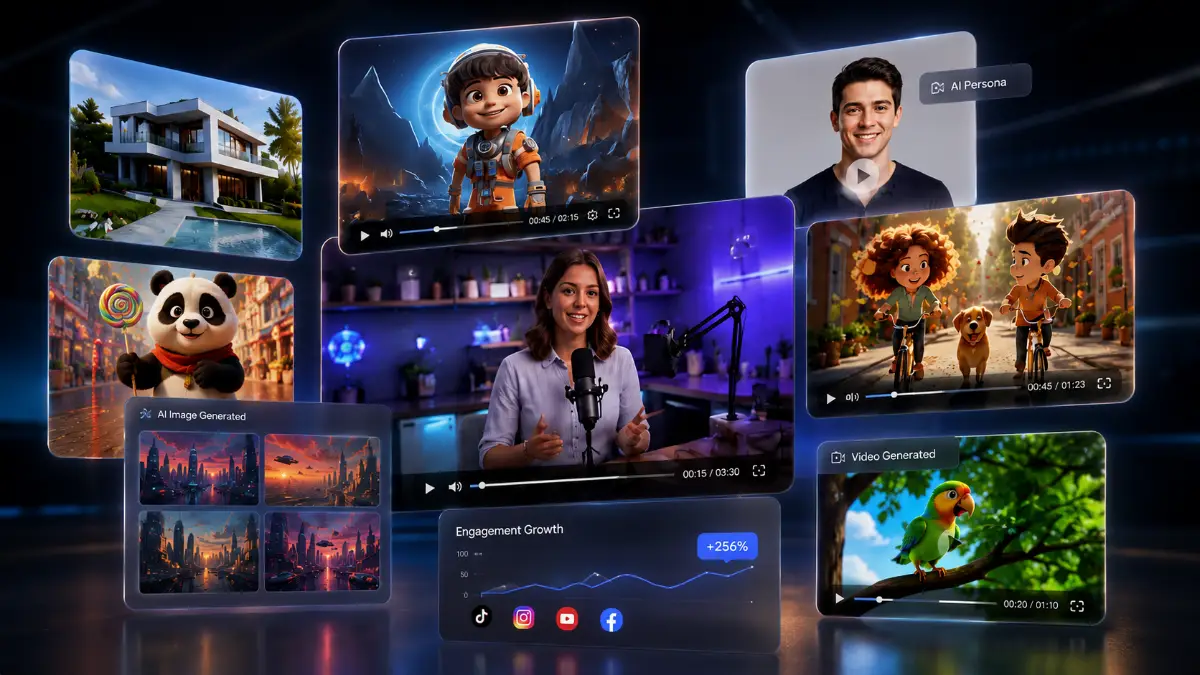
ViralRevenueAI is most interesting when you look at the entire content cycle. A prompt can become a video concept, an uploaded image can become a motion clip, a persona can deliver a message, the editor can shape the asset, the trend scanner can guide the angle, and the automation tools can push the finished content into the channels where it needs to appear.
- AI Snap-to-Motion: transform static images into animated motion videos with cinematic movement, useful for product showcases, travel clips, reels, and visual ads.
- AI text-to-video generation: create video content from simple prompts, topics, campaign ideas, or descriptions without needing timeline editing experience.
- AI persona videos: generate talking avatar and spokesperson-style clips for branding, education, sales messages, tutorials, and promotional content without appearing on camera.
- Image generator: produce custom visuals for videos, social posts, thumbnails, and campaigns directly inside the platform instead of relying on external stock or design tools.
- Niche Trend Scanner: find trending topics, content angles, hashtags, and niche opportunities that can help shape videos around active demand.
- Built-in video editor: refine, customize, and optimize videos for different platforms without needing a separate editing application.
- Prompt Enhancer: improve short or vague prompts so AI outputs become more specific, usable, and aligned with the intended campaign.
- Social media automation: automate distribution across Facebook, Instagram, TikTok, and YouTube so content publishing is less manual.
- Scheduling and publishing: plan posts from a central dashboard and keep channels active with a more consistent publishing rhythm.
- YouTube Auto Reply: respond to YouTube comments and viewer interactions more efficiently, which can help maintain audience engagement.
- DFY video library: use done-for-you video assets and creative resources to speed up campaign creation when starting from scratch is not ideal.
- Faceless content creation: build content for faceless brands, YouTube automation, affiliate campaigns, motivational pages, educational accounts, and niche social pages.
- Multi-platform optimization: adapt content for YouTube Shorts, Instagram Reels, TikTok, Facebook posts, vertical videos, promotional clips, and short-form formats.
- Cashflow Sources: access monetization ideas and revenue resources for affiliate promotions, content marketing, client work, and social media growth.
- Agency Client Panel: available in the Unlimited + Agency upgrade for users who want to manage client projects and sell content creation services.
- Commercial license options: selected packages include commercial rights, allowing users to create and sell content for clients and business campaigns.
Pros & Cons (realistic)
Pros
- Strong content workflow: generation, editing, trend research, scheduling, and publishing are connected in one platform.
- Good fit for short-form campaigns: snap-to-motion, persona videos, and faceless clips match the formats creators publish every day.
- Useful for affiliates and agencies: commercial options and the agency upgrade make it easier to turn the tool into client deliverables.
- Less technical friction: prompts, image uploads, templates, and automation reduce the need for advanced video editing skills.
- Automation adds practical value: scheduling, publishing, and YouTube auto reply address the repetitive work that often slows content plans down.
Cons
- Credits matter: the lower tiers have usage limits, so frequent publishers may need an upgrade.
- AI output still needs review: generated videos, scripts, visuals, and replies should be checked before publishing.
- Results depend on strategy: automation will not fix weak offers, poor hooks, or random content topics.
- Best features are split across upgrades: persona videos, trend scanning, automation, agency tools, and reseller rights sit in different parts of the funnel.
My personal angle (how I’d use it)
- For affiliate reviews: I would turn product benefits into short promotional clips, comparison reels, avatar explainers, and platform-specific video posts that lead back to a review or bonus page.
- For faceless channels: I would build repeatable content batches around trending niche topics, then use the editor and scheduler to keep output consistent without recording myself.
- For local businesses: I would create simple promo videos, offer announcements, FAQ clips, and seasonal social posts that can be scheduled across multiple channels.
- For client services: I would use the Unlimited + Agency path to package weekly video creation and social posting as a recurring service for small businesses.
Bonuses
ViralRevenueAI becomes more useful when it is paired with a clear publishing plan: niche selection, content hooks, video prompts, posting schedule, engagement workflow, and monetization path. For the full Tool Review Central bonus list and delivery details, use the internal page below:
Bonus details
See what’s included and how delivery works after purchase.
Quick buying decision (what I’d pick)
The Starter front-end is the right entry point if you want to test the core video tools and see whether the workflow fits your content style. I would look at Pro Elite if persona videos, more credits, the DFY library, and trend research are important. Automation Suite is the practical add-on for anyone publishing across multiple platforms. Unlimited + Agency is the serious tier for high-volume content, client work, and fewer restrictions. The Reseller License is only for marketers who want to sell the offer itself rather than simply use the software.
Pricing & funnel breakdown
| Offer | Price | Best for |
|---|---|---|
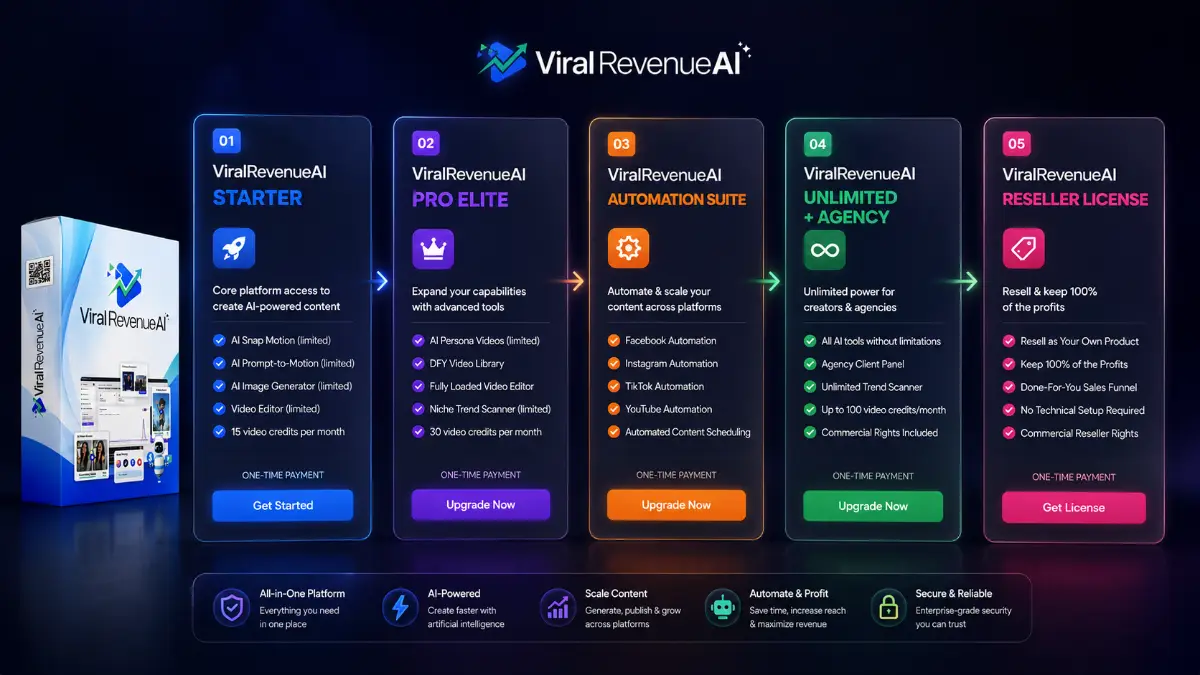
| Front-End — ViralRevenueAI Starter | $27/$37 | Main entry offer for beginners, affiliates, marketers, and creators who want the core AI video platform. Includes limited AI Snap Motion, AI Prompt-to-Motion, AI Image Generator, limited video editor features, Prompt Enhancer, Cashflow Sources, 15 video credits per month, Personal Use License at $27, and Commercial Rights Upgrade at $37. |
| Upsell 1 — ViralRevenueAI Pro Elite | $47/$57 | For users who want more creation power and more consistent output. Includes limited AI Persona Videos, additional Image Generator credits, additional Snap Motion credits, additional Prompt-to-Motion credits, DFY Video Library, Fully Loaded Video Editor, limited Niche Trend Scanner, 30 video credits per month, 30 trend searches per month, Personal Use License at $47, and Commercial Rights Upgrade at $57. |
| Upsell 2 — ViralRevenueAI Automation Suite | $37 | For users who want to automate social media distribution and engagement. Includes Facebook Automation, Instagram Automation, TikTok Automation, YouTube Automation, automated content scheduling, automated publishing, YouTube Auto Reply, multi-platform social media management, and commercial rights. |
| Upsell 3 — ViralRevenueAI Unlimited + Agency | $127 | For power users, agencies, marketers, and businesses that need higher limits and client management. Includes unlimited AI Snap Motion, unlimited AI Prompt-to-Motion, unlimited AI Persona, unlimited Niche Trend Scanner, unlimited AI Image Generator, Fully Loaded Video Editor, Agency Client Panel, up to 100 video credits per month under fair usage, unlimited trend scanner access, and commercial rights. |
| Upsell 4 — ViralRevenueAI Reseller License | $197 | For marketers who want to resell ViralRevenueAI as their own product. Includes reseller rights, ability to keep 100% of profits, done-for-you sales funnel, no product creation requirement, no technical setup requirement, no admin panel management, and a ready-to-sell business opportunity. |
Direct links (front end first)
Open in a new tab. These are affiliate links.
FAQ
Is ViralRevenueAI mainly a video tool or a social automation tool?
It combines both. The front-end starts with AI video creation, image-to-motion, prompt-based content, image generation, and editing, while the Automation Suite adds scheduling, publishing, social platform automation, and YouTube Auto Reply.
Can ViralRevenueAI create talking avatar videos?
Yes. AI Persona Videos are included in the Pro Elite upgrade, allowing users to create virtual presenter clips, spokesperson videos, educational content, sales messages, and branding videos without recording themselves.
Which upgrade makes the most sense for agencies?
Unlimited + Agency is the best fit for client work because it unlocks higher usage, fewer restrictions, unlimited tool access in key areas, the Fully Loaded Video Editor, Agency Client Panel, and commercial rights.
Do you have a bonus page?
Yes — bonus info is here: /viralrevenueai-bonus/.
About the reviewer

Samuel Marco
I publish practical reviews of AI software and online business tools, focusing on real workflows, buyer use cases, monetization potential, pricing decisions, and whether a tool can realistically help someone save time, increase output, or package a service around it.
Final verdict
ViralRevenueAI is a practical option for creators and marketers who want to produce more AI-powered video content while keeping publishing and automation under control. The strongest parts are the AI Snap-to-Motion, text-to-video generation, persona videos, image generator, Prompt Enhancer, Niche Trend Scanner, built-in video editor, faceless content workflow, social scheduling, automated publishing, YouTube Auto Reply, DFY Video Library, commercial options, and agency path. It still requires content judgment, offer clarity, and consistent posting, but it can reduce the number of tools and manual steps needed to run a video-first content strategy. For most users, the Starter offer is the sensible test; heavier publishers should compare Pro Elite, Automation Suite, and Unlimited + Agency based on volume and client needs.
Want one dashboard for AI videos, faceless reels, avatar clips, and social media automation?
The Front-End gives you the core ViralRevenueAI platform and starter credits. Pro Elite adds stronger creation tools, persona videos, more credits, DFY assets, and trend research. Automation Suite adds scheduling, publishing, and platform automation. Unlimited + Agency is the high-volume and client-service path, while Reseller is for users who want to sell the offer itself.