What is VidOverlay?
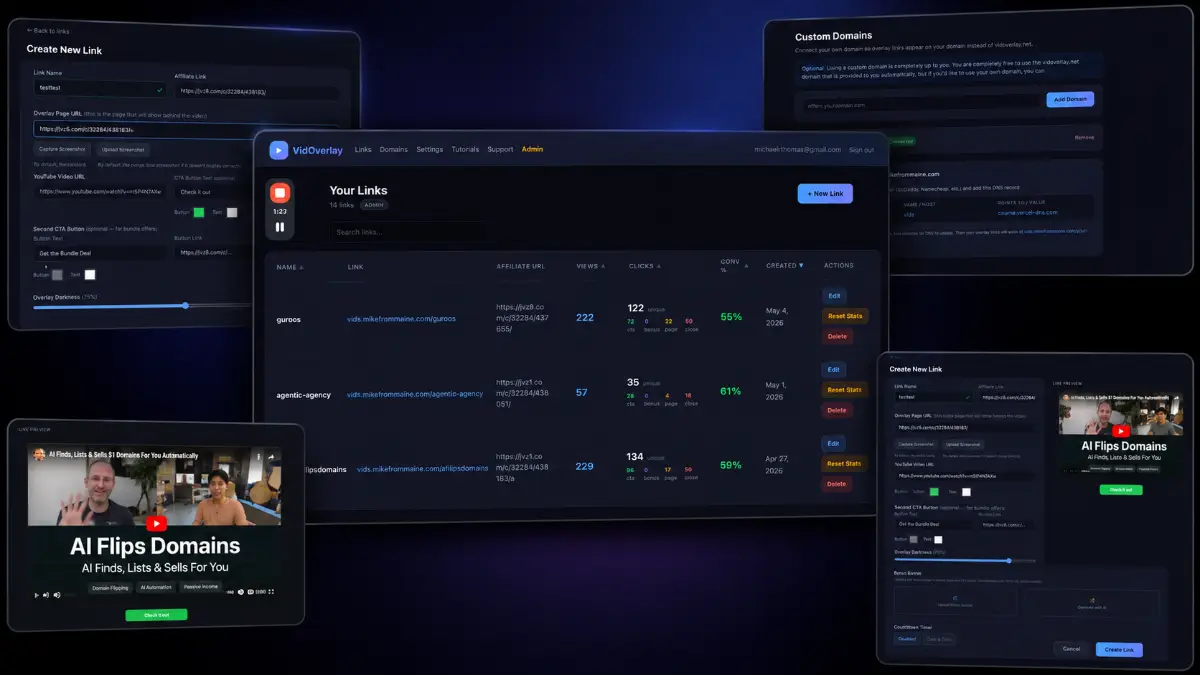
VidOverlay is a cloud-based affiliate marketing tool that lets you place a YouTube video overlay on top of almost any sales page. The visitor can see the destination page in the background while your video, call-to-action, and promotion message sit in front of it.
The main use case is simple but useful: when you recommend an offer, you can add your own explanation before the buyer moves forward. That video could be a bonus presentation, a product summary, a personal endorsement, a quick objection-handling clip, or a demo-style introduction. VidOverlay also connects the campaign to your affiliate link, so clicks can be routed through the correct referral URL while you track activity from the built-in dashboard.
How it works (3 simple steps)
- Step 1 — Create your campaign: Open VidOverlay, name the campaign, paste the sales page URL, and add the affiliate link you want visitors routed through. The software can automatically pull a preview of the target page so the campaign looks polished without extra design work.
- Step 2 — Add your video overlay: Insert your YouTube video, write the call-to-action text, choose the button destination, and adjust the visual settings. This is where you turn a plain affiliate click into a short pre-sell moment with your own voice and positioning.
- Step 3 — Share the overlay link: Generate the VidOverlay link and use it in emails, reviews, social posts, bonuses, ads, or communities. Visitors see your video on top of the offer page, then their interactions can continue through your affiliate link while analytics record views and clicks.
See how VidOverlay works
Step-by-step walkthrough from my YouTube channel.

Key features that matter
The best reason to look at VidOverlay is not that it adds a video to a page. The better reason is that it gives affiliates a faster way to add persuasion, bonus framing, and personal context before sending a visitor to a vendor-controlled sales page. That matters when the offer is good, but the affiliate still needs to explain why their recommendation or bonus stack is worth paying attention to.
- Video overlay on any sales page: place a YouTube video above the destination page so visitors can hear your recommendation while still seeing the offer behind it.
- Affiliate link integration: connect each campaign to your affiliate URL so visitor actions can be routed through the referral link instead of sending traffic to a plain sales page.
- Built-in call-to-action button: add a custom CTA with your own button text and destination, useful for bonus claims, checkout prompts, or product access links.
- Custom design settings: adjust colors and visual elements so the overlay feels aligned with the product, your brand, or the promotion angle.
- Automatic page preview: when you add the destination URL, VidOverlay can generate a preview of the sales page for a cleaner campaign presentation.
- Custom screenshot support: upload your own image if the automatic preview does not capture the page correctly or if you want more control over the visual.
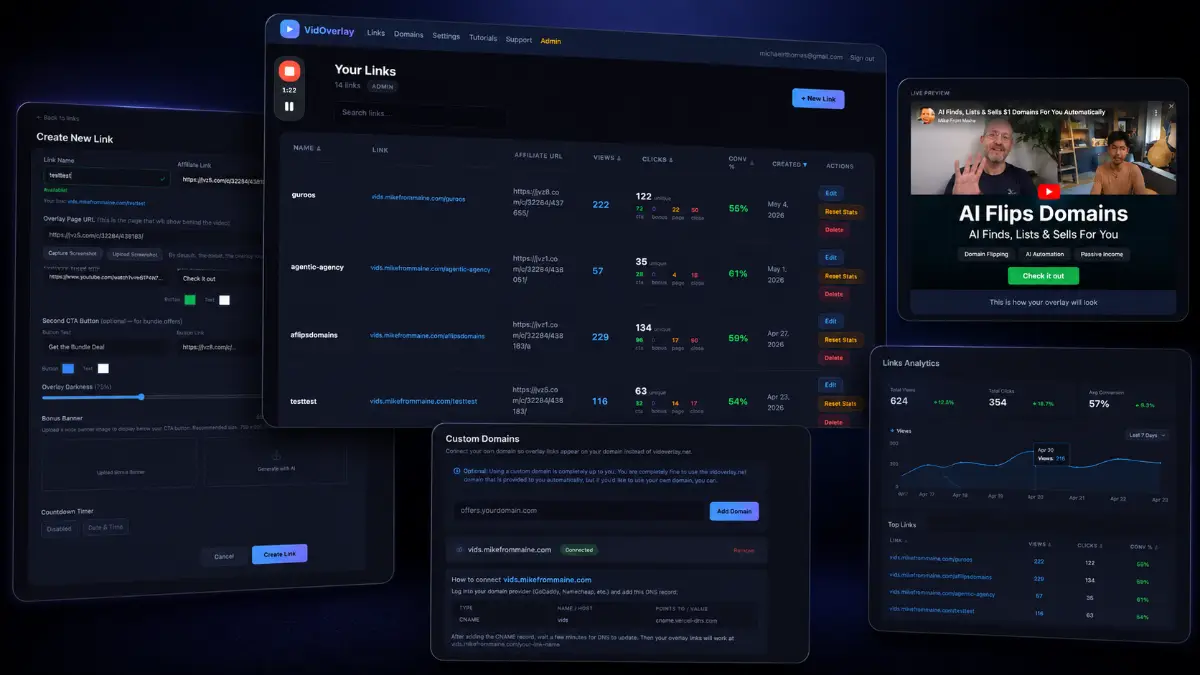
- Cloud-based dashboard: create and manage campaigns online without downloads, installations, hosting, or a separate domain.
- One-click link creation: build a campaign by adding the page URL, YouTube video, CTA details, and affiliate link, then generate a shareable overlay link.
- Built-in analytics: track overlay views and click activity so you can see which offers, videos, and traffic sources are getting engagement.
- Countdown timer bar: available in Pro, this adds urgency for launch promos, expiring bonuses, deadline discounts, or short-term campaigns.
- AI bonus banner generator: the Pro upgrade can create bonus graphics, which helps affiliates promote bonus stacks without designing banners manually.
- Unlimited active links: the Front-End supports up to 10 active links, while Pro removes that limit for affiliates running multiple campaigns.
- Training and implementation guidance: the optional training upgrade helps users understand setup, traffic ideas, promotion strategy, and practical campaign usage.
Pros & Cons (realistic)
Pros
- Useful affiliate pre-sell layer: you can add your voice, recommendation, and bonus explanation before visitors reach the offer.
- No tech stack required: campaigns can be created without hosting, page builders, plugins, or a separate bonus page.
- Good for video-first promoters: YouTube reviews, walkthroughs, and bonus videos can become part of the click path.
- Cleaner campaign tracking: built-in analytics help compare which overlay links are getting views and clicks.
- Pro features make sense for volume: unlimited links, countdown bars, and bonus banners are practical for active launch affiliates.
Cons
- Your video still has to be persuasive: the overlay format helps presentation, but weak messaging will still convert poorly.
- Some pages may need manual screenshots: automatic previews are convenient, but not every sales page will render perfectly.
- Front-End link cap: up to 10 active links is fine for testing, but frequent promoters may need Pro.
- Traffic is not included: VidOverlay improves the promotion path, but you still need email, content, social, ads, or community traffic.
My personal angle (how I’d use it)
- For launch reviews: I would place a short video above the vendor page that explains who the product is for, what my bonus adds, and why someone should act before the deadline.
- For bonus campaigns: I would use the overlay as a bridge between the review and checkout, especially when the bonus stack needs more explanation than a button can provide.
- For email clicks: instead of sending subscribers straight to the sales page, I would send them to a VidOverlay link with a 60–120 second personal note.
- For testing: I would create different videos for the same offer, then compare clicks inside analytics to see whether a bonus angle, demo angle, or problem-solution angle performs best.
Bonuses
VidOverlay becomes more valuable when the overlay is paired with a clear bonus message, a simple buying path, and a traffic source that already trusts your recommendation. For the full Tool Review Central bonus list and delivery details, use the internal page below:
Bonus details
See what’s included and how delivery works after purchase.
Quick buying decision (what I’d pick)
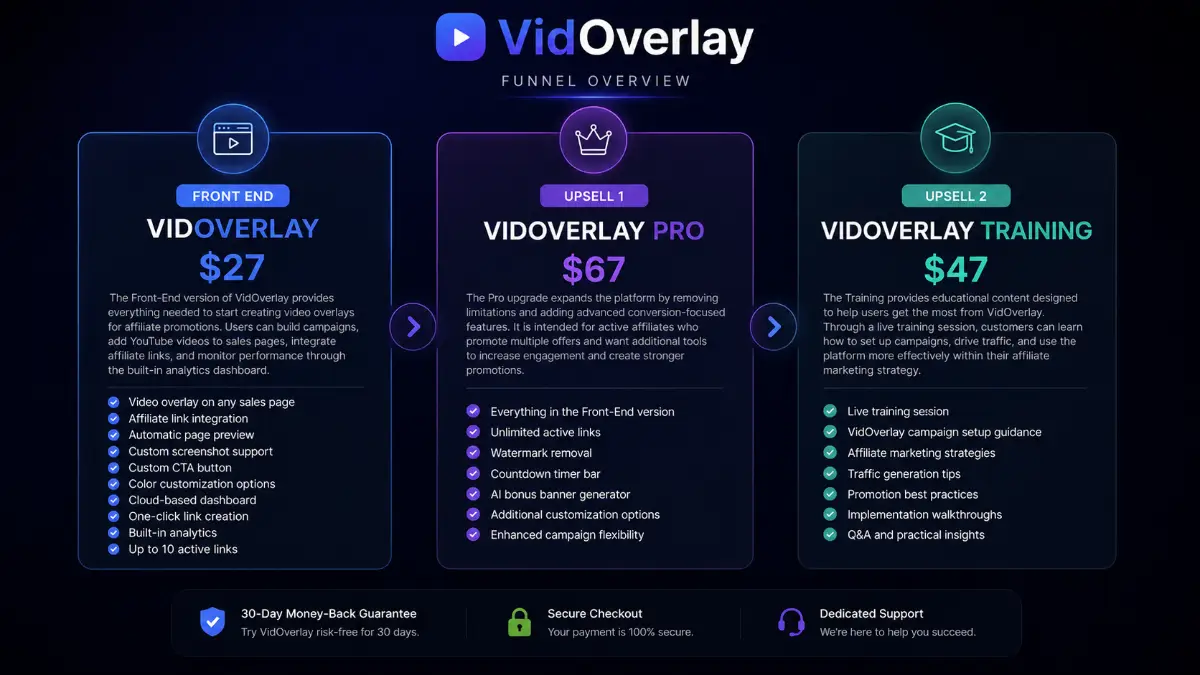
The Front-End is the right starting point if you want to test the core concept: add videos to sales pages, connect affiliate links, create CTAs, and track campaign activity. I would choose VidOverlay Pro if you plan to promote offers regularly because unlimited active links, watermark removal, countdown bars, and the AI bonus banner generator are more useful once you have multiple campaigns running. VidOverlay Training is the better fit if you want campaign setup help, traffic ideas, promotion examples, and a clearer implementation path.
Pricing & funnel breakdown
| Offer | Price | Best for |
|---|---|---|
| Front-End — VidOverlay | $27 | Main entry offer for affiliates who want to create video overlay campaigns without building separate pages. Includes video overlay on any sales page, affiliate link integration, automatic page preview, custom screenshot support, custom CTA button, color customization, cloud dashboard, one-click link creation, built-in analytics, and up to 10 active links. |
| Upsell 1 — VidOverlay Pro | $67 | For active affiliates who want more flexibility and conversion features. Includes everything in the Front-End version, unlimited active links, watermark removal, countdown timer bar, AI bonus banner generator, additional customization options, and enhanced campaign flexibility. |
| Upsell 2 — VidOverlay Training | $47 | For users who want practical guidance on using the software inside an affiliate marketing workflow. Includes live training, campaign setup guidance, affiliate marketing strategies, traffic generation tips, promotion best practices, implementation walkthroughs, Q&A, and practical insights. |
Direct links (front end first)
Open in a new tab. These are affiliate links.
FAQ
Is VidOverlay a page builder?
No. VidOverlay is not a traditional page builder. It creates an overlay campaign that places your YouTube video and CTA on top of a sales page, so you can add a pre-sell layer without building a full page from scratch.
Do I need a domain or hosting?
No. VidOverlay is cloud-based, and campaign links are generated from the dashboard. That makes it useful for affiliates who want a faster way to promote offers without buying hosting, installing software, or setting up a separate bonus page.
Who is the best fit for VidOverlay Pro?
Pro is better for affiliates who promote multiple offers, want unlimited active links, prefer watermark-free campaigns, and want extra conversion tools such as countdown timer bars and AI-generated bonus banners.
Do you have a bonus page?
Yes — bonus info is here: /vidoverlay-bonus/.
About the reviewer

Samuel Marco
I publish practical reviews of AI software and online business tools, focusing on real workflows, buyer use cases, monetization potential, pricing decisions, and whether a tool can realistically help someone save time, increase output, or package a service around it.
Final verdict
VidOverlay is a practical affiliate tool for people who want more control over the moment between the traffic click and the vendor sales page. The strongest parts are the YouTube video overlay, affiliate link integration, custom CTA button, automatic page preview, custom screenshot option, cloud dashboard, one-click campaign creation, built-in analytics, Pro countdown bar, AI bonus banner generator, and training path. It does not replace good traffic or a persuasive recommendation, but it gives affiliates a faster way to add trust, context, and bonus positioning without building a complete bridge page. For review creators and launch affiliates, the Front-End is a sensible test; frequent promoters should look closely at Pro.
Want to add your own video recommendation on top of sales pages?
The Front-End gives you the core VidOverlay campaign builder, YouTube overlays, affiliate link integration, CTAs, page previews, screenshot support, analytics, and up to 10 active links. Pro adds unlimited links, watermark removal, countdown bars, AI bonus banners, and more campaign flexibility. Training is the implementation option for setup help, traffic ideas, and practical affiliate promotion guidance.