What is VideoClawBot?
VideoClawBot is a cloud-based AI video marketing platform built around autonomous agents. These agents can help users create promo videos, product clips, faceless videos, short-form content, scripts, hooks, captions, thumbnails, graphics, social posts, outreach emails, and campaign assets from simple instructions. The platform also supports WhatsApp and Telegram integration, which means some campaign tasks can be requested and managed directly from a phone instead of only inside a browser dashboard.
The broader promise is production leverage. A creator may need daily content. A freelancer may need assets for multiple clients. A local-business marketer may need outreach angles, demo ideas, short videos, and follow-up messages. VideoClawBot tries to bring those moving parts into one agent-led workflow. Users can start with ready-made agents for niches like ecommerce, real estate, coaching, and local businesses, or they can build a custom agent trained with URLs, documents, product details, brand guidelines, website information, and client context.
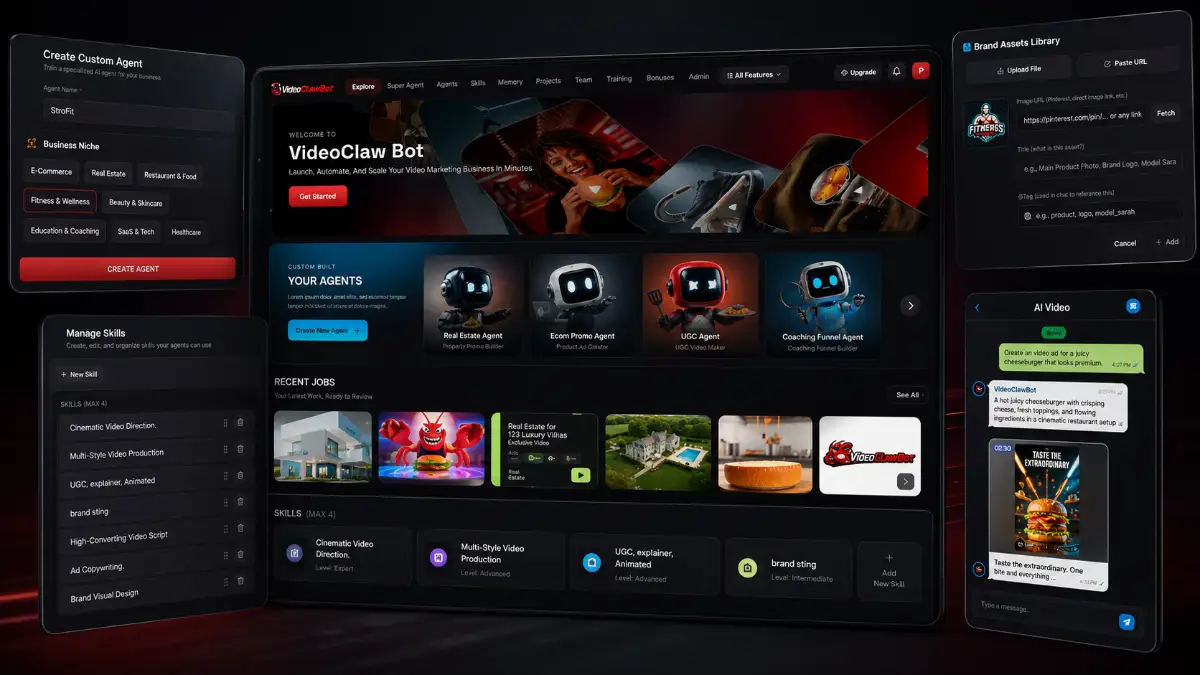
How it works (4 simple steps)
- Step 1 — Pick or build an agent: Choose a pre-built AI agent for ecommerce, real estate, coaching, local business marketing, or another niche, or create a custom agent for a specific workflow, client, product, or service.
- Step 2 — Add business context: Train the agent with URLs, product pages, documents, brand notes, client details, audience information, and campaign goals so the generated output matches the offer more closely.
- Step 3 — Request campaign assets: Ask the agent to generate videos, hooks, scripts, captions, thumbnails, graphics, social posts, emails, demo ideas, and full campaign material from one command.
- Step 4 — Publish and repeat: Export assets in the right formats, manage projects through the dashboard or mobile messaging apps, monitor trends, find prospects, and scale content output across platforms or clients.
Watch the VideoClawBot demo
Full walkthrough from my YouTube channel

Key features that matter
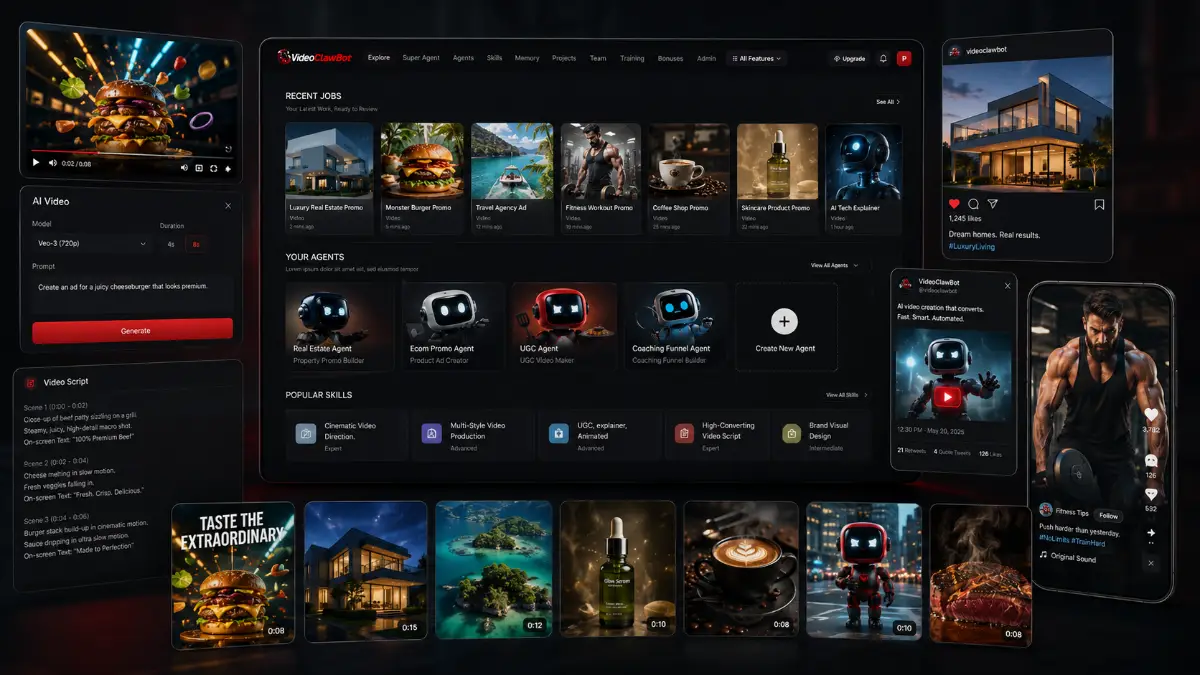
VideoClawBot becomes interesting when you look at the full content pipeline rather than one isolated output. A campaign rarely needs only a video. It usually needs the hook, script, visual concept, caption, thumbnail, platform-specific copy, distribution angle, and sometimes a prospecting or outreach sequence. The platform is designed to let AI agents handle more of that sequence so users can move from idea to publishable material with fewer manual handoffs.
- Custom AI agent builder: create agents for specific brands, niches, services, clients, offers, or repeatable marketing workflows instead of relying only on generic prompts.
- Pre-built niche agents: start with ready-made agents for ecommerce, real estate, coaching, local businesses, and other common client or creator markets.
- Autonomous video creation: generate promo videos, product videos, social clips, explainers, logo animations, UGC-style videos, faceless content, and cinematic walkthroughs from text instructions.
- Script and copy tools: produce hooks, scripts, voiceover drafts, captions, ad copy, outreach messages, social posts, and platform-ready content variations.
- Agent training memory: feed agents with websites, URLs, files, brand guidelines, product pages, business details, and client information so future outputs carry more useful context.
- WhatsApp and Telegram access: connect agents to messaging apps and request content, videos, and campaign tasks directly from a phone.
- Multi-platform content support: create captions, hashtags, thumbnails, social graphics, and post ideas for Instagram, TikTok, YouTube Shorts, Facebook, LinkedIn, and other distribution channels.
- AI image and graphic generation: build product photoshoots, social visuals, thumbnails, branding mockups, promotional graphics, background edits, and ecommerce-style image assets.
- Lead generation and outreach: discover potential clients, scan websites, identify marketing gaps, generate personalized outreach emails, and prepare demo-led sales campaigns.
- Trend and competitor research: pull new content angles from market activity, competitor examples, niche research, hooks, and platform trends.
- One-command campaign builder: request a complete campaign and receive connected assets such as videos, captions, graphics, posts, pages, and outreach material.
- Cloud asset library: store scripts, videos, graphics, campaign files, and project materials in one organized workspace.
- Multi-format exports: prepare vertical, square, and landscape HD assets for different publishing environments.
- Commercial and agency use: create content for your own campaigns or package video marketing assets, social content, outreach, and AI agent workflows as a service for clients.
- Scalable production workflow: manage multiple brands, products, client campaigns, and creative iterations without rebuilding the strategy from scratch every time.
Pros & Cons (realistic)
Pros
- Agent-based workflow saves setup time: trained agents can reuse brand, niche, product, and client context instead of starting every campaign from a blank prompt.
- Strong fit for content-heavy businesses: creators, local marketers, ecommerce sellers, and agencies can use it for recurring video, caption, graphic, and outreach production.
- Phone control is practical: WhatsApp and Telegram access make the tool easier to use when ideas, client requests, or campaign changes happen away from the desktop.
- It covers more than video: scripts, graphics, social posts, thumbnails, research, and outreach make the platform broader than a basic AI video generator.
- Agency packaging is clear: demo videos, content packs, social campaigns, lead research, and outreach assets can be bundled into client services.
Cons
- AI output still needs editorial control: videos, claims, captions, and outreach copy should be checked for accuracy, tone, compliance, and brand fit before publishing.
- More features can mean more decisions: users who only want one quick video may find the campaign, agent, lead, and agency tools more advanced than necessary.
- Training quality affects results: weak input data, vague brand direction, or unclear offers can lead to generic creative assets.
- Credits and upgrade limits matter: heavy creators or agencies should compare the front-end allowance with Pro, Creator, Cinematic, and Bundle options before choosing.
My personal angle (how I’d use it)
- For affiliate content: I would train an agent around a product category, then use it to create short demo-style videos, comparison hooks, social captions, and follow-up posts that push traffic to a review page.
- For local clients: I would build quick sample campaigns for restaurants, salons, gyms, real estate agents, dentists, and service providers, then use the demo assets as a reason to start a sales conversation.
- For ecommerce: I would use the product photo, UGC-style video, caption, thumbnail, and ad copy tools to create launch assets for a product without waiting on a full creative team.
- For agency delivery: I would package monthly content bundles around videos, captions, graphics, posting ideas, and outreach material, with a trained agent for each client to keep brand context consistent.
Bonuses
VideoClawBot becomes more valuable when the assets connect to a real publishing or client acquisition plan. The video, hook, caption, thumbnail, distribution channel, lead source, and follow-up message should all support the same campaign goal. For the full Tool Review Central bonus list and delivery details, use the internal page below:
Bonus details
See what’s included and how delivery works after purchase.
Quick buying decision (what I’d pick)
For the most complete setup, I would look at the VideoClawBot Bundle first because it combines the Commercial front end with Pro, Closer, Creator, Empire, and Cinematic in one package. The listed bundle coupon is 100OFF for $100 off. The Front-End is the entry point for testing the core agent workflow, WhatsApp and Telegram access, HD exports, commercial use, and 2,500 monthly credits; the listed coupon is EARLY10 for 10% off. Pro makes sense for higher volume, custom agents, 4K, longer videos, and faster rendering. Closer is the prospecting and outreach upgrade. Creator is for AI visuals, product images, thumbnails, and ecommerce creative. Empire is aimed at agencies, whitelabel delivery, client workspaces, and reseller rights. Cinematic is for stronger scene generation, visual effects, faceless clips, and more advanced video editing workflows.
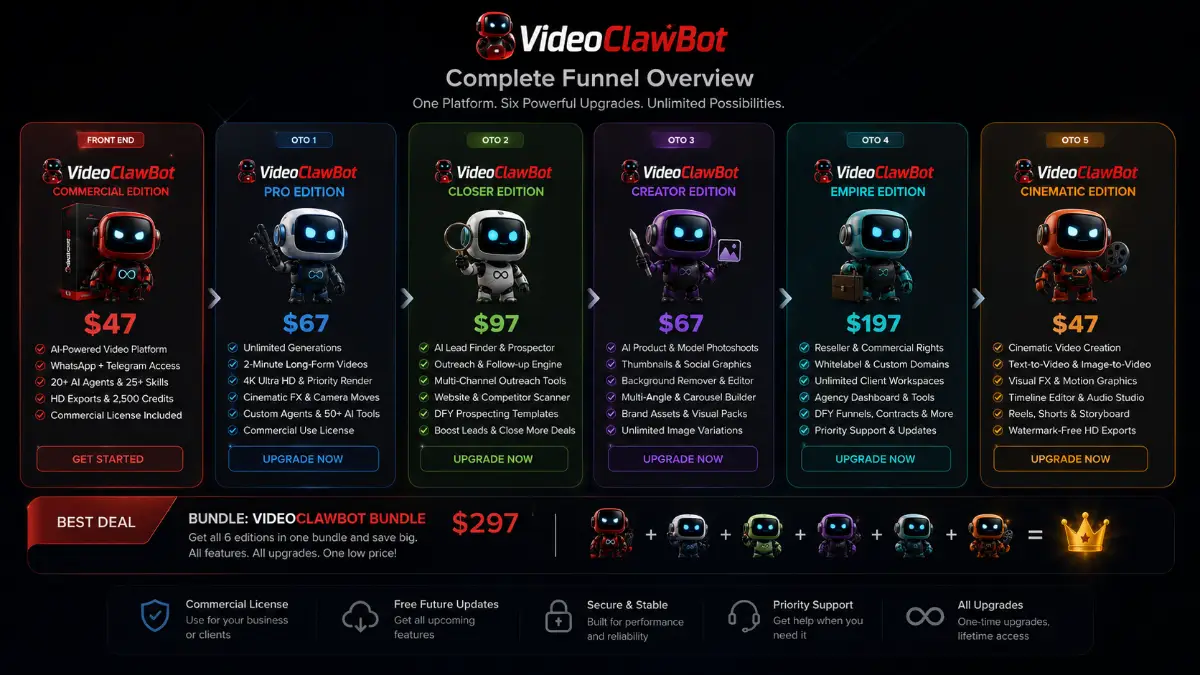
Pricing & funnel breakdown
| Offer | Price | Best for |
|---|---|---|
| Bundle — VideoClawBot Bundle | $297 | Best overall route for buyers who want the full VideoClawBot stack in one purchase. Includes VideoClawBot Commercial Edition, Pro Edition, Closer Edition, Creator Edition, Empire Edition, Cinematic Edition, core features, premium upgrades, and additional tools. Coupon: 100OFF for $100 off the bundle. |
| Front-End — VideoClawBot Commercial Edition | $47 | Main entry package for creating AI-powered videos, social content, scripts, and marketing assets from WhatsApp, Telegram, or the cloud dashboard. Includes 20+ AI agents, 25+ skills, brand memory, 5 projects, HD multi-format exports, 2,500 monthly credits, AI ads, promos, faceless videos, product videos, UGC-style videos, cinematic videos, AI Director Mode, voiceovers, hooks, scripts, captions, planner tools, and commercial usage rights. Coupon: EARLY10 for 10% off the front end. |
| Upsell 1 — VideoClawBot Pro Edition | $67 | For users who need more creative power and fewer limits. Adds unlimited videos, images and exports, 2-minute 4K Ultra HD videos, faster priority rendering, cinematic effects, lighting and camera moves, multi-variation video generation, 5x cloud storage, custom agents, skill builder, 50+ pre-trained AI agents, smart memory trainer, one-command campaign builder, up to 5 team members, and commercial use. |
| Upsell 2 — VideoClawBot Closer Edition | $97 | Lead generation and sales automation upgrade. Adds AI lead finder tools, prospecting agents, demo asset and pitch generation, cold outreach, follow-up automation, multi-channel outreach, website and business opportunity scanning, prospect research, pain-point detection, trend monitoring, competitor research, YouTube and website analysis, and DFY niche prospecting templates. |
| Upsell 3 — VideoClawBot Creator Edition | $67 | Visual asset upgrade for creators, ecommerce sellers, and agencies. Includes AI product and model photoshoots, fashion and lifestyle visuals, social graphics, thumbnails, branding mockups, brand assets, background editing, image cleanup, multi-angle and carousel image building, ecommerce visual packs, premium rendering, and unlimited image style variations. |
| Upsell 4 — VideoClawBot Empire Edition | $197 | Agency and reseller upgrade for scaling client operations. Includes full commercial and reseller rights, 100% reseller revenue, whitelabel branding, custom domains, unlimited client workspaces, multi-client management dashboard, client memory and onboarding workflows, DFY funnels, swipes, contracts, agency service package builder, priority support, lifetime updates, and early access to new features. |
| Upsell 5 — VideoClawBot Cinematic Edition | $47 | Advanced video production upgrade for cinematic content, social media ads, faceless clips, and storytelling workflows. Includes AI cinematic video creation, text-to-video, image-to-video, faceless viral clip generator, Hollywood-style visual effects, AI Director Mode, Scene Writer, AI reels and short-form generator, timeline editor, motion graphics, audio studio, visual presets, templates, HD watermark-free exports, MP4 downloads, storyboard previews, commercial license, and lifetime access. |
Direct links (bundle first)
Open in a new tab. These are affiliate links.
FAQ
Is VideoClawBot only an AI video generator?
No. VideoClawBot includes AI video creation, but the platform is broader than that. It can help with scripts, hooks, captions, social posts, thumbnails, AI graphics, product visuals, outreach emails, lead research, competitor monitoring, and campaign planning through AI agents.
Can beginners use VideoClawBot?
Yes. The workflow is based on pre-built agents, prompts, business data, URLs, documents, and guided content generation. Beginners should still review the final assets, especially claims, contact details, pricing, brand tone, and outreach messages before publishing or sending campaigns.
Which upgrades matter most for agencies?
Pro is useful for higher output and custom agents. Closer helps with prospecting, demo assets, and outreach. Creator adds stronger image and visual asset production. Empire is the main agency and reseller path with client workspaces, whitelabel branding, custom domains, reseller rights, and agency resources.
Do you have a bonus page?
Yes — bonus info is here: /videoclawbot-bonus/.
About the reviewer

Samuel Marco
I publish practical reviews of AI software and online business tools, focusing on real workflows, buyer use cases, monetization potential, pricing decisions, and whether a tool can realistically help someone save time, increase output, or package a service around it.
Final verdict
VideoClawBot is designed for the current reality of online marketing: campaigns need constant creative output, short-form video is everywhere, and small teams often have to produce like larger media departments. The platform brings together custom AI agents, autonomous video generation, scriptwriting, captions, voiceover drafts, graphics, thumbnails, social posts, lead research, outreach automation, trend analysis, WhatsApp control, Telegram control, and agency delivery tools. That mix gives it a stronger practical angle than a single-purpose video tool, especially for users who want repeatable campaign production rather than one-off experiments. The main caution is quality control. AI can accelerate the asset creation process, but brand judgment, offer positioning, compliance checks, and final editing still matter. For creators, ecommerce sellers, affiliate marketers, local-business consultants, freelancers, and agencies that need faster content and client campaign production, VideoClawBot has a clear automation and monetization use case.
Want a faster way to create AI video campaigns, scripts, captions, social graphics, outreach emails, and client-ready marketing assets with trained AI agents?
The Bundle gives the widest setup. Front-End is the easiest starting point. Pro expands volume and custom agents, Closer adds prospecting and sales automation, Creator strengthens visual asset production, Empire supports agency and reseller growth, and Cinematic adds deeper video creation tools.