Thumble review: what it actually changes in a YouTube workflow
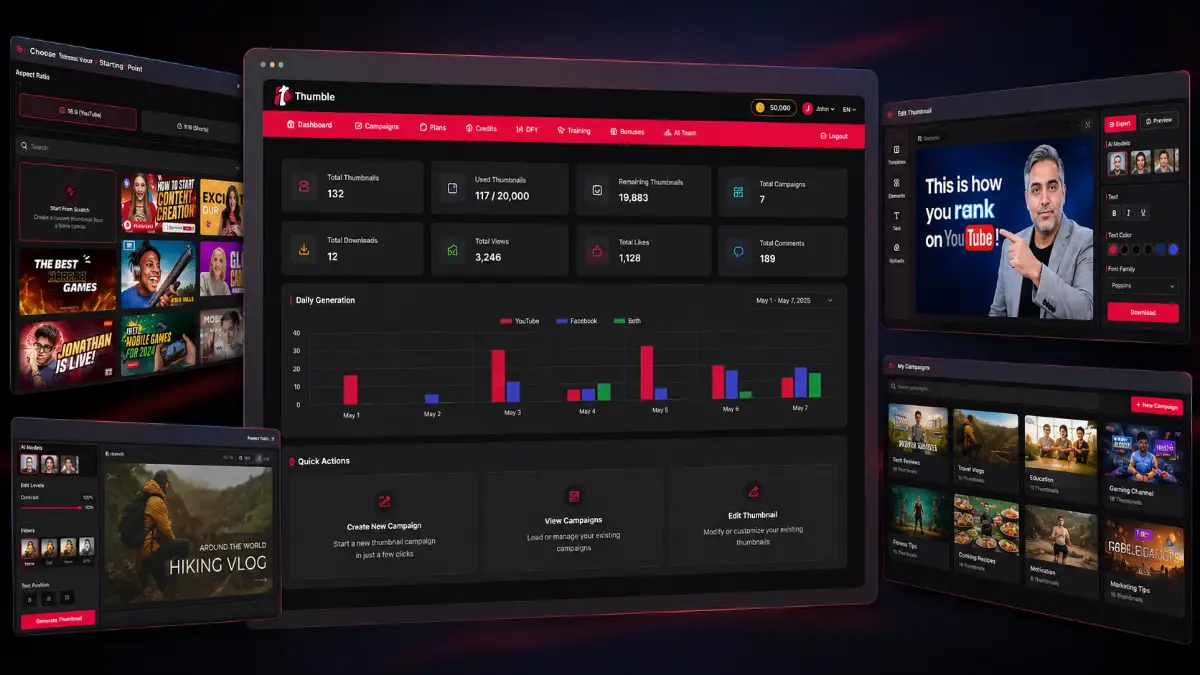
Thumble is an AI thumbnail production tool built for the moment between finishing a video and persuading someone to click it. Instead of opening a blank canvas, hunting for stock assets, cutting out a subject, and manually rebuilding every variation, you can begin with a topic, a proven template, an existing thumbnail, or a face-swap concept. The platform then uses AI to generate and revise visual directions that can be downloaded in full resolution. For creators who publish often, the practical benefit is not simply “AI art”; it is reducing the time needed to reach several credible thumbnail candidates.
Thumbnail work becomes expensive when every new video starts from a blank canvas
A strong video can underperform before the viewer ever reaches the content. The thumbnail has to communicate a clear promise at small size, compete against polished alternatives, and remain readable across devices. Doing that consistently means concept work, image sourcing, subject cutouts, typography, color decisions, and often several revisions. That creative overhead compounds quickly for anyone publishing on a schedule.
Where thumbnail production slows down
- Every upload needs a fresh visual concept, not just a resized graphic.
- Editing faces, objects, backgrounds, and text can become repetitive manual work.
- Creators often settle on one design because making alternatives takes too long.
- Outsourcing adds cost and can create revision delays around publishing deadlines.
How Thumble approaches it
- Start from a topic, template, reference thumbnail, or face-swap workflow.
- Use simple AI instructions to revise visuals instead of rebuilding everything manually.
- Generate several interpretations so testing different hooks becomes more realistic.
- Download finished assets for YouTube videos, Shorts, or other video platforms.
The real upside is more creative shots on goal
Move from topic to visual direction faster
A simple idea can produce finished-looking concepts without a long prompt or a fully specified art brief. That is useful when the bottleneck is deciding what the thumbnail should communicate, not merely operating design software.
Create alternatives before committing
Multiple variations make it easier to compare emotional angles, compositions, subject emphasis, and visual hierarchy. For channels that use thumbnail testing, faster variation creation can directly improve the testing process.
Personalize proven visual formulas
Templates and winning-design inspiration provide a stronger starting point than an empty canvas, while AI editing lets you change faces, text, imagery, colors, objects, and branding so the result fits your own video.
Productize thumbnail creation for clients
With the commercial rights in the Pro tier, freelancers and agencies can turn the same workflow into a service: produce concepts faster, handle revisions efficiently, and support more channels without scaling manual design hours at the same rate.
How Thumble goes from an idea to a downloadable thumbnail
Choose how to begin
Create a new thumbnail from scratch or a template, import an existing design for AI editing, or use the face-swap route when you want to place yourself into a proven composition.
Describe the changes
Use straightforward instructions to alter text, subjects, backgrounds, objects, colors, faces, or branding. Select among available AI models when you want a different creative interpretation.
Generate and compare
Produce one or more versions, inspect whether the focal point reads clearly at thumbnail size, and create additional variations when the first concept does not communicate the hook strongly enough.
Refine and download
Make final AI-assisted edits, then download the full-resolution asset for the video. The best next step is to measure performance rather than assuming the first attractive design is the winner.
Watch the Thumble demo
See the thumbnail creation workflow, AI editing options, visual examples, and how the offer is structured before deciding which tier fits your publishing volume.

Which Thumble features matter beyond the feature list
AI thumbnail generation from simple ideas
You do not need to engineer a long image prompt before getting started. A topic or concept can become a set of visual directions, which lowers the friction between planning a video and producing its packaging.
Best for ideation speedProven templates and design inspiration
The template library gives users recognizable visual structures that have worked in competitive thumbnail environments. The value is in borrowing the communication logic—not blindly copying another creator's identity.
Best for stronger starting pointsAI editing and customization
Existing or generated thumbnails can be reworked by changing copy, colors, imagery, logos, backgrounds, and objects. That makes the tool more useful after generation, where many one-click AI image tools become limiting.
Best for revisionsFace swaps and subject insertion
Creators can place themselves or another subject into a composition without arranging a new photo shoot for every concept. This is particularly useful for personality-led channels that rely on expressive faces and recognizable hosts.
Best for personal brandingMultiple models, formats, and languages
Different AI models can produce different creative interpretations, while landscape and portrait support covers standard video and Shorts-oriented workflows. Multi-language support broadens use for international channels and client work.
Best for varied campaignsCommercial rights and team access
The Pro upgrade expands Thumble from a personal creator tool into a client-production workflow with commercial use, higher limits, campaign management, team access, and two years of free upgrades.
Best for agencies
Where Thumble fits into a real content business
High-frequency YouTube channel
Build several visual directions for every upload, keep a consistent publishing rhythm, and reduce the amount of time spent manually compositing each thumbnail.
Thumbnail testing workflow
Create alternate hooks, subject expressions, layouts, and text treatments so you have genuinely different candidates to test rather than tiny cosmetic variations.
Agency or freelance service
Use the commercial license to produce thumbnail packages for clients, speed up revision rounds, and potentially increase the number of accounts a small team can support.
Multi-platform video campaigns
Adapt visual concepts for traditional YouTube videos, Shorts-style portrait assets, and other video platforms while keeping branding and campaign themes more consistent.
Who is most likely to get value from Thumble?
Creators publishing consistently
You need thumbnails every week, care about CTR, and want faster ways to create multiple visual concepts without hiring a designer for every upload.
Marketers managing several channels
You are responsible for campaigns or content across multiple niches and need repeatable production rather than a one-off graphic design solution.
Freelancers and agencies
You sell thumbnail or YouTube marketing services and can turn faster generation, revisions, team access, and commercial rights into operational leverage.
Occasional uploaders happy with current design tools
If you make only a few videos and already have an efficient Canva or Photoshop workflow, another subscription or credit system may not save enough time.
Anyone expecting automatic viral CTR
Thumble can improve the production process, but no thumbnail generator can guarantee views. Topic strength, title, audience fit, and honest testing still decide performance.
Precision-heavy brand design teams
Teams that require exact layer control, complex brand systems, or pixel-level manual compositing may still prefer professional design software for final production.
Thumble pricing, Bundle, OTOs, and order bumps
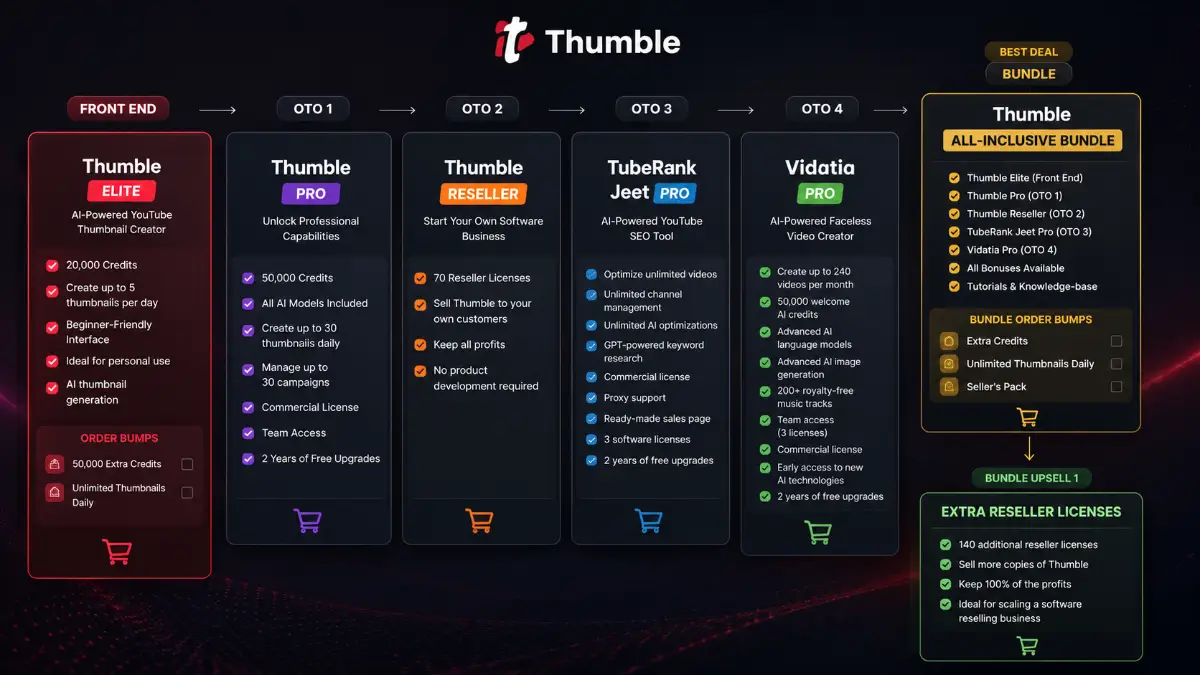
The funnel starts with Thumble Elite at $37, then expands into higher-volume production, commercial use, reselling, YouTube SEO, and AI video creation. The $189 all-inclusive Bundle groups the five principal products listed below. Order bumps are separate optional additions, so check the checkout screen carefully before completing a purchase.
Thumble Elite
- 20,000 credits
- Up to 5 thumbnails per day
- AI thumbnail generation
- Beginner-friendly personal-use entry
Thumble Bundle
- Thumble Elite ($37 value)
- Thumble Pro ($47 value)
- Thumble Reseller ($147 value)
- TubeRank Jeet Pro ($67 value)
- Vidatia Pro ($67 value)
- Bonuses, tutorials, and knowledge base
Optional order bumps
- 50,000 Extra Credits — $44
- Unlimited Thumbnails Daily — $14
- Seller's Pack — $29 on the Bundle funnel
Complete Thumble funnel
| Offer | Price | What it adds | Best for | Link |
|---|---|---|---|---|
| All-Inclusive Bundle | $189 | Elite, Pro, Reseller, TubeRank Jeet Pro, Vidatia Pro, bonuses, tutorials, and knowledge base. | Buyers who already want the complete creator, commercial, reseller, SEO, and video stack. | Bundle |
| Bundle Upsell 1: Extra Reseller Licenses | $99 | 140 additional reseller licenses with the ability to keep 100% of reseller profits. | Reseller buyers planning to scale beyond the included license allocation. | Bundle OTO1 |
| Thumble Elite | $37 | 20,000 credits, AI thumbnail generation, up to 5 thumbnails daily, beginner-friendly interface. | Individual creators testing the core thumbnail workflow. | Front-End |
| OTO1: Thumble Pro | $47 | 50,000 credits, all AI models, up to 30 thumbnails daily, 30 campaigns, commercial license, team access, two years of upgrades. | Freelancers, marketers, businesses, and agencies doing higher-volume or client work. | OTO1 |
| OTO2: Thumble Reseller | $147 | 70 reseller licenses, the right to sell Thumble to customers, and keep the profits from those sales. | Entrepreneurs who specifically want a software-reselling model. | OTO2 |
| OTO3: TubeRank Jeet Pro | $67 | Unlimited video optimization, channel management, AI optimizations, GPT keyword research, commercial license, proxy support, sales page, 3 licenses, two years of upgrades. | Creators and agencies pairing thumbnail optimization with YouTube SEO. | OTO3 |
| OTO4: Vidatia Pro | $67 | Up to 240 videos monthly, 50,000 welcome credits, advanced AI models and image generation, 200+ music tracks, 3 team licenses, commercial use, two years of upgrades. | Users who also need scalable AI-powered faceless video production. | OTO4 |
Thumble bonuses available through my links
When you purchase an eligible Thumble offer through my links, use the dedicated bonus page to review the current bonus package, eligibility rules, and delivery instructions. I recommend checking that page before buying so the offer and bonus process are clear in advance rather than treated as an afterthought after checkout.
Check the bonus package before choosing your offer
Review the current bonus details first, then return to the Front-End or Bundle link that matches the level you actually need.
Affiliate disclosure: this page may contain compensated links. Evaluate the product, pricing, refund terms, usage limits, credit requirements, and checkout details independently before purchasing.
Thumble pros and cons
Pros
- Focuses tightly on thumbnails instead of burying the workflow inside a general design suite.
- Simple topic-based generation lowers the effort needed to explore a visual idea.
- Templates and proven-style inspiration help users avoid starting from a blank canvas.
- AI editing, face swaps, and subject insertion can reduce repetitive compositing work.
- Multiple variations make thumbnail testing more practical for frequent publishers.
- Landscape and portrait support extends the workflow beyond standard YouTube videos.
- Pro's commercial license and team access create a credible agency use case.
Cons and limitations
- AI-generated visuals still need human judgment to avoid clutter, odd details, or misleading promises.
- The Elite plan's five-thumbnails-per-day limit may feel restrictive for high-output creators without an order bump or upgrade.
- Credits add another usage constraint to monitor when generating and revising heavily.
- Commercial rights and higher limits require the Pro tier rather than the basic front end.
- Thumbnail quality alone cannot rescue a weak topic, title, or audience mismatch.
- Specialist designers may still want Photoshop or similar tools for exact layer-level control.
I would judge Thumble by how many useful iterations it creates—not by the prettiest first render
Thumbnail tools are easy to evaluate incorrectly. A dramatic AI image can look impressive at full size and still fail in the YouTube feed. My priority would be whether Thumble lets me reach several clearly differentiated, readable concepts faster, then learn from real click-through data and feed those lessons back into the next batch.
“Will AI thumbnails automatically increase views?”
No. They can improve speed and creative range, but CTR is influenced by the topic, title, audience, competition, timing, and whether the image communicates a compelling but accurate promise.
“Can I replace Canva or Photoshop?”
For rapid AI-first thumbnail production, possibly. For exact typography, layered compositing, strict brand systems, or detailed manual retouching, a traditional editor may still remain part of the workflow.
“Is Elite enough?”
It is the logical starting point for personal use and lower volume. Pro makes more sense when you need 30 daily thumbnails, all AI models, more credits, campaign management, team access, or commercial rights.
“Does the Bundle make sense?”
Only when the wider stack matches your plans. The Bundle is much easier to justify if you also want reseller rights, YouTube SEO through TubeRank Jeet Pro, and AI video production through Vidatia Pro.
- You publish often enough that thumbnail production is a recurring bottleneck.
- You are willing to generate variations and evaluate performance instead of trusting one AI output.
- You know whether the Elite daily limit and credits fit your expected usage.
- You need commercial rights before choosing Pro or the Bundle for client work.
- You have checked current order bumps, billing terms, refund conditions, and funnel availability at checkout.
Thumble FAQ
What is Thumble?
Thumble is an AI-powered thumbnail maker designed to generate new video thumbnails, edit existing designs with AI, use templates, swap faces, insert subjects, create variations, and export finished assets for YouTube and other video platforms.
Do I need graphic design experience?
No. The workflow is designed around simple ideas, templates, and AI-assisted edits. Design judgment still helps, but you do not need traditional image-editing skills to generate and revise thumbnails.
Can Thumble edit an existing thumbnail?
Yes. You can import an existing thumbnail and use AI-driven instructions to change visual elements such as text, imagery, faces, backgrounds, colors, objects, and branding.
Can I create thumbnails with my own face?
Yes. The feature set includes face swapping and AI subject insertion, which can place you or another subject into a thumbnail concept without requiring a dedicated photo shoot for every design.
What is the difference between Thumble Elite and Pro?
Elite is the $37 front end with 20,000 credits and up to five thumbnails per day. Pro is a $47 upsell with 50,000 credits, all AI models, up to 30 daily thumbnails, up to 30 campaigns, commercial rights, team access, and two years of free upgrades.
What is included in the $189 Thumble Bundle?
The funnel information lists Thumble Elite, Thumble Pro, Thumble Reseller, TubeRank Jeet Pro, Vidatia Pro, available bonuses, tutorials, and the knowledge base in the all-inclusive Bundle.
Does Thumble guarantee higher click-through rates or more views?
No. It can speed up thumbnail production and make creative testing easier, but performance depends on the complete packaging of the video and how viewers respond. Measure CTR and viewer behavior rather than assuming any design is guaranteed to win.
Where can I see the Thumble bonus details?
Current bonus eligibility, package details, and delivery instructions are available on the Tool Review Central Thumble bonus page.
About the reviewer

Samuel Marco
Samuel Marco is a Top 1% JVZoo affiliate specializing in AI software and online-business tools. He provides practical, in-depth reviews that go beyond features to examine how products work in real-world use, who they are best suited for, their limitations, pricing and upgrade options, and their potential for monetization. His goal is simple: help buyers understand what they’re actually getting and make a more informed purchase decision.
Is Thumble worth buying?
Thumble is most compelling for people who already understand that thumbnails are an ongoing publishing system, not a one-time design task. Its combination of fast AI generation, proven templates, editing, face swaps, subject insertion, multiple variations, and multi-format support can remove a meaningful amount of repetitive creative work.
I would not buy it on the assumption that AI automatically produces “viral” thumbnails. I would buy it to shorten the route from idea to several testable concepts. For personal use and lighter output, the $37 Elite version is the cleaner entry point. For commercial production, the $47 Pro upgrade materially changes the use case with higher limits, all models, team access, campaigns, and commercial rights. The $189 Bundle becomes the stronger value only when you genuinely plan to use the reseller, SEO, and AI video tools included alongside Thumble.
Fit score
Choose based on publishing volume and business model
Start with Elite when you mainly want the core thumbnail workflow. Choose Pro for client work and higher production limits. Consider the Bundle when Thumble, reseller rights, YouTube SEO, and AI video creation all have a defined place in your business.