What is Prezent IQ?
Prezent IQ is an AI-powered interactive presentation creator. Instead of building static decks that need a human presenter every time, you can create presentations that talk, explain, answer questions, collect leads, and guide viewers toward action from one cloud-based dashboard.
The workflow is simple: start from a keyword, paste a website URL, or upload an existing PPT. Then choose an avatar, pick a voice, customize branding and behavior, and publish the final experience through a smart link, embedded page, or QR code. It is designed for marketers, coaches, agencies, local businesses, SaaS demos, onboarding, webinars, and client presentations where engagement matters more than just showing slides.
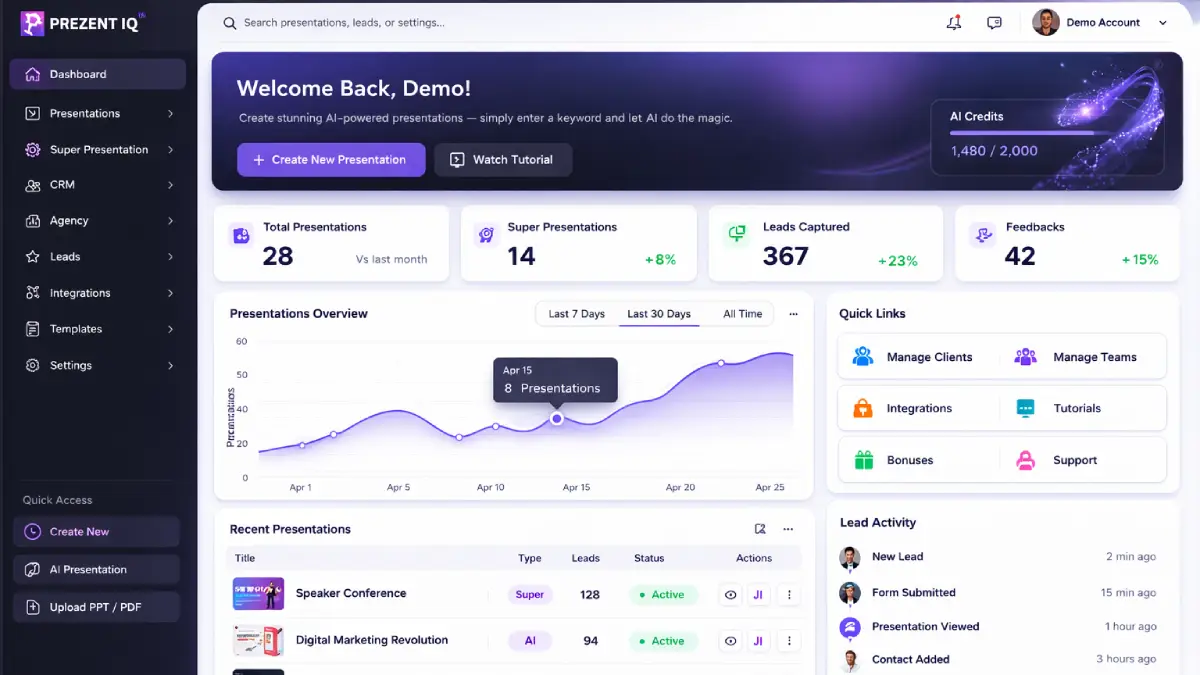
How it works (3 simple steps)
- Step 1 — Create: Enter a prompt, paste a website URL, or upload your existing PPT. Prezent IQ turns it into an AI-powered interactive presentation.
- Step 2 — Customize: Choose your AI avatar, select voice, adjust branding, set slide behavior, and control how your presentation talks, responds, and engages.
- Step 3 — Share & convert: Publish by smart link, embed it on a page, or generate a QR code. Your AI presentation agent presents, answers questions, and captures leads in real time.
Discover how Prezent IQ works
Step-by-step walkthrough from my YouTube channel

Key features that matter
These are the parts of Prezent IQ that actually solve the “my slides are static, repetitive, and hard to scale” problem.
- Prompt, URL, or PPT input: start from a simple idea, a live website, or your current deck and turn it into an interactive presentation fast.
- Lifelike AI avatars + voice options: choose from 2000+ moving AI presenters and 1500+ voices, or add your own cloned voice for a more personal brand feel.
- Built-in AI chat: let viewers ask questions inside the presentation and receive answers in real time.
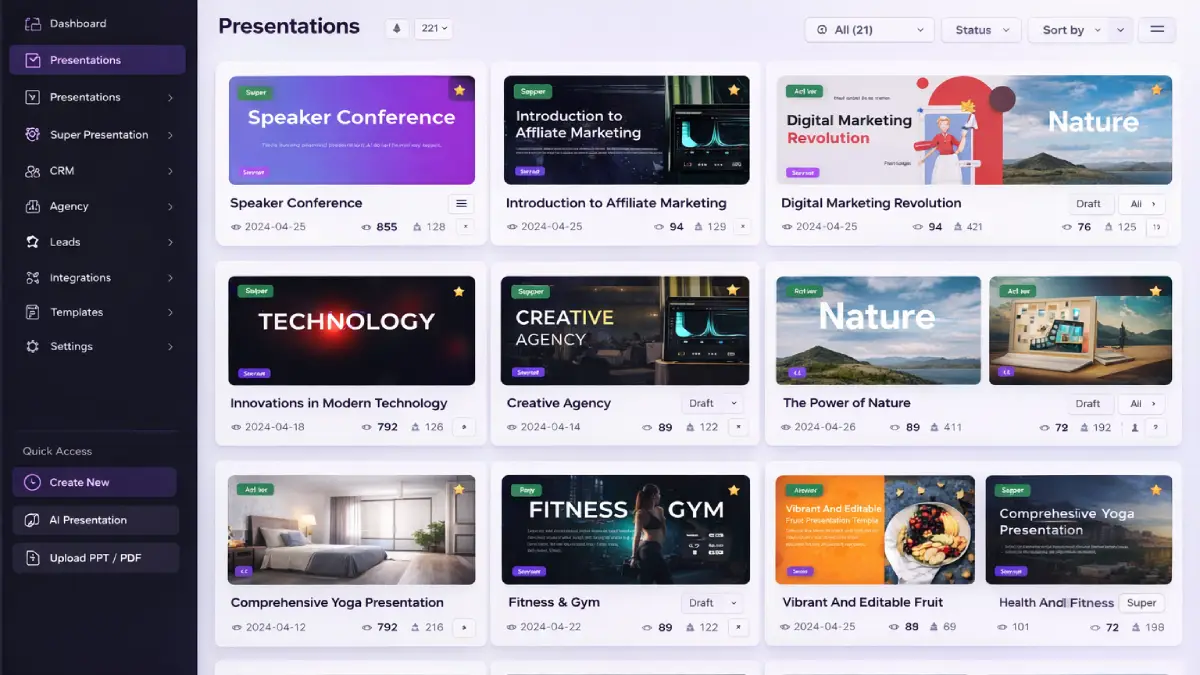
- Super Presentations: combine multiple decks into one structured multi-chapter experience for courses, demos, onboarding, or sales flows.
- Lead capture + forms: add forms, feedback, thank-you messages, and conversion elements directly into the presentation flow.
- Built-in CRM: store leads, track engagement, manage interactions, and follow up from inside the platform.
- Drag-and-drop live editor: customize text, images, layouts, branding, subtitles, and slide behavior without coding.
- Smart sharing: publish by instant link, QR code, or embed so the presentation can be used online or offline.
- Export flexibility: download presentations as PDF, PPT, or image files when needed.
- Commercial license included: create and sell interactive presentations for clients without needing extra tools from day one.
Pros & Cons (realistic)
Pros
- Much stronger than static decks: the interactive voice + avatar + Q&A angle gives presentations a more modern and engaging feel.
- Versatile input workflow: prompt, URL, and PPT conversion make it easier to reuse existing assets instead of starting from scratch.
- Monetization is obvious: the commercial license and agency positioning make it easier to pitch this as a client service.
- Good fit for selling and explaining: presentations can educate, answer objections, and collect leads in one experience.
- Built-in CRM adds real value: this is more than a deck builder because it also helps track and manage engagement.
- Multilingual potential: useful for global audiences, client work, and niche markets where localization matters.
Cons
- The result still depends on your messaging: AI can create the presentation faster, but weak offers still convert weakly.
- Too many features for casual users: if you only need simple internal slides, the full funnel may feel heavier than necessary.
- Agency-style users will likely want upgrades: unlimited usage, automation, enterprise behavior rules, and white-label value sit deeper in the funnel.
- Interactive does not automatically mean persuasive: you still need clear positioning, good structure, and a solid CTA path.
My personal angle (how I’d use it)
- Client demos that keep selling after the meeting: I’d use it to turn service presentations into assets prospects can revisit on their own time.
- Lead-gen presentations for niche offers: local businesses, coaching offers, and software demos all benefit from built-in Q&A and lead capture.
- Authority positioning: I’d use a branded avatar + voice + smart presentation flow to look more polished than standard slide decks.
- Agency upsells: once the first presentation is working, it becomes easier to sell follow-up work such as automation, client onboarding decks, webinar funnels, and interactive sales assets.
Bonuses
I’m not listing bonuses here on purpose so this page stays focused on the actual product review. If you want bonus access details and how delivery works on Tool Review Central, use the bonus info page:
Bonus details
See what’s included and how delivery works after purchase.
Quick buying decision (what I’d pick)
If you want the broadest value, go Bundle. If you mainly want the upgrades without rebuying the front-end, Fast Pass is the cleaner step-up. If you want to test the core concept first, start with Front-End. If your main goal is client delivery, white-label selling, deeper automation, or hands-off implementation, the later OTOs make more sense.
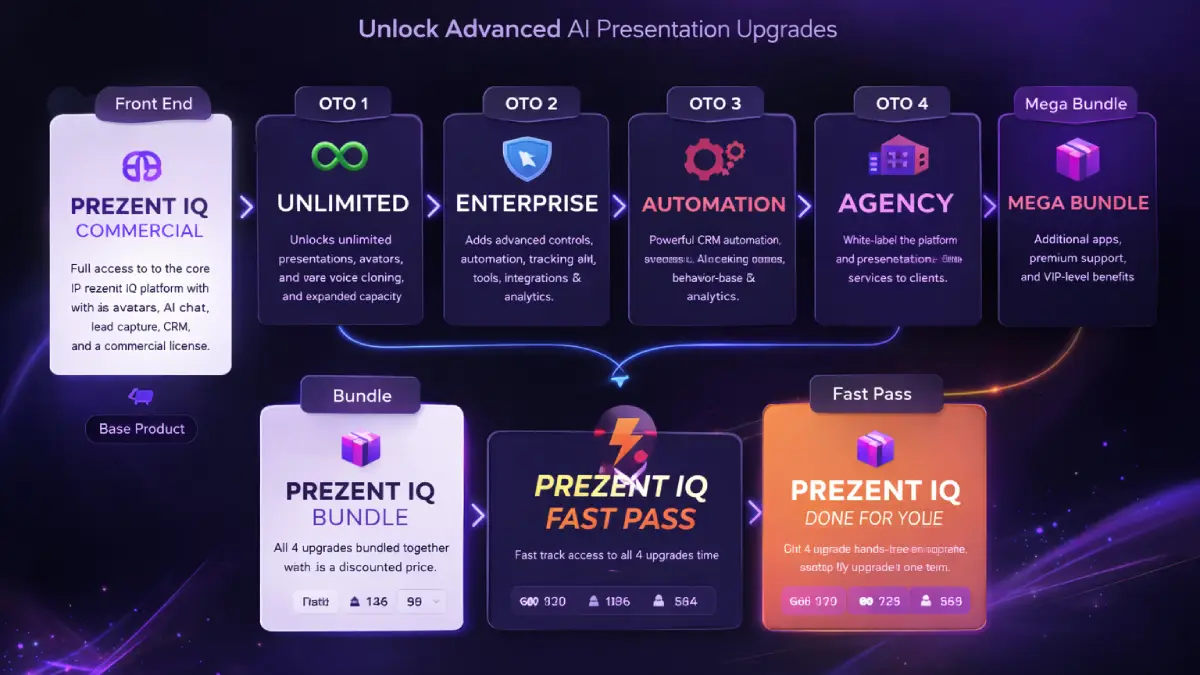
Pricing & funnel breakdown
| Offer | Price | Best for |
|---|---|---|
| Front-End — Prezent IQ Commercial | $37 one-time | Best starting point if you want the core app: create interactive AI presentations from prompts, websites, or PPT files, add avatars and chat, capture leads, and sell client work with the included commercial license. Coupon: EARLY2 for $2 off. |
| Fast Pass — OTO1 to OTO4 | $230 | Good if you already know you want the upgrade stack: Unlimited, Enterprise, Automation, and Agency access without manually buying each step one by one. |
| Bundle — FE to OTO4 | $367 | Best complete-value option for serious users: front-end plus Unlimited, Enterprise, Automation, and Agency. Coupon: SAVE100 for $100 off. |
| Mega Bundle | $127 | Extra app stack with VIP training, premium support, and account manager support for buyers who want more ecosystem value around the main offer. |
| OTO1 — Prezent IQ Unlimited | $77 | Best for active users and client work: unlimited workspaces, unlimited AI presentations, broader avatar and voice access, more traffic freedom, and higher-volume lead capture. |
| OTO2 — Prezent IQ Enterprise | $97 | Best for deeper control: unlimited super presentations, behavior rules, analytics, smart forms, CRM integrations, appointment booking, webinar registration, and enterprise-level engagement features. |
| OTO3 — Prezent IQ Automation | $97 | Best for follow-up systems: interactive smart CRM, lead scoring, automation flows, re-engagement campaigns, and unified communication management. |
| OTO4 — Prezent IQ Agency | $77 / $97 | For white-label and client scaling: branded dashboard, client accounts, team access, DFY agency materials, and a direct path to selling high-ticket AI presentation services. |
| OTO5 — Prezent IQ Done For You | $147 | Best for hands-off buyers: custom setup, strategist support, voice and branding integration, CRM configuration, website-to-presentation conversion, and rapid deployment. |
Direct links (Bundle first)
Open in a new tab. These are affiliate links.
FAQ
Is Prezent IQ just a slide builder?
Not really. It is better viewed as an interactive presentation platform. The slides matter, but the bigger value is the AI presenter, Q&A flow, lead capture, CRM, and the ability to keep the presentation working after you share it.
Can I start from an existing website or PowerPoint?
Yes. One of the strongest parts of the offer is that you can start with a prompt, a website URL, or an uploaded PPT instead of rebuilding everything manually.
Does it include commercial rights?
Yes. The front-end already includes a commercial license, which makes it easier to offer interactive presentation creation as a paid service.
Can it capture leads and manage interactions?
Yes. Lead forms, feedback, built-in chat, and CRM features are a big part of the offer, especially if your use case is sales, coaching, support, demos, or agency work.
Do you have a bonus page?
Yes — bonus info is here: /bonus/.
About the reviewer

Samuel Marco
I publish hands-on reviews of AI software and online business tools, with a focus on real workflows, monetization paths, and what actually matters when you try to scale. My goal is to help you decide fast and choose tools that can produce real-world results.
Final verdict
Prezent IQ is best viewed as an AI presentation communication platform, not just another deck creator. If your problem is not “I need prettier slides,” but “I need presentations that explain better, engage more, answer objections, capture leads, and scale beyond live meetings,” then the offer makes sense. The people who will get the most value are the ones who already understand the commercial use case: agencies, consultants, coaches, local marketers, SaaS sellers, and business owners who want communication assets that keep working long after the first share.
Want interactive presentations that can present, answer, and convert without repeating yourself?
Bundle is the simplest best-value path. Fast Pass is strong if you mainly want the upgrade stack. Front-End is the starter option. OTOs add scale, automation, agency control, and DFY execution.