What is Pitchora AI?
Pitchora AI is a cloud-based platform for creating interactive AI sales pitches that can present an offer, answer visitor questions, capture leads, and help move people toward the next step. Instead of relying only on a traditional landing page, it creates a more dynamic pitch experience using AI presenters, voice replies, guided sections, forms, CRM features, and automation tools.
The workflow can begin with a prompt, URL, product description, service page, or existing content. Pitchora AI uses that input to assemble pitch copy, visuals, interaction points, and AI-powered responses. From there, users can customize the presenter, voice, layout, branding, lead forms, FAQs, and pitch sequence. For freelancers, agencies, and business owners, this matters because a pitch can become more than a page; it can behave like a lightweight sales assistant that explains, qualifies, and follows up.
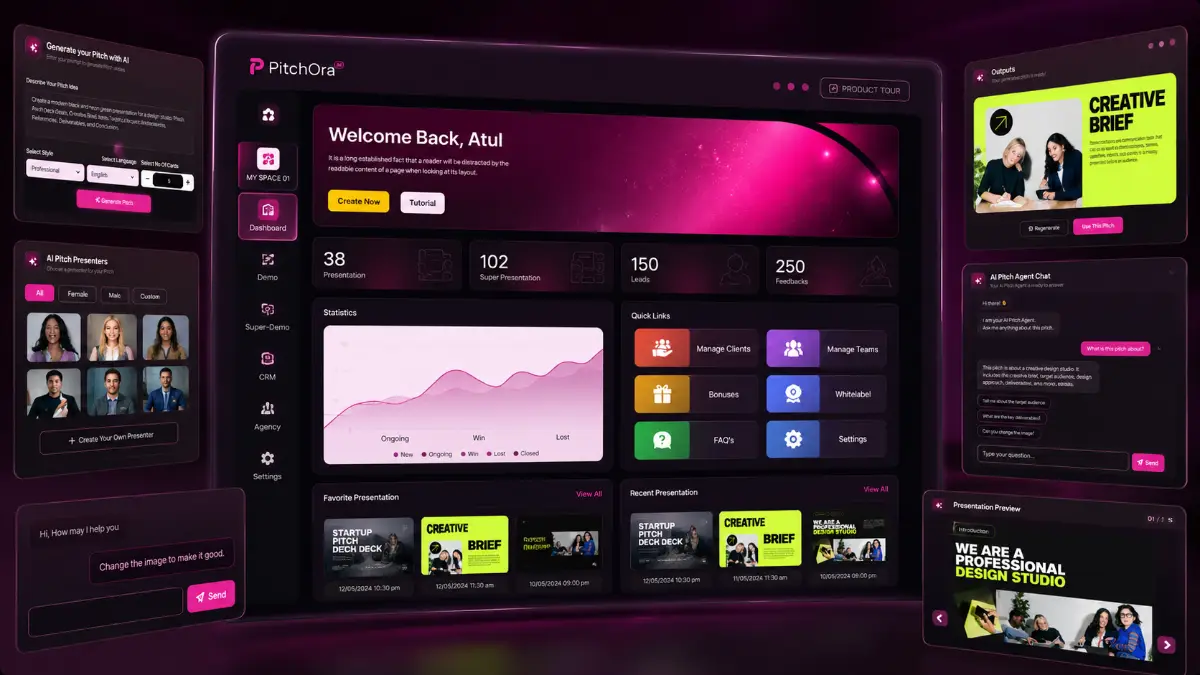
How it works (3 simple steps)
- Step 1 — Generate the pitch foundation: Add a product idea, offer description, website URL, or existing content, then let Pitchora AI create the first version of the interactive sales experience with copy, structure, visuals, and AI conversation logic.
- Step 2 — Shape the visitor journey: Select an AI presenter, choose a voice, adjust the branding, refine the sections, add lead forms, build FAQs, insert hotspots, and organize the pitch flow with the drag-and-drop editor.
- Step 3 — Publish and follow the signals: Embed the pitch on a site or funnel, connect a custom domain if needed, then use the CRM, analytics, engagement data, conversations, and automations to capture leads and continue the sales process.
See how Pitchora AI works
Step-by-step walkthrough from my YouTube channel

Key features that matter
Pitchora AI becomes useful when you think about the missing middle between attention and conversion. A visitor may like an offer but still need clarification, proof, direction, or a reason to leave contact details. This platform tries to cover that gap with AI-led presentation, voice interaction, built-in forms, CRM tracking, and automated follow-up rather than making every page behave like a flat brochure.
- AI pitch creation: turn prompts, URLs, product pages, service descriptions, or rough ideas into interactive sales pitches without manually designing every section from scratch.
- 3D-style presentation experience: create more immersive pitch flows with motion effects, layered sections, visual depth, and guided interactions that feel more active than a normal page.
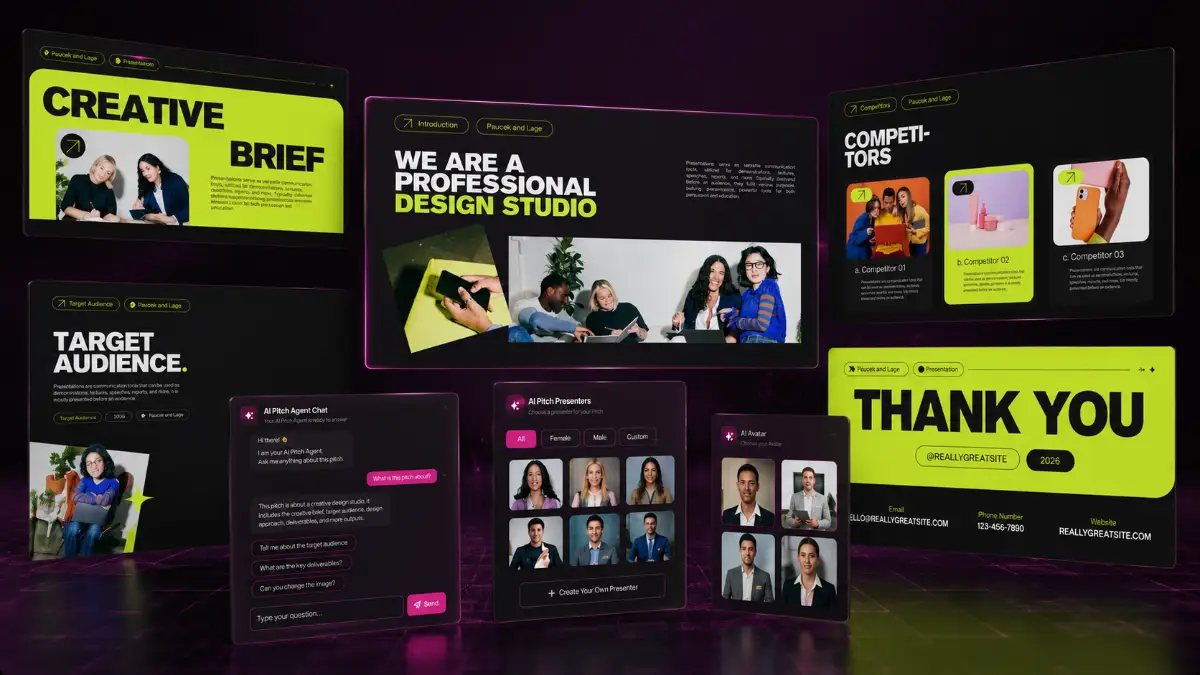
- AI presenters: choose from a large presenter library or build a custom presenter that can explain your offer, introduce benefits, and guide users through the pitch.
- Real-time AI Q&A: let visitors ask questions inside the pitch and receive instant answers through voice and text, reducing friction before the conversion step.
- Natural AI voice options: use voice libraries and voice cloning features to create a more personal pitch experience for different markets, brands, or client campaigns.
- No-code editor: edit text, visuals, branding, sections, layout, calls to action, forms, and interaction points with a drag-and-drop workflow.
- Guided pitch flows: add tooltips, hotspots, step-based journeys, forms, FAQs, and interactive elements that help prospects move through the offer logically.
- Lead capture and CRM: collect visitor information, manage contacts, review conversations, and track prospects from the same dashboard.
- Analytics and buyer behavior tracking: monitor views, clicks, questions, engagement, interactions, and high-intent signals so you can see where visitors are responding.
- Website and domain publishing: embed pitches on sites, landing pages, and funnels, or connect custom domains for stronger branding and client delivery.
- Automation and follow-up: trigger follow-up emails, reminders, lead nurturing sequences, segmentation, and behavior-based actions after the pitch interaction.
- Multi-language pitch support: create AI pitch experiences for different countries or language segments without rebuilding the full campaign manually.
- Business lead generation: find local businesses by niche or location, collect contact information, build lists, and prepare outreach campaigns from inside the platform.
- Commercial and agency options: use Pitchora AI for your own offers or create interactive pitch assets for clients as a service.
- Cloud access: manage pitches, leads, edits, and campaigns from a browser on desktop, tablet, or mobile without installing software.
Pros & Cons (realistic)
Pros
- More engaging than a static page: the interactive format can make demos, local offers, agency services, and lead magnets feel more guided and memorable.
- AI Q&A can reduce hesitation: letting visitors ask questions inside the pitch may help with objections that would otherwise stop the conversion.
- Useful agency packaging: interactive pitch creation, lead capture, CRM setup, and automation can be sold as a client service.
- Lead tools are built into the concept: the platform is not only about presentation; it also includes capture, behavior tracking, CRM, and follow-up workflows.
- The funnel covers several buyer types: beginners can start with the front end, while agencies can move toward Unlimited, Leads, Automation, and Agency features.
Cons
- A weak offer will still struggle: an interactive pitch can improve delivery, but it cannot fix poor positioning, unclear benefits, or low market demand.
- AI answers need review: Q&A logic, product claims, pricing details, and objections should be checked carefully before sending traffic.
- Visual novelty can be overused: motion, presenters, and 3D effects should support the sale, not distract from the decision path.
- Upgrade choices depend on workload: casual users may not need agency, automation, or lead generation upgrades unless they plan to create many campaigns or sell client services.
My personal angle (how I’d use it)
- For affiliate campaigns: I would create a short interactive pitch that explains the problem, shows the product angle, answers common objections, and then sends users to the best affiliate link.
- For a local-business service: I would build sample pitches for restaurants, clinics, coaches, real estate agents, gyms, or agencies, then use those demos as outreach assets.
- For software or SaaS demos: I would use the AI presenter to walk through the value proposition, then add Q&A around pricing, features, support, and ideal use cases.
- For lead qualification: I would make the pitch ask for contact details only after a visitor has engaged with key sections, then use the CRM and automation tools to follow up based on behavior.
Bonuses
Pitchora AI is most valuable when the pitch connects to a real campaign: the hook that gets attention, the offer being explained, the objections being handled, and the follow-up that happens after the lead is captured. For the full Tool Review Central bonus list and delivery details, use the internal page below:
Bonus details
See what’s included and how delivery works after purchase.
Quick buying decision (what I’d pick)
If I wanted the broadest setup, I would check the Pitchora AI Bundle first because it includes the Commercial front end, Unlimited, Enterprise, Leads, Automation, Agency, bonuses, tutorials, and knowledge-base access. The listed coupon SAVE100 gives $100 off the bundle. The Front-End is the lowest-friction way to test the main pitch creation workflow, and the coupon EARLY5 is listed for $5 off. The Fast Pass makes sense for buyers who already want OTO1 through OTO5 together. Unlimited is the practical choice for more volume. Enterprise improves customization, analytics, presenters, voice cloning, and integrations. Leads is for prospecting and outreach. Automation supports nurturing and CRM workflows. Agency is the route for client delivery and white-label positioning. The Done-For-You option is for users who prefer implementation help instead of building the setup themselves.
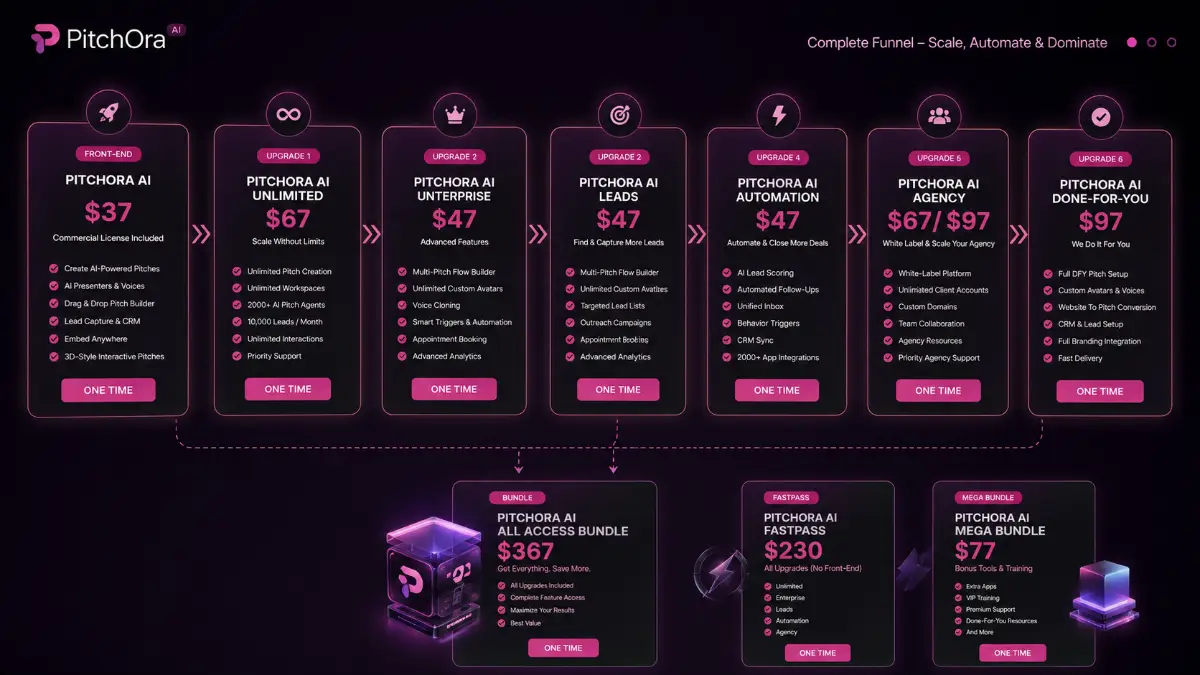
Pricing & funnel breakdown
| Offer | Price | Best for |
|---|---|---|
| Bundle — Pitchora AI Bundle | $267 | Best overall route for buyers who want the complete Pitchora AI stack in one purchase. Includes Pitchora AI Commercial, Unlimited, Enterprise, Leads, Automation, Agency, all bonuses, tutorials, and knowledge-base access. Coupon: SAVE100 for $100 off the bundle. |
| Mega Bundle — Pitchora AI Mega Bundle | $77 | Value-enhancement package with additional apps, VIP step-by-step training, priority premium support, a dedicated account manager, and extra resources designed to accelerate implementation and growth. |
| Front-End — Pitchora AI Commercial | $37 | Main entry package for creating AI-powered interactive sales pitches. Includes URL-to-pitch creation, AI presenters, voice technology, drag-and-drop editing, lead forms, CRM features, website and funnel embeds, 3D-style pitch flows, and commercial license. Coupon: EARLY5 for $5 off the front end. |
| Fast Pass — Pitchora AI Fast Pass | $230 | For buyers who want OTO1 through OTO5 together after the front end. Includes Unlimited, Enterprise, Leads, Automation, Agency, bonuses, tutorials, and knowledge-base access. |
| Upsell 1 — Pitchora AI Unlimited | $67 | Built for users who need higher creation volume: unlimited AI pitches, unlimited workspaces and deployments, 2000+ AI pitch agents, expanded voice access, unlimited visitor chats, up to 10,000 leads per month, multi-language support, priority processing, and commercial use. |
| Upsell 2 — Pitchora AI Enterprise | $47 | Best for advanced pitch experiences with multiple pitches in one flow, unlimited custom presenters, voice cloning, behavior triggers, booking tools, CRM and autoresponder integrations, deeper analytics, surveys, feedback tools, and advanced 3D-style customization. |
| Upsell 3 — Pitchora AI Leads | $47 | Lead generation upgrade for agencies and freelancers. Helps find businesses by niche or location, collect emails, phone numbers and websites, build targeted lists, send outreach campaigns, use done-for-you email templates, export leads, and connect with CRM tools. |
| Upsell 4 — Pitchora AI Automation | $47 | Automation-focused upgrade for AI lead scoring, follow-up systems, unified inbox management, behavior-based triggers, customer timelines, multi-channel lead handling, smart segmentation, tagging, CRM sync, and integrations with 2,000+ apps. |
| Upsell 5 — Pitchora AI Agency | $67 / $97 | Agency license for selling AI pitch services to clients. Includes white-label platform access, unlimited client accounts, custom domain mapping, team collaboration, agency resources, priority support, and the ability to keep client revenue. |
| Upsell 6 — Pitchora AI Done-For-You | $97 | Hands-free implementation service where the Pitchora AI team helps create, optimize, brand, and deploy interactive AI pitches. Includes strategist support, custom presenter creation, voice setup, website-to-pitch conversion, CRM and lead setup, multi-step pitch flow creation, and rapid deployment. |
Direct links (bundle first)
Open in a new tab. These are affiliate links.
FAQ
Is Pitchora AI just a landing page builder?
No. Landing pages are static compared with what Pitchora AI is trying to create. The platform builds interactive sales pitches with AI presenters, voice Q&A, guided flows, lead forms, CRM tools, analytics, and automation. It can be used alongside pages and funnels, but the core angle is a more conversational pitch experience.
Can beginners use Pitchora AI without coding?
Yes. The creation process is based on prompts, URLs, existing content, AI generation, and drag-and-drop customization. Beginners still need to review the final pitch, adjust claims, and make sure the offer is clear, but they do not need to code the presenter, pitch flow, forms, or embed setup manually.
Which upgrades are most relevant for agencies?
Unlimited helps with volume and higher usage. Leads is useful for finding prospects and running outreach. Automation helps with follow-up, segmentation, and CRM workflows. Agency is the upgrade aimed at white-label delivery, client accounts, custom domains, collaboration, and selling interactive pitch services.
Do you have a bonus page?
Yes — bonus info is here: /pitchora-ai-bonus/.
About the reviewer

Samuel Marco
I publish practical reviews of AI software and online business tools, focusing on real workflows, buyer use cases, monetization potential, pricing decisions, and whether a tool can realistically help someone save time, increase output, or package a service around it.
Final verdict
Pitchora AI is built for marketers and service providers who want sales pages to behave more like guided conversations. It brings together AI pitch creation, 3D-style presentations, AI presenters, voice responses, real-time Q&A, lead capture, CRM tracking, analytics, automation, multi-language support, business prospecting, and agency delivery. That makes it more interesting than a basic page builder when the offer needs explanation or when visitors may have questions before they act. The key limitation is that the pitch still needs a strong reason to exist: clear positioning, a good hook, credible claims, and a clean conversion path. For affiliates, freelancers, agencies, local marketers, software sellers, and business owners who want a more interactive way to present offers and collect leads, Pitchora AI has a practical sales and monetization angle.
Want a faster way to turn URLs, products, services, or ideas into interactive AI sales pitches with presenters, voice Q&A, lead capture, CRM tools, and follow-up automation?
The Bundle gives the widest setup. Front-End is the easiest starting point. Fast Pass unlocks the main upgrades together, Unlimited raises usage capacity, Enterprise adds deeper customization, Leads supports prospecting, Automation handles follow-up workflows, Agency supports client delivery, and Done-For-You is for hands-free implementation.