What is GEO Optimizer?
GEO Optimizer is a WordPress plugin built around one clear objective: helping pages become easier for AI systems to crawl, interpret, and cite. Instead of acting like a conventional SEO plugin that focuses mainly on titles and meta tags, it leans into the mechanics of AI-facing discoverability by adding structured data, generating answer-friendly sections, creating an llms.txt file, and making sure bots like GPTBot, PerplexityBot, ClaudeBot, and Google-Extended are not blocked from useful content.
From a publishing and monetization perspective, that makes it relevant to far more than technical SEO people. Bloggers, affiliate marketers, lead-gen operators, niche site builders, media brands, and agencies all need their content to stay visible as search behavior changes. The appeal here is that existing articles can be upgraded into clearer, more citation-ready assets without rebuilding every page manually. That matters when content volume is high, margins depend on organic reach, and distribution increasingly passes through AI answer engines rather than direct clicks from traditional search alone.

How it works (3 simple steps)
- Step 1 — Install the plugin and open your site to the right AI crawlers: GEO Optimizer is installed directly inside WordPress and handles the setup layer automatically. It can configure robots.txt behavior, adjust sitemap accessibility, and make sure the major AI bots can reach the content you actually want indexed without asking you to write code or edit files by hand.
- Step 2 — Turn ordinary posts into AI-friendly pages: Once active, the plugin scans content and enhances it with features such as FAQs, answer capsules, schema markup, heading improvements, and llms.txt generation. You can work page by page or apply changes more broadly depending on the version you choose and how much automation you want.
- Step 3 — Improve your chances of showing up in AI-generated answers: After optimization, your content is presented in a cleaner format for tools like ChatGPT, Perplexity, and Google AI Overviews. The upside is greater citation potential, better content trust signals, and a stronger shot at earning visibility where users increasingly ask questions instead of browsing ten tabs.
See how GEO Optimizer works
Step-by-step walkthrough from my YouTube channel

Key features that matter
GEO Optimizer becomes more useful when you look at it as a workflow stack rather than a single-plugin gimmick. Access management, content formatting, schema, audits, and automation all point toward the same goal: making site content easier for AI engines to extract and trust. That can save time for solo publishers, improve consistency for teams, and create a more repeatable process for agencies optimizing multiple client sites.
- AI bot access manager: the plugin handles crawler access for systems such as GPTBot, ClaudeBot, PerplexityBot, and Google-Extended, reducing the chance that important content is accidentally hidden from the engines you actually want visiting your site.
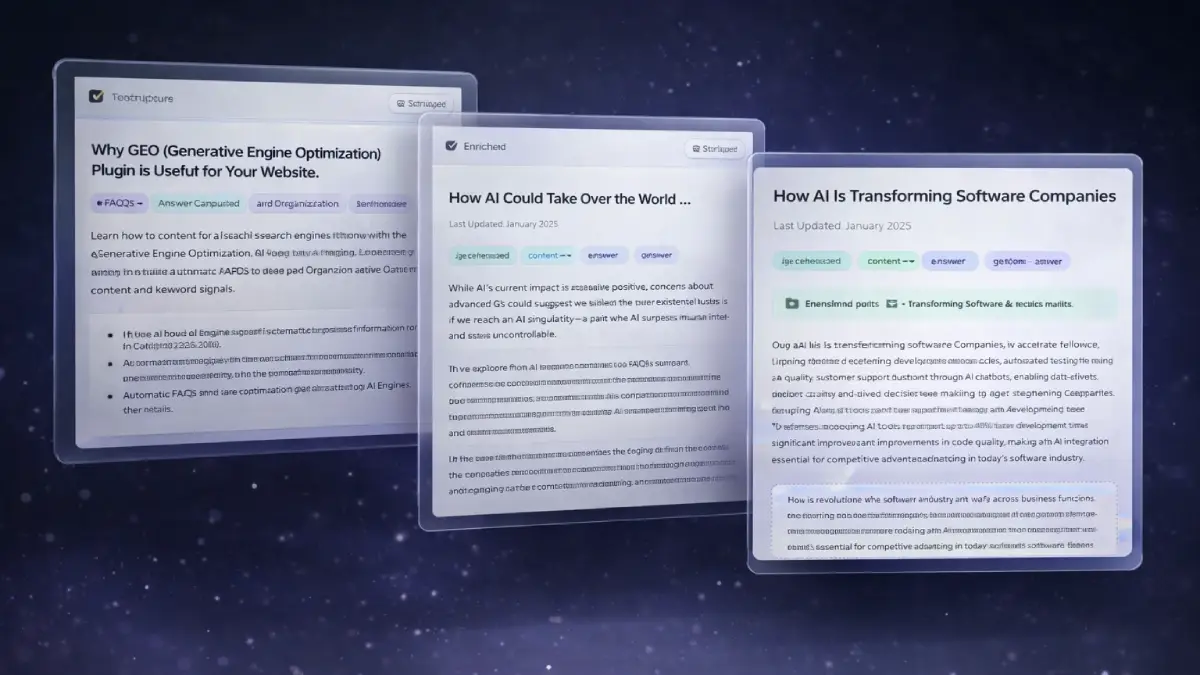
- Auto AI-Ready Writer: with one click, posts can be reformatted to include clearer headings, FAQ sections, answer-driven copy blocks, and a structure that is easier for AI models to parse.
- Full JSON-LD schema injection: Article, Organization, Person, FAQPage, Breadcrumb, and other structured data elements are added automatically so your pages communicate context more clearly to search and AI systems.
- FAQ schema auto-detection: when your headings are already written as questions, the plugin can convert those sections into FAQ schema without requiring manual markup work.
- Answer capsule shortcode: important responses can be wrapped in dedicated answer blocks that highlight the most extractable takeaway, which is especially useful for citation-friendly summaries and direct-answer queries.
- llms.txt generator: GEO Optimizer builds an llms.txt file that points AI crawlers toward priority pages, helping them discover the parts of your site that matter most.
- GEO audit and scoring: each post receives an AI-readiness score so you can see what is missing, what needs improvement, and where the fastest gains are likely to come from.
- Crawler access configuration: beyond schema and content edits, the plugin works on the underlying discoverability layer by keeping robots.txt and sitemap settings aligned with AI visibility goals.
- Autopilot mode: content can be re-optimized on a schedule, which matters for sites publishing frequently or maintaining large archives that cannot be refreshed by hand every week.
- Citation tracker: the tracking component is aimed at measurement, showing where your content gets mentioned or cited across AI environments and making visibility less of a guessing game.
- Bing auto-ping on publish: each newly published page can trigger a sitemap ping to Bing, which may help faster discovery for systems that rely on Bing-powered indexing data.
- One-click content revert: before automated edits happen, the original content is backed up so you can roll back changes quickly if you prefer the earlier version or want tighter editorial control.
Pros & Cons (realistic)
Pros
- It fits the current search transition: the plugin is built for AI answer visibility, which is a more relevant problem than old-school SEO tweaks alone for many publishers right now.
- The setup looks accessible: WordPress users can get schema, bot access, FAQ formatting, and llms.txt generation without doing technical implementation from scratch.
- It helps existing content work harder: large archives of articles can potentially be refreshed into better AI-ready assets instead of being left in a format that AI engines may only partially understand.
- Automation adds operational value: scoring, scheduled optimization, and content enhancement can reduce repetitive manual work for agencies and multi-site operators.
- The measurement layer matters: citation tracking and audit scoring make it easier to treat AI visibility as a process you can monitor rather than a vague hope.
Cons
- Optimization is not a substitute for expertise: weak content will not become authoritative just because it gets wrapped in schema and answer blocks.
- Results depend on the platform shift itself: AI citation visibility is still an evolving ecosystem, so gains may vary by niche, query type, and engine behavior.
- Power users may want higher tiers fast: agencies, heavy publishers, and site portfolios will likely outgrow the entry offer and look toward stronger automation or agency-oriented upgrades.
- Editorial review is still smart: automated rewrites and FAQ generation can save time, but many site owners will still want to check output quality before treating it as final.
My personal angle (how I’d use it)
- For upgrading old content libraries: I would use GEO Optimizer first on existing posts that already rank or already attract impressions, because those are the easiest assets to turn into stronger AI-citation candidates without starting from zero.
- For affiliate and lead-gen sites: pages that answer practical questions clearly often perform well in discovery environments, so I would focus on comparison posts, tutorials, problem-solution pages, and FAQ-heavy content.
- For agencies managing many WordPress installs: the bigger appeal for me is not a single site but repeatability across multiple properties, especially when scoring, batch actions, and automation reduce the amount of manual cleanup required.
- For distribution beyond Google alone: I would treat this as part of a broader visibility strategy where content is prepared for AI search surfaces, traditional SEO, and owned-site authority all at the same time.
Bonuses
What stands out to me is not only the possibility of extra traffic, but the chance to make a site structurally easier to reuse across newer search layers. When content becomes simpler for AI systems to read, summarize, and cite, the value extends beyond a single ranking position and into broader content distribution. For the full bonus list and delivery details on Tool Review Central, use the internal page below:
Bonus details
See what’s included and how delivery works after purchase.
Quick buying decision (what I’d pick)
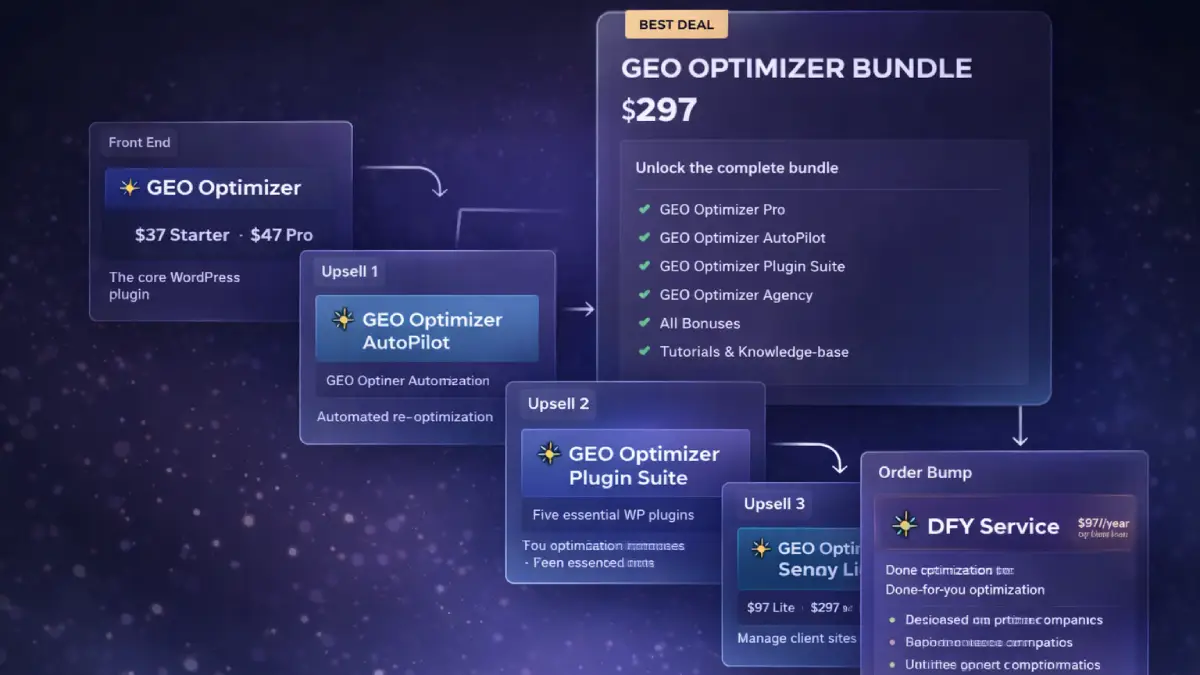
If I wanted the broadest setup for serious site optimization without piecing together the stack later, I would choose the GEO Optimizer Bundle because it includes the core plugin plus Autopilot, Plugin Suite, and Agency access in one offer. The Front-End is the easiest entry for WordPress users who mainly want the base plugin, AI-ready formatting, schema injection, crawler access, and llms.txt generation. OTO1 Autopilot is the strongest fit for users who want the optimization layer to keep running without constant manual work, especially when content changes often. OTO2 Plugin Suite makes more sense for site owners who also want to strengthen the technical side of their WordPress setup with backups, security, speed, monitoring, and image optimization alongside GEO work. OTO3 Agency License is the better route for freelancers and service providers who want to manage multiple client sites and package GEO optimization as an agency offer. OTO4 DFY Service is for buyers who want a specialist to handle implementation, strategy, and ongoing maintenance for them.
Pricing & funnel breakdown
| Offer | Price | Best for |
|---|---|---|
| Bundle — GEO Optimizer Bundle | $247 Coupon: GEO50 $50 OFF |
Best overall option for buyers who want the full setup from day one. Includes GEO Optimizer Pro, GEO Optimizer Autopilot, GEO Optimizer Plugin Suite, GEO Optimizer Agency, bonuses, tutorials, and knowledge-base access. It is the strongest choice for users who want the core optimization plugin plus automation, supporting WordPress utilities, and client-facing expansion in one package. |
| Front-End — GEO Optimizer | $37 / $47 Coupon: GEO2 $2 OFF |
Entry offer for WordPress users who want the core AI-readiness plugin without technical setup. Includes one-click install and auto-setup, AI-Ready Writer with FAQs, Answer Capsules, and JSON-LD Schema, llms.txt generation, sitemap.xml and robots.txt optimization, a GEO visibility score dashboard, and compatibility with any WordPress theme. Starter covers 5 sites, while Pro covers unlimited sites. |
| OTO1 — GEO Optimizer Autopilot | $67 | Best for users who want a hands-free optimization workflow. Adds scheduled re-optimization, stale-post refresh rules, automatic llms.txt updates when content changes, weekly GEO performance emails, and a dedicated Autopilot control panel for ongoing maintenance with minimal manual work. |
| OTO2 — GEO Optimizer Plugin Suite | $47 | Built for WordPress users who want stronger overall site operations alongside GEO optimization. Includes backup and restore tools, a security firewall with malware scanning, speed optimization with caching and minification, image compression with WebP conversion, and uptime monitoring with instant downtime alerts. |
| OTO3 — GEO Optimizer Agency License | $97 / $297 | Useful for freelancers, agencies, and service providers who want to manage multiple client sites and offer GEO optimization as a service. Adds team and client management, a centralized dashboard for multiple websites, agency controls, priority support, and white-label rights plus PDF reports on the Premium tier. Agency Lite covers 50 sites, while Agency Premium covers 100 sites and includes white-label rights. |
| OTO4 — DFY Service | $97/mo or $497/y | The done-for-you path for buyers who want expert execution instead of handling the process themselves. Includes a dedicated GEO specialist, full site optimization, monthly content and schema refreshes, performance and strategy calls, priority feature access, ongoing AI visibility management, and fully hands-free implementation. |
Direct links (bundle first)
Open in a new tab. These are affiliate links.
FAQ
Is GEO Optimizer only for technical SEO users, or can regular WordPress site owners use it too?
Regular WordPress users are clearly part of the target audience. The plugin is positioned around one-click setup, automated formatting, schema injection, and built-in optimization features, so the workflow is intended to be accessible even for site owners who do not want to edit code or configure files manually.
Can GEO Optimizer help with AI visibility beyond Google?
Yes. The positioning is broader than a standard Google-only SEO plugin because it is built around AI-facing search environments such as ChatGPT, Perplexity, and Google AI Overviews. Features like bot access management, llms.txt generation, answer capsules, and citation tracking all support that wider use case.
Who should seriously consider Autopilot, Plugin Suite, Agency License, or the DFY Service?
Autopilot is the best fit for users who want recurring optimization without extra manual work. Plugin Suite is more attractive for WordPress owners who want backups, security, speed tools, and uptime monitoring packaged alongside GEO optimization. Agency License makes the most sense for freelancers and agencies managing multiple client websites. DFY Service is aimed at buyers who want expert implementation and ongoing maintenance instead of a DIY workflow.
Do you have a bonus page?
Yes — bonus info is here: /bonus/.
About the reviewer

Samuel Marco
I publish hands-on reviews of AI software and online business tools, with an emphasis on practical workflows, monetization potential, and whether a product can realistically help someone produce more output, save time, or build a marketable service around it.
Final verdict
GEO Optimizer is aimed at a timely opportunity in digital publishing: making WordPress content easier for AI systems to understand, surface, and cite. By combining crawler access management, answer-friendly formatting, schema automation, llms.txt generation, page scoring, and optional tracking inside one plugin, it gives site owners a more structured way to adapt to AI-led search behavior without piecing the workflow together from multiple tools. The full funnel expands that into automation, WordPress performance support, agency delivery, and managed implementation, which makes the offer more commercially useful than a simple front-end plugin alone. The bigger question is not whether the plugin can add technical enhancements. It is whether the underlying content is worth citing and whether the publisher has a plan to turn that added visibility into traffic, leads, or revenue. For buyers who want a WordPress-based shortcut into AI search readiness and citation-focused optimization, GEO Optimizer presents a solid case.
Want a faster way to make WordPress pages easier for ChatGPT, Perplexity, and Google AI Overviews to crawl, interpret, and cite?
The Bundle gives the broadest value. Front-End is the easiest place to begin. OTO1 automates ongoing optimization, OTO2 adds a supporting WordPress plugin stack for backups, security, speed, and monitoring, OTO3 opens the agency route for client management, and OTO4 gives you a fully managed implementation path.