What is FunnelHero AI?
FunnelHero AI is a cloud-based AI funnel builder that helps users create complete sales funnels without coding, design experience, or a separate copywriting workflow. You enter details about your product, audience, and objective, then the platform uses AI to generate funnel pages, sales copy, page content, and visual assets.
The platform is designed for marketers, affiliates, entrepreneurs, agencies, freelancers, coaches, software sellers, eCommerce brands, and service providers who want to launch campaigns faster. Users can choose AI models such as GPT-4o, Claude Sonnet, and Claude Opus depending on the plan, then refine the generated funnel with chat commands or manual drag-and-drop editing.
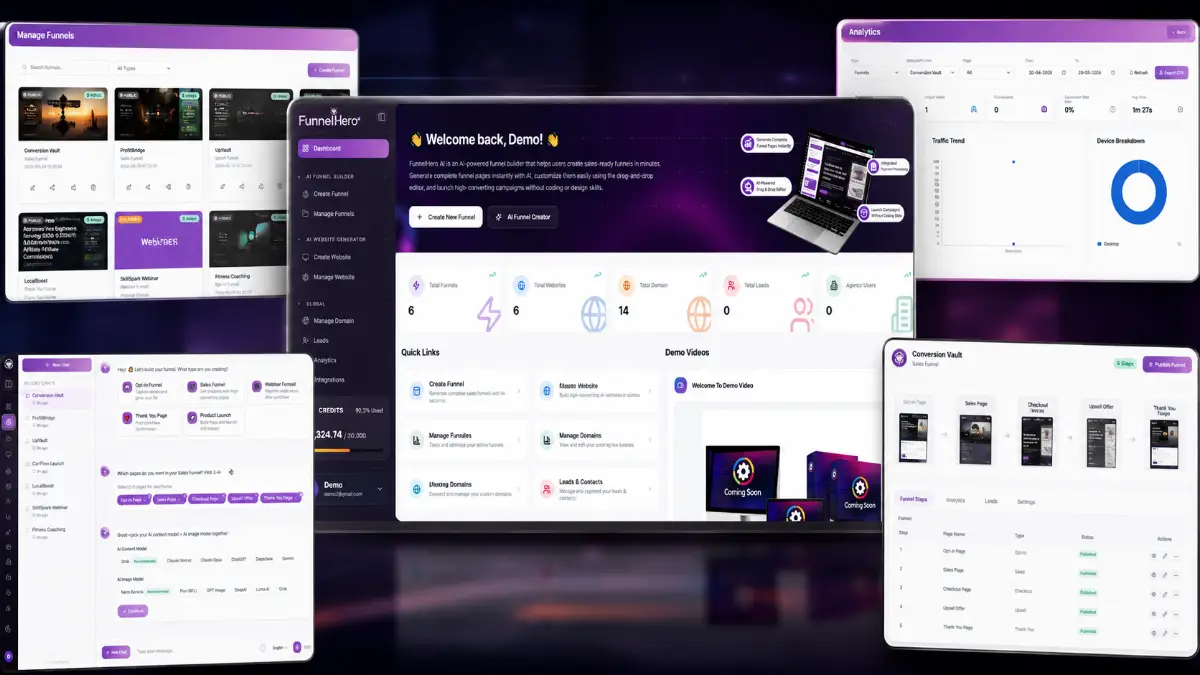
How it works (3 simple steps)
- Step 1 — Describe your offer: Add the product, service, audience, goal, and preferred tone so FunnelHero AI can understand what the funnel needs to communicate.
- Step 2 — Choose your AI model: Select GPT-4o, Claude Sonnet, or Claude Opus on supported plans, then let the platform generate the funnel structure, copy, pages, and content direction.
- Step 3 — Customize and publish: Edit by typing instructions into chat, adjust details manually in the drag-and-drop builder, then publish on a custom domain or export the funnel as HTML and CSS.
See how FunnelHero AI works
Step-by-step walkthrough from my YouTube channel.

Key features that matter
FunnelHero AI is most interesting when you look at the whole launch workflow rather than one isolated page builder feature. It can help draft the customer journey, generate persuasive copy, produce visuals, let the user revise pages in plain language, and provide the publishing and analytics pieces needed after the funnel goes live.
- AI-powered funnel generation: create complete funnel structures from a short description of the offer, audience, and campaign objective.
- Selectable AI models: choose GPT-4o, Claude Sonnet, and Claude Opus on supported plans for different writing styles and content quality preferences.
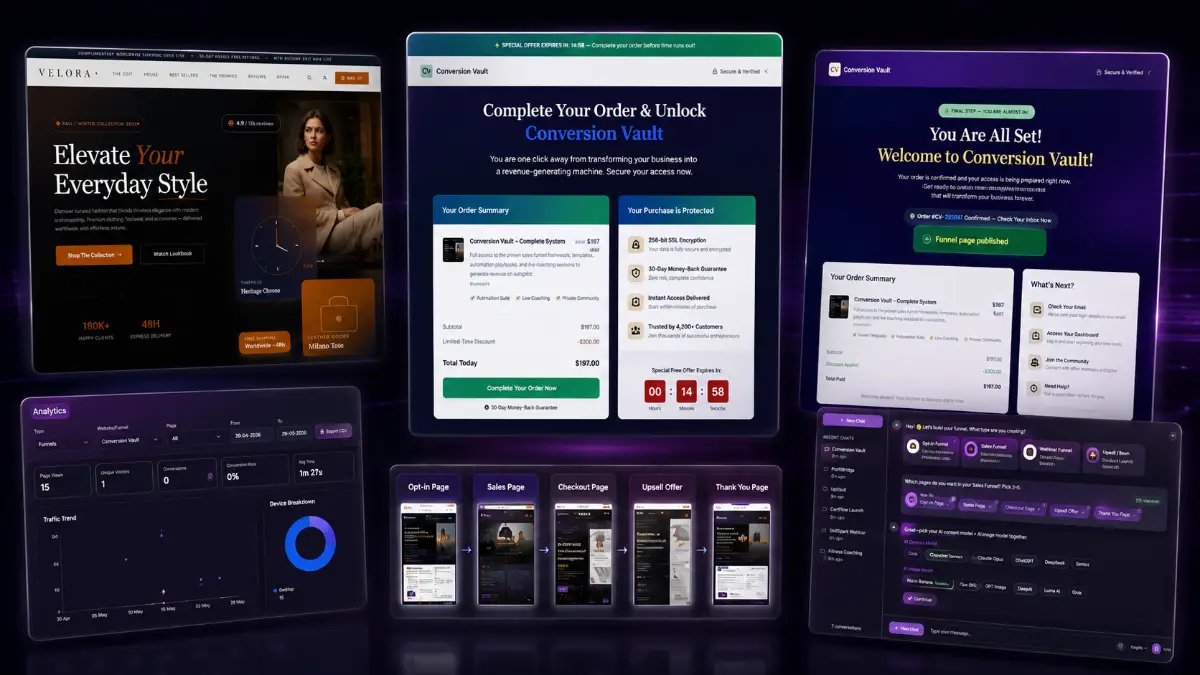
- Multi-step funnel creation: build opt-in pages, sales pages, upsell pages, and thank-you pages that connect into a working funnel sequence.
- AI image generation: create hero graphics, banners, product visuals, and other funnel assets without moving into a separate design tool.
- Chat-based page editing: request headline changes, CTA revisions, image swaps, copy improvements, or design edits through natural language prompts.
- Drag-and-drop editor: move, resize, rearrange, and customize page elements visually without editing code.
- Dual editing workflow: switch between AI-assisted changes and manual page control depending on the type of edit needed.
- Pre-built funnel templates: start with more than 20 ready-made templates across common campaign types and industries.
- Niche-specific designs: use layouts for affiliate promotions, software offers, coaching, eCommerce, information products, and other markets.
- Undo and redo history: experiment with design and copy changes while keeping the option to restore earlier versions.
- Custom domain publishing: publish funnels on a branded domain instead of relying only on generic platform links.
- HTML and CSS export: download clean files and host the funnel on a preferred server or website setup.
- Email marketing integration: connect autoresponder services so leads captured by the funnel can move into follow-up campaigns.
- Payment processor integration: connect payment tools and collect orders directly from the funnel pages.
- Built-in analytics: monitor funnel performance without adding a separate analytics stack at the start.
- Real-time visitor tracking: see visits and unique visitor activity as traffic begins arriving.
- Conversion rate monitoring: track opt-ins and funnel conversion rates so page performance is visible.
- Device performance reports: compare how visitors behave on desktop and mobile devices.
- CSV data export: export analytics data for reports, client updates, or deeper analysis outside the platform.
- Commercial license included: build funnels for clients and charge for funnel creation services.
- Agency and white-label paths: higher upgrades add client accounts, reseller options, agency controls, and full white-label capabilities.
Pros & Cons (realistic)
Pros
- Fast first draft: a funnel can move from concept to editable pages much faster than building the structure, copy, and visuals separately.
- Good editing flexibility: chat commands are useful for quick revisions, while the drag-and-drop builder gives manual control when precision matters.
- Model choice is valuable: being able to choose GPT-4o or Claude gives users more room to match the tone of different offers.
- Useful for client work: commercial rights, exports, custom domains, templates, and agency upgrades make it practical for service providers.
- Analytics are built in: early traffic, opt-ins, conversion rates, device data, and CSV exports help users evaluate funnel performance after publishing.
Cons
- AI output still needs review: generated copy should be checked for accuracy, offer positioning, compliance, and brand voice before going live.
- The offer drives results: a polished funnel cannot rescue weak pricing, unclear positioning, or low-quality traffic by itself.
- Front-end limits may feel tight: users building many funnels or long page sequences will likely compare the front end with Pro and the bundle options.
- White-label use is an upgrade path: agencies wanting full rebranding or SaaS-style resale need the higher white-label offer.
My personal angle (how I’d use it)
- For affiliate campaigns: I would generate a focused opt-in or bridge funnel first, then test the headline, lead magnet angle, and CTA before expanding the sequence.
- For client services: I would use templates plus AI drafts to produce a fast demo funnel during the sales process, then customize it after the client approves the offer direction.
- For product launches: I would build the sales page, upsell page, and thank-you page as one connected journey so the message stays consistent across the funnel.
- For quick validation: I would publish a simple funnel on a custom domain, run a small traffic test, and use the built-in analytics before investing in a larger campaign buildout.
Bonuses
FunnelHero AI becomes more valuable when the software is paired with a repeatable campaign process: clarify the offer, generate the funnel, improve the copy, publish the pages, connect follow-up, review the analytics, and optimize from real traffic. For the full Tool Review Central bonus list and delivery details, use the internal page below:
Bonus details
See what’s included and how delivery works after purchase.
Quick buying decision (what I’d pick)
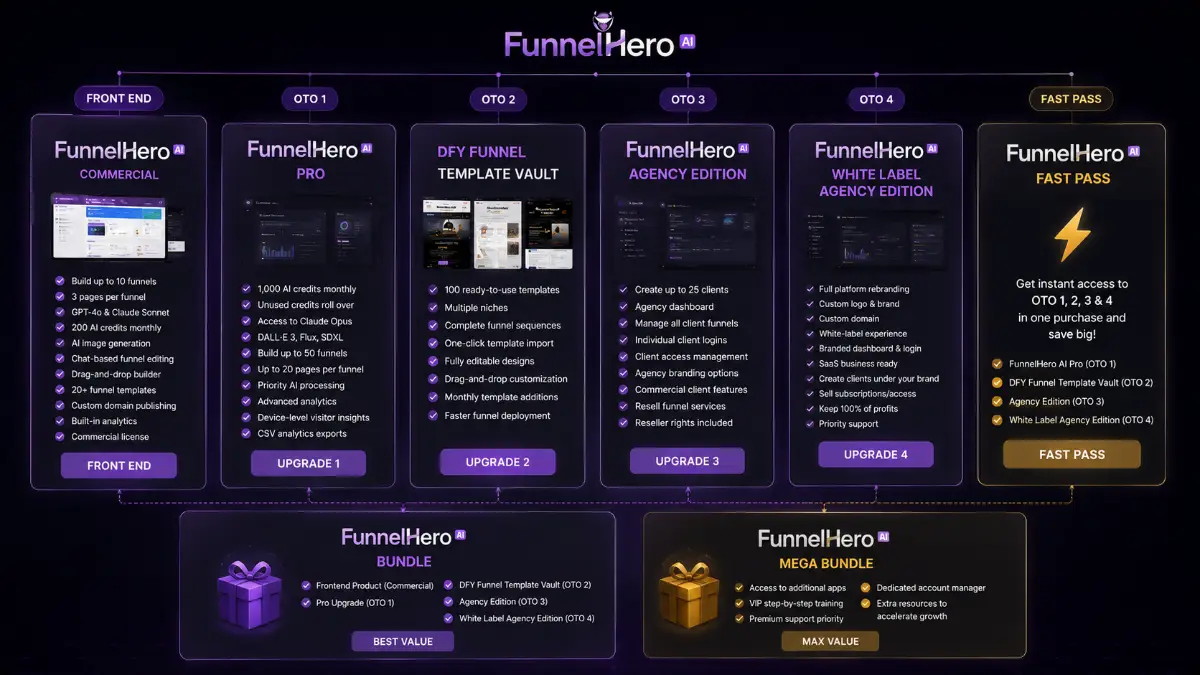
If I wanted the broadest practical setup, I would check the FunnelHero AI Bundle first because it includes the Commercial front end, Pro, DFY Funnel Template Vault, Agency Edition, and White Label Agency Edition together. The Front-End is the simplest way to test AI funnel generation, chat editing, templates, publishing, analytics, and commercial use. Pro is the upgrade I would consider for higher usage limits, Claude Opus, more image models, deeper analytics, and larger funnel projects. DFY Funnel Template Vault is useful when speed matters and you want more done-for-you layouts. Agency Edition makes sense for client work, while White Label Agency Edition is the option for users who want to rebrand the platform and sell access under their own name. The Fast Pass unlocks OTO1 through OTO4 together, and the Mega Bundle adds extra apps, training, support, and VIP-style benefits.
Pricing & funnel breakdown
| Offer | Price | Best for |
|---|---|---|
| Bundle — FunnelHero AI Bundle | $267 | Best overall route for buyers who want the main software and the main upgrade stack together. Includes FunnelHero AI Commercial, FunnelHero AI Pro, DFY Funnel Template Vault, FunnelHero AI Agency Edition, and FunnelHero AI White Label Agency Edition. |
| Mega Bundle — FunnelHero AI Mega Bundle | $127 | Value-enhancement package with additional apps, VIP step-by-step training, premium support priority, a dedicated account manager, and extra growth resources. |
| Front-End — FunnelHero AI Commercial | $37 | Main software for building up to 10 funnels with up to 3 pages per funnel. Includes GPT-4o and Claude Sonnet integration, 200 monthly AI credits, AI image generation, chat editing, drag-and-drop building, 20+ templates, HTML/CSS export, custom domain publishing, built-in analytics, and commercial rights. |
| Fast Pass — FunnelHero AI Fast Pass | $230 | One-purchase access to OTO1, OTO2, OTO3, and OTO4. Useful for buyers who want Pro, the template vault, agency tools, and white-label rights without buying each upgrade separately. |
| Upsell 1 — FunnelHero AI Pro | $97 | For users who need larger funnel projects and more AI power. Includes 1,000 monthly AI credits, credit rollover, Claude Opus, DALL·E 3, Flux, SDXL, up to 50 funnels, up to 20 pages per funnel, priority AI processing, advanced analytics, device-level visitor insights, and CSV analytics exports. |
| Upsell 2 — DFY Funnel Template Vault | $67 | For faster funnel deployment using 100 done-for-you templates across multiple niches. Includes complete funnel sequences, one-click import, editable designs, drag-and-drop customization, and monthly template additions. |
| Upsell 3 — FunnelHero AI Agency Edition | $147 | For users selling funnel services to clients. Includes up to 25 client accounts, a centralized agency dashboard, client funnel management, individual client logins, access controls, agency branding options, commercial client features, reseller rights, and the ability to resell funnel services. |
| Upsell 4 — FunnelHero AI White Label Agency Edition | $247 | For agencies and SaaS-style operators who want to rebrand the platform. Includes full platform rebranding, custom logo and brand name, custom domain integration, branded dashboard and login page, white-label client experience, SaaS business infrastructure, client accounts under your brand, subscription or one-time access sales, 100% profit retention, white-label commercial rights, and priority support. |
Direct links (bundle first)
Open in a new tab. These are affiliate links.
FAQ
Is FunnelHero AI only a page builder?
No. Page editing is part of the workflow, but the platform also generates funnel structures, sales copy, AI images, multi-step pages, templates, analytics, custom domain publishing, integrations, and exportable files. The goal is to help users move from offer idea to published funnel faster.
Can beginners use FunnelHero AI without coding?
Yes. The workflow is browser-based and no-code. Users can describe the offer, choose an AI model, generate pages, make changes with chat prompts, customize visually with drag-and-drop controls, and publish without writing HTML or CSS.
Which upgrades are most relevant for agencies?
Pro is relevant for higher usage limits and premium AI models. DFY Funnel Template Vault helps with faster client builds. Agency Edition adds client accounts and reseller capabilities. White Label Agency Edition is the main upgrade for users who want to rebrand the platform and sell access under their own business name.
Do you have a bonus page?
Yes — bonus info is here: /funnelhero-ai-bonus/.
About the reviewer

Samuel Marco
I publish practical reviews of AI software and online business tools, focusing on real workflows, buyer use cases, monetization potential, pricing decisions, and whether a tool can realistically help someone save time, increase output, or package a service around it.
Final verdict
FunnelHero AI is built for a practical funnel-building bottleneck: getting from an offer idea to a usable, published funnel without assembling separate tools for copy, design, images, page editing, hosting, and early analytics. It combines AI funnel generation, GPT-4o and Claude model selection, AI image creation, chat-based editing, drag-and-drop customization, templates, custom domain publishing, HTML/CSS export, autoresponder and payment integrations, analytics, visitor tracking, conversion monitoring, device reports, CSV exports, commercial rights, and agency or white-label upgrade paths. The limitation is that AI can speed up production, but it cannot replace strong offer positioning, good traffic, and careful review before launch. For affiliates, creators, agencies, entrepreneurs, and marketers who need funnels built faster and want both AI assistance and manual control, FunnelHero AI has a clear and useful role.
Want a faster way to build AI-powered sales funnels, create copy and images, edit pages by chat, and publish campaigns without coding?
The Bundle gives the widest setup. Front-End is the easiest starting point. Pro raises limits and adds premium AI options, DFY Funnel Template Vault speeds up builds with more templates, Agency Edition supports client work, White Label Agency Edition supports rebranding, Fast Pass unlocks the main OTOs together, and Mega Bundle adds extra growth resources.