What is FlowMail AI?
FlowMail AI is an AI email campaign builder made for people who need to create sales emails, affiliate promotions, launch sequences, welcome campaigns, webinar emails, abandoned cart messages, follow-ups, and lead nurturing campaigns without manually writing every message from zero.
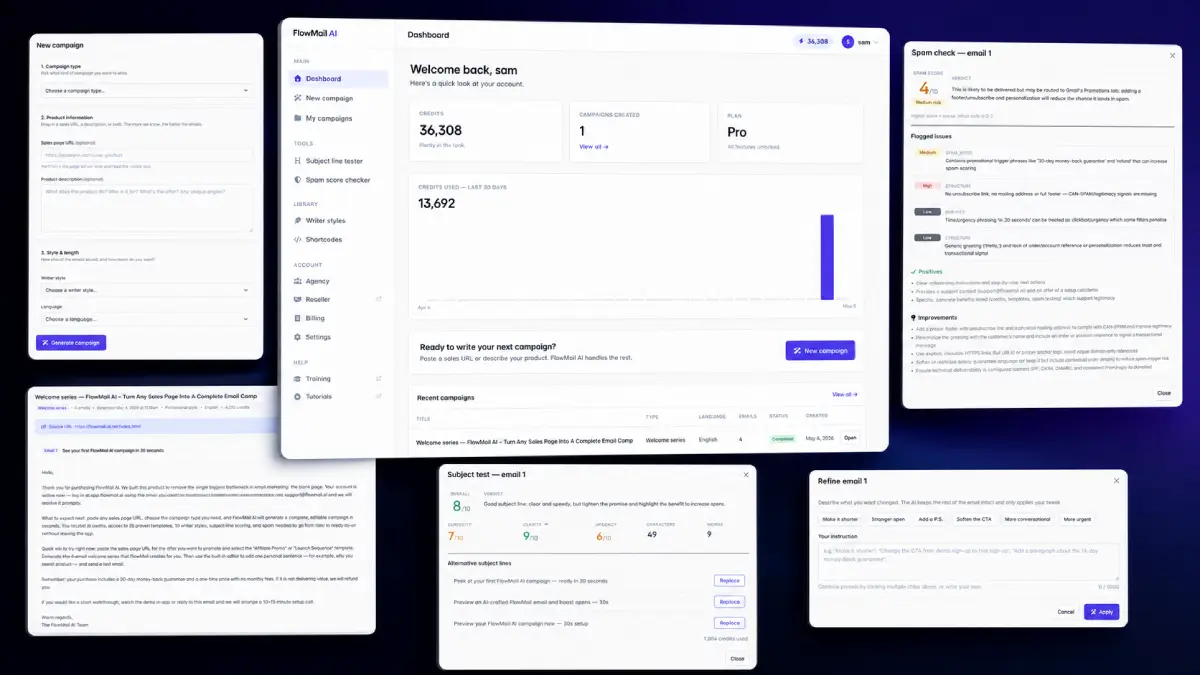
The workflow begins with the offer itself. You can paste a product URL, vendor sales page, or short product description, then select the campaign type you want. FlowMail AI studies the page, extracts the main selling points, identifies the promise and angle, then drafts a campaign that can be edited inside the platform. That matters because strong email marketing is rarely one perfect email. It is usually a chain of messages: introduction, problem framing, benefit explanation, objection handling, urgency, proof, reminder, and final call to action.
How it works (3 simple steps)
- Step 1 — Add the offer: Paste a product URL, vendor page, sales page, or brief product summary so FlowMail AI can understand what is being sold, who it is for, and which benefits should be emphasized.
- Step 2 — Pick the campaign goal: Choose the type of sequence you want, such as an affiliate promo, launch campaign, welcome series, webinar promotion, re-engagement sequence, follow-up campaign, or lead nurturing flow.
- Step 3 — Generate, polish, and export: Let the platform create the campaign, review the copy, adjust the tone, improve the subject lines, run checks, and move the finished emails into the email marketing tool you already use.
See how FlowMail AI works
Step-by-step walkthrough from my YouTube channel

Key features that matter
FlowMail AI is not trying to replace an autoresponder or broadcast platform. Its job is the creative and strategic layer before sending: turning an offer into a campaign, shaping the message flow, testing subject lines, reducing obvious spam risks, and giving marketers enough variations to match different audiences or promotions.
- Product URL campaign generation: paste a sales page or offer link and let the software analyze the content before producing a campaign around the product’s benefits, angle, and call to action.
- Ready-made campaign templates: use built-in frameworks for launches, affiliate promotions, webinars, welcome emails, follow-ups, re-engagement, nurturing, and other common campaign types.
- AI-generated sequences: create multi-email flows instead of disconnected drafts, which helps the campaign develop an argument across several touches.
- Multiple copywriting styles: switch between urgency, authority, story-based, direct-response, and other persuasive tones depending on the audience and promotion.
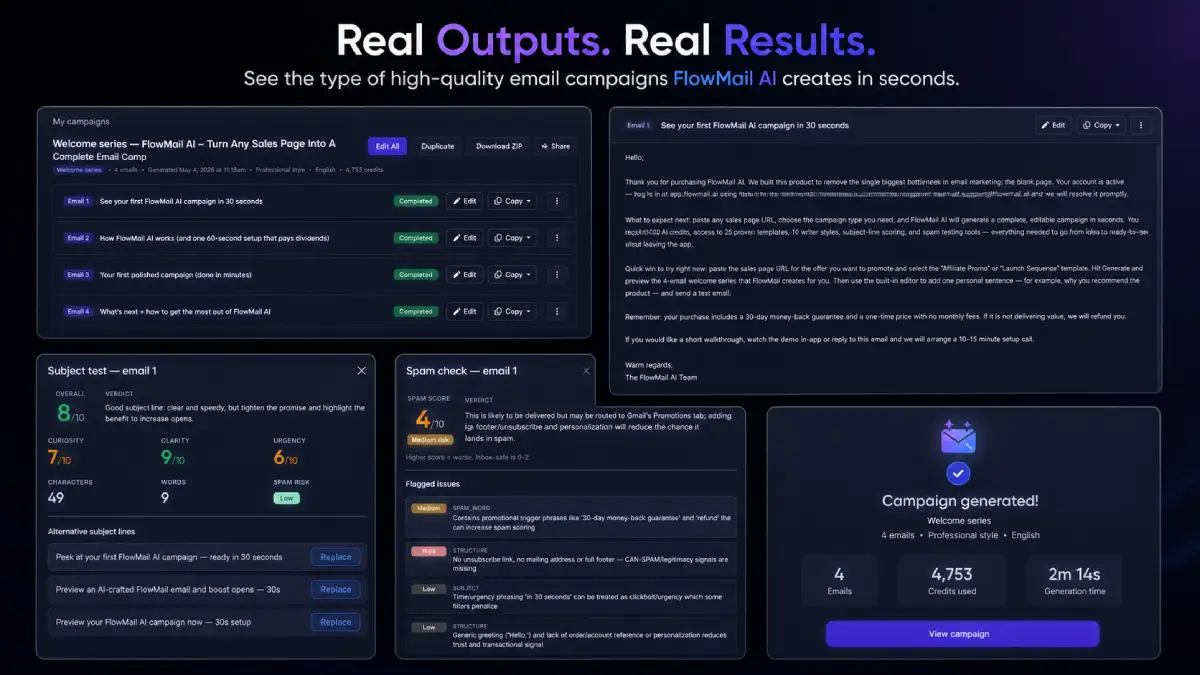
- Built-in editor: review, rewrite, refine, and prepare emails in the same workspace instead of jumping between a generator, document editor, and email tool.
- Subject line scoring: evaluate headline strength before sending so weak or unclear subject lines can be improved earlier in the process.
- Spam testing and deliverability checks: scan emails for potential issues that may increase spam risk or reduce inbox placement quality.
- Affiliate campaign builder: create promotional sequences for launches, webinars, limited-time offers, and partner products without manually extracting every feature from the vendor page.
- Welcome and follow-up sequences: generate messages for new subscribers, new buyers, post-purchase engagement, onboarding, and customer education.
- Lead nurturing automation content: build emails that keep prospects warm, explain the offer over time, and prepare leads for a later sales push.
- Beginner-friendly dashboard: keep the creation process simple for users who are not copywriters and do not want a technical campaign-building workflow.
- Time-saving production flow: reduce the hours usually spent collecting product points, outlining a campaign, drafting copy, rewriting subject lines, and checking emails before launch.
Pros & Cons (realistic)
Pros
- Strong match for affiliate promotions: the URL-based workflow is practical when you need to convert vendor pages into launch emails quickly.
- Sequences are more useful than one-off drafts: building a full campaign helps users think beyond a single broadcast and create a more complete sales path.
- Good for agencies and freelancers: campaign creation can become a service for clients who have offers but do not know how to write persuasive follow-up emails.
- Subject and spam tools add discipline: scoring and checks push users to review performance-related details before moving campaigns into an autoresponder.
- Beginner-friendly without being too narrow: templates and styles make the tool approachable while still covering multiple campaign categories.
Cons
- Email performance is not automatic: list quality, sender reputation, segmentation, and offer strength will still determine much of the result.
- AI copy needs human review: claims, testimonials, scarcity, pricing, compliance, and product details should be checked before sending.
- Export still requires another platform: FlowMail AI creates the campaign, but users still need an email service provider to send and automate it.
- Heavy users may need upgrades: frequent promoters, agencies, or list owners will likely want higher limits, more campaign types, or client-facing options.
My personal angle (how I’d use it)
- For an affiliate launch: I would paste the sales page, generate a multi-day promo, then rewrite the opening emails around my own experience, audience problems, and bonus angle.
- For a lead magnet funnel: I would create a welcome sequence that educates new subscribers first, then slowly introduces the paid offer instead of rushing every reader into a hard pitch.
- For client services: I would package campaign planning, AI-assisted copy, subject line testing, and autoresponder setup as a simple email launch service for local businesses, coaches, consultants, and online sellers.
- For split testing: I would use different copywriting styles to create alternate subject lines and email angles, then test which hook produces better opens, clicks, and replies.
Bonuses
FlowMail AI helps create the email assets, but the strongest campaign results usually come from the surrounding strategy: the promise, audience match, sending schedule, list segmentation, bonus positioning, proof, and follow-up plan. For the full Tool Review Central bonus list and delivery details, use the internal page below:
Bonus details
See what’s included and how delivery works after purchase.
Quick buying decision (what I’d pick)
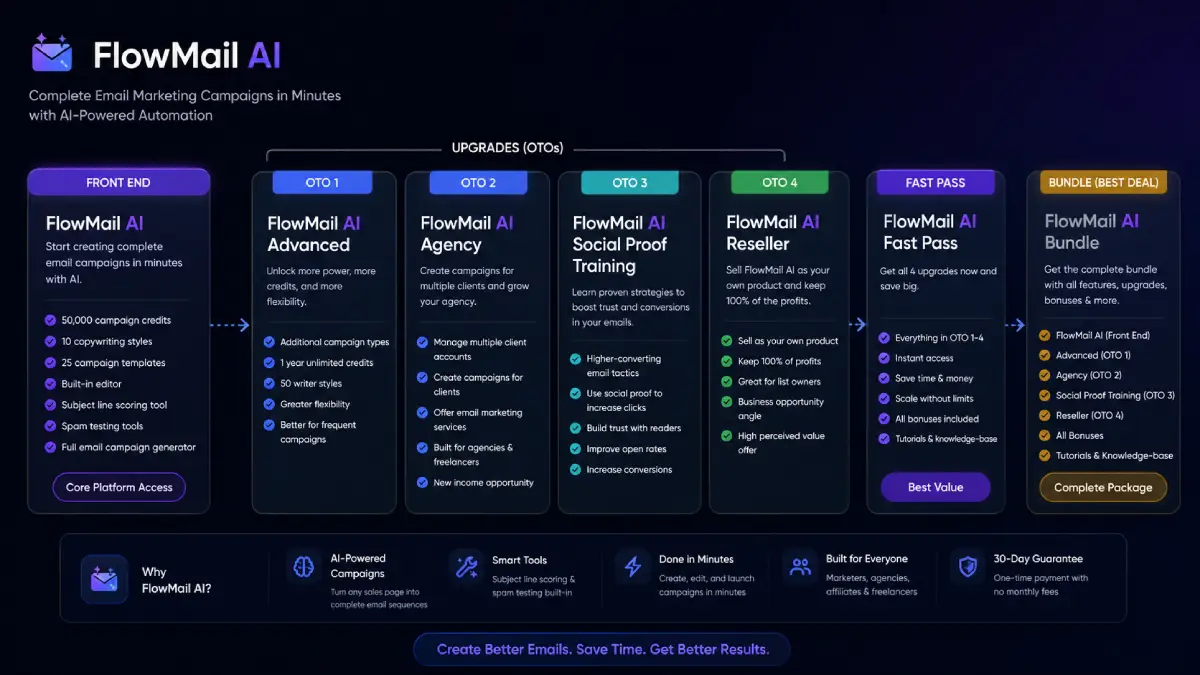
The FlowMail AI Bundle is the most complete path because it combines the front-end platform, Advanced, Agency, Social Proof Training, Reseller, all bonuses, tutorials, and knowledge-base access in one purchase. The Front-End is the simple entry point if you only want the core campaign generator with credits, templates, styles, subject scoring, editor, and spam checks. Advanced makes sense for users who send campaigns often and want more variety, higher output, and a year of unlimited credits. Agency is the practical move for freelancers or consultants who plan to create campaigns for clients. Social Proof Training is more education-focused, with an emphasis on trust-building and conversion improvements. Reseller is the business-opportunity route for users who want to sell FlowMail AI as their own product and keep the profits.
Pricing & funnel breakdown
| Offer | Price | Best for |
|---|---|---|
| Bundle — FlowMail AI Bundle | $297 | Best overall route for buyers who want the full FlowMail AI stack in one package. Includes FlowMail AI Front End, FlowMail AI Advanced, FlowMail AI Agency, FlowMail AI Social Proof Training, FlowMail AI Reseller, all bonuses, tutorials, and knowledge-base access. |
| Front-End — FlowMail AI | $47 | Main starting package for marketers, affiliates, agencies, and business owners who want to generate complete email campaigns in minutes. Includes 50,000 campaign credits, 10 copywriting styles, 25 campaign templates, built-in editor, subject line scoring, spam testing tools, and the full email campaign generator. |
| Upsell 1 — FlowMail AI Advanced | $97 | Built for frequent campaign creators who want more output, more campaign types, stronger variety, one year of unlimited credits, 50 writer styles, and greater flexibility for repeated promotions. |
| Upsell 2 — FlowMail AI Agency | $147 | Designed for agencies, freelancers, and consultants who want to manage multiple client accounts, create client campaigns, and turn email campaign production into a service offer. |
| Upsell 3 — FlowMail AI Social Proof Training | $97 | Training upgrade for users who want to improve email conversions with trust-building, social proof tactics, stronger credibility signals, better click-through intent, and more persuasive campaign structure. |
| Upsell 4 — FlowMail AI Reseller | $147 | Commercial upgrade for list owners, marketers, and business-opportunity buyers who want to sell FlowMail AI as their own product and keep 100% of the profits. |
Direct links (bundle first)
Open in a new tab. These are affiliate links.
FAQ
Is FlowMail AI an email sending platform?
No. FlowMail AI is primarily a campaign creation tool. It helps generate, edit, score, and check email copy, but you still use your preferred email marketing platform or autoresponder to send the campaign.
Can FlowMail AI create campaigns from a sales page?
Yes. One of its main workflows is pasting a product URL or sales page so the AI can analyze the offer and build a campaign around the product’s promise, benefits, audience, and promotion angle.
Who should consider Advanced, Agency, Social Proof Training, or Reseller?
Advanced is useful for frequent campaigns and higher output. Agency is best for client work. Social Proof Training helps users strengthen trust and conversion elements inside emails. Reseller is for people who want to sell FlowMail AI as their own product and keep the profits.
Do you have a bonus page?
Yes — bonus info is here: /flowmail-ai-bonus/.
About the reviewer

Samuel Marco
I publish hands-on reviews of AI software and online business tools, focusing on practical workflows, realistic business use cases, pricing clarity, upgrade paths, and whether a product can help users create assets faster, improve execution, or package a useful service around the tool.
Final verdict
FlowMail AI fits a very clear marketing workflow: take an offer, understand the selling points, build a sequence, polish the message, and prepare the campaign for sending. That makes it especially relevant for affiliate marketers, launch promoters, agencies, freelancers, coaches, digital sellers, and small businesses that need more email output without spending hours outlining every campaign manually. The most useful pieces are the product URL analysis, campaign templates, multi-email generation, copywriting styles, editor, subject line scoring, spam checks, and agency upgrade path. It will not fix a weak offer, an inactive list, poor deliverability, or a mismatch between audience and promotion. But when the offer is solid and the list is relevant, FlowMail AI can shorten the distance between product research and a usable sales sequence.
Want a faster way to create AI-assisted promo emails, affiliate campaigns, welcome sequences, webinar follow-ups, cart recovery messages, and lead nurturing content from one campaign-building workspace?
The Bundle gives the broadest setup. Front-End is the easiest starting point. Advanced expands output and styles, Agency supports client work, Social Proof Training adds conversion education, and Reseller opens the commercial selling angle.