What is CastAI?
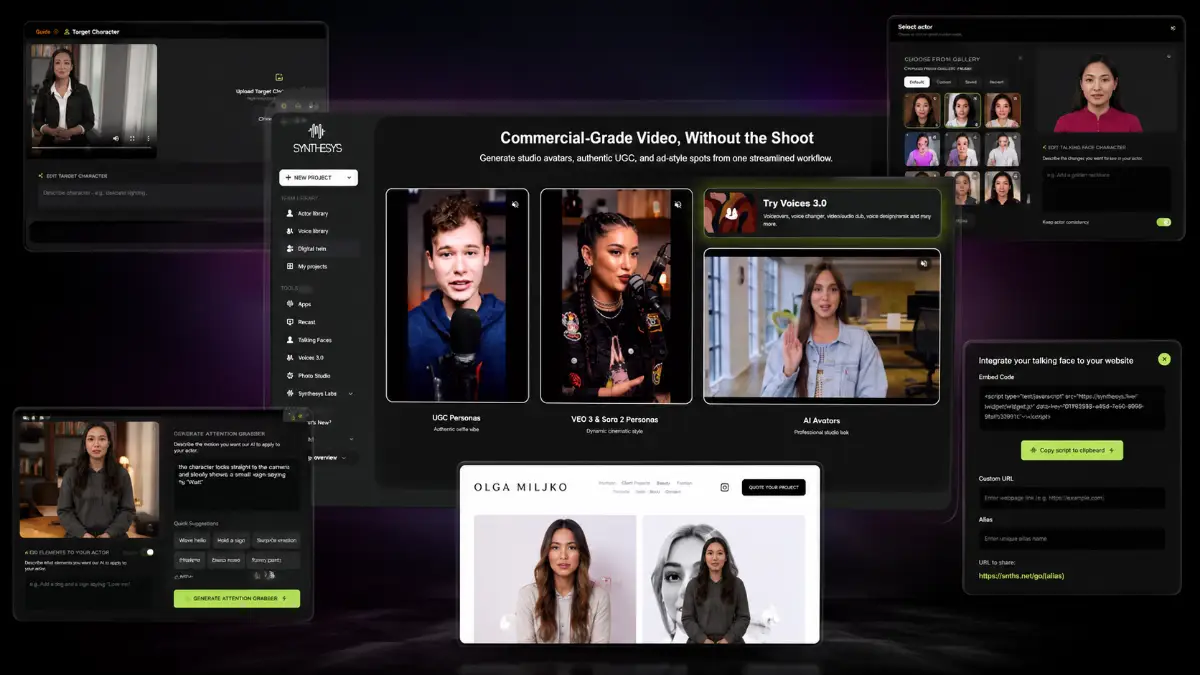
CastAI is an AI video persona creator for sales videos and website presenters. It lets you upload an existing talking-head video, change the presenter’s face, clothing, voice, objects, and script, then automatically sync the new speech to the person on screen.
The platform is built around two engines: ReCast and TalkingFaces. ReCast handles the video transformation work: face swap, outfit changes, voice cloning, script rewriting, object insertion, and lip-sync. TalkingFaces takes the finished presenter and places it on your website as an interactive overlay with attention grabbers and clickable buttons. That combination makes CastAI different from a normal AI avatar generator because the video can become an active sales element on the page, not just a file you upload somewhere.
How it works (4 simple steps)
- Step 1 — Upload your source video: Start with a talking-head clip in MP4, MOV, or WebM format. It can be your own recording, an AI avatar video, stock footage, or another compatible presenter-style clip.
- Step 2 — Rebuild the presenter: Use ReCast to change the face, outfit, voice, objects, and general look of the person in the video. You can also rewrite the message after recording and let CastAI re-sync the lips to the updated script.
- Step 3 — Publish the presenter on your site: Use TalkingFaces to generate an embed code and add the AI spokesperson to WordPress, Shopify, Wix, ClickFunnels, or a custom HTML page.
- Step 4 — Send visitors toward action: Add clickable CTA buttons that point to a checkout, booking form, product page, calendar, opt-in page, or any custom destination so the presenter can support conversions around the clock.
Who should buy CastAI — and who should skip it?
Buy CastAI if...
- You want video presenters on sales pages, bonus pages, booking pages, funnels, product pages, or client websites.
- You already use video but hate recording every new script, price change, niche angle, or client variation.
- You want to package AI spokesperson videos or TalkingFaces website overlays as a service.
- You care about clickable CTAs, not just exporting a video file.
Skip CastAI if...
- You only want static graphics, blog posts, or plain text content.
- You will never deploy videos on websites or landing pages.
- You expect AI to fix a weak offer, confusing page, or bad call to action by itself.
- You do not want to plan credits, scripts, page placement, or conversion flow.
My recommendation
For most buyers, start with the Full front-end because the TalkingFaces deployment layer is what makes the tool more than another video editor. Add upgrades only when your use case requires them.
See how CastAI works
Step-by-step walkthrough from my YouTube channel.

Key features that matter
CastAI stands out when you treat presenter video as a reusable asset. One recording can become a different spokesperson for a new campaign, a localized version for another audience, a branded clip for a client, or an on-site sales guide with its own button. That is the real workflow: transform the presenter, adjust the message, deploy it where buyers are already deciding.
- ReCast video transformation: upload an existing talking-head video and rebuild the presenter’s face, outfit, style, voice, and message without filming the scene again.
- Face and identity swap: replace the original person on screen while keeping natural movement and expression, making it easier to create multiple campaign variations from a single base clip.
- Outfit and style changes: adjust the presenter’s clothing and look so the same video can match different niches, brands, seasons, offers, or client industries.
- Script rewriting with lip-sync: edit the spoken message inside CastAI and let the AI synchronize the mouth movement to the new speech, which is useful when an offer, price, hook, or CTA changes.
- Voice cloning: keep a consistent voice across different presenter versions and updated scripts, with support for broader campaign and language needs.
- Object insertion: add products, logos, signs, promotional visuals, or branded elements directly into the video so the presenter can point attention toward the specific offer.
- AI Script Writer: paste a website URL and generate a sales-focused script that can become the starting message for your AI presenter.
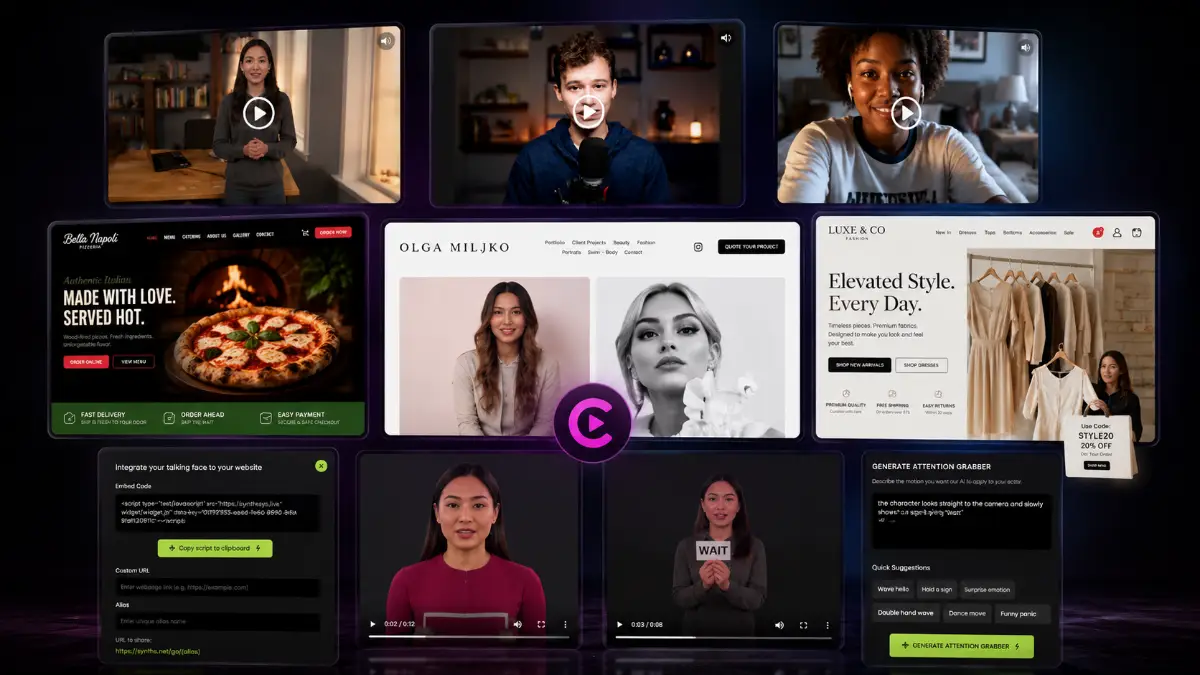
- TalkingFaces deployment: place your finished AI spokesperson on WordPress, Shopify, Wix, ClickFunnels, or a custom HTML site using a simple embed code.
- Clickable in-video CTAs: add buttons that send visitors to checkout pages, booking forms, product pages, opt-in pages, or any custom URL.
- Attention grabber intros: use animated entrance elements to make the presenter noticeable when visitors land on the page.
- Unlimited website deployments in Full: the Full front-end adds TalkingFaces and lets you place presenters across unlimited websites.
- Commercial license: the front-end includes commercial rights, so freelancers and agencies can create AI presenter videos or website spokespersons for clients.
- HD and translation path: CastAI Pro adds 1080p rendering plus translation with matched voice and native lip-sync for broader audience reach.
- Custom spokesperson path: Spokesperson Pro expands the presenter library and allows users to upload their own face or a client’s face for more personalized assets.
- Credit expansion options: users who create frequently can use the annual Credit Boost or one-time Credit Pack depending on volume and budget preference.
High-converting use cases
CastAI becomes more valuable when each presenter has a clear job. The best use is not “make a cool AI video.” The best use is “put the right message in front of the right visitor and point them to the next action.”
Affiliate bonus pages
Explain the offer, remind visitors about your bonus stack, and send them to the checkout link.
Local service pages
Use a friendly spokesperson to explain services, reduce hesitation, and push visitors toward booking.
Agency client packages
Sell monthly presenter updates, landing page spokespersons, and campaign-specific AI video assets.
Course funnels
Introduce the promise, explain what students get, and drive clicks toward enrollment.
SaaS product pages
Use short presenter clips to explain features, objections, and trial or demo CTAs.
E-commerce promotions
Add a seasonal product presenter that points to a discount, bundle, or limited-time offer.
Real estate pages
Create property, agent, or neighborhood presenters that invite visitors to book a viewing.
Coaching & consulting
Build trust faster with a human-style intro that drives visitors toward a strategy call.
Recruiting pages
Explain the role, company culture, and application CTA with a personal-feeling video guide.
Pros & Cons (realistic)
Pros
- Strong sales-page use case: TalkingFaces turns a video into an on-page presenter with CTAs instead of leaving it as a passive media file.
- Good reuse potential: ReCast can turn one source recording into several angles, looks, scripts, and audience-specific versions.
- Useful for client work: commercial rights, website deployment, custom faces, and presenter libraries make it easy to package as a service.
- Script changes are practical: automatic lip-sync after rewriting the message can save a lot of reshoot time when offers change.
- Clear upgrade logic: Pro improves quality and translation, while Spokesperson Pro expands presenter customization.
Cons
- Source footage still matters: a weak, awkward, or low-quality base video will limit the final result.
- Credits need planning: frequent testing, client work, and multilingual versions can consume credits quickly.
- Full value depends on deployment: users who only export videos may miss the bigger benefit of the TalkingFaces website layer.
- AI presenters need tasteful use: aggressive popups or unclear CTAs can hurt trust if the page experience is poorly designed.
My personal angle (how I’d use it)
- For affiliate pages: I would create a short presenter that introduces the offer, explains the bonus angle, and points visitors toward the main CTA without forcing them to watch a full embedded video.
- For local businesses: I would build simple website greeters for booking pages, service pages, special offers, and FAQ sections where a human-style explanation can reduce hesitation.
- For agencies: I would sell monthly presenter updates: one recorded concept, several industry variations, new scripts when promotions change, and TalkingFaces deployment on client websites.
- For course or SaaS funnels: I would test different spokesperson looks, hook scripts, button destinations, and page placements to see which presenter supports the best conversion behavior.
See the complete bonus list before you buy
The bonus page explains the complete package. The main CastAI link is where you purchase first, then you can follow the bonus instructions.
Quick buying decision (what I’d pick)
The Front-End Full is the most sensible starting point if you want the actual website-presenter angle, because TalkingFaces is what turns CastAI from a video editor into an on-page sales assistant. I would consider CastAI Pro if 1080p quality and multilingual campaigns matter. Spokesperson Pro is the upgrade I would look at for agency work, client faces, and a broader spokesperson library. The Credit Pack is mainly for users who already know they will produce a larger batch of videos and want non-expiring credits.
Questions smart buyers ask before clicking buy
Will AI presenters look believable?
The final result still depends on the source footage, script, and page context. CastAI helps with the transformation, but you should start with a clean talking-head clip and use short, specific scripts.
Do credits matter?
Yes. Testing scripts, creating client versions, translating videos, and rendering multiple angles can use credits quickly. Buy extra credits only if your production plan justifies them.
Is this useful without TalkingFaces?
Yes for exporting presenter videos, but the conversion advantage is stronger when TalkingFaces puts the presenter directly on the page with clickable CTAs.
Can agencies sell this?
Yes. The commercial license and upgrade path make it suitable for client-facing services such as spokesperson videos, website greeters, and landing page presenters.
Pricing & funnel breakdown
Which CastAI option should you choose?
Most buyers
Choose Front-End Full. It gives you the practical website-presenter workflow, not just video transformation.
Higher quality / languages
Add CastAI Pro when 1080p output, translation, matched voice, and native lip-sync are important.
Agency / client work
Add Spokesperson Pro when you want more presenters, custom faces, or client-specific spokesperson assets.
High-volume production
Add credits only if you already plan to render many versions, languages, tests, or client videos.
| Offer | Price | Best for |
|---|---|---|
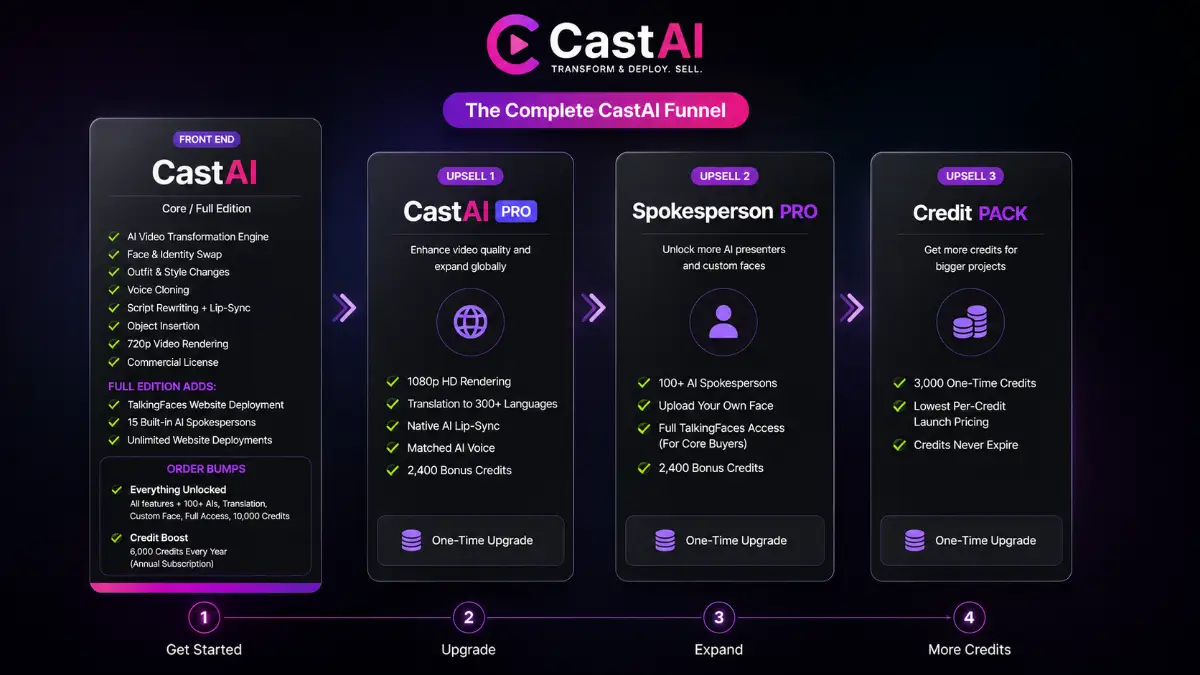
| Front-End — CastAI Core / Full | $22-$24 | Main entry offer for users who want AI presenter video creation. Core includes the AI video transformation engine, face and identity swap, outfit and style changes, voice cloning, script rewriting with automatic lip-sync, object insertion, 720p rendering, and commercial license. Full adds TalkingFaces website deployment, 15 built-in AI spokespersons, and unlimited website deployments. |
| Order Bump 1 — Everything Unlocked | $197 | For buyers who want the complete CastAI platform in one purchase. Includes premium features, 100+ AI spokespersons, translation support, upload-your-own-face capability, full TalkingFaces access, and 10,000 bonus credits. |
| Order Bump 2 — Credit Boost | $147/year | For regular creators who want predictable annual usage. Adds 6,000 new credits every year, which helps users avoid running out of credits during ongoing video production. |
| Upsell 1 — CastAI Pro | $67 | For users who want higher quality and broader language reach. Includes 1080p HD rendering, translation to 300+ languages, native AI lip-sync, matched AI voice, and 2,400 bonus credits. |
| Upsell 2 — Spokesperson Pro | $67 | For agencies, brands, and businesses that need more presenter options. Includes 100+ AI spokespersons, upload-your-own-face capability, full TalkingFaces access for Core buyers, and 2,400 bonus credits. |
| Upsell 3 — Credit Pack | $147 | For users who need more one-time production capacity without another subscription. Includes 3,000 non-expiring credits at the lowest per-credit launch pricing. |
Direct links (front end first)
Open in a new tab. These are affiliate links.
CastAI vs normal AI avatar tools
Most AI avatar tools focus on creating a video file. CastAI is more conversion-focused because it combines video transformation with website deployment and clickable CTAs.
| Feature | Standard AI Avatar Tool | CastAI |
|---|---|---|
| Starting Point | Create a new AI avatar or scene from scratch. | Transform an existing talking-head video into multiple new versions. |
| Website Presenter | Usually embedded as a passive video with no interaction. | Interactive TalkingFaces presenter with clickable CTA buttons. |
| Updating Scripts | Often requires generating an entirely new video. | Rewrite the script and automatically re-sync the lips. |
| Customization | Limited avatar templates and branding options. | Change faces, outfits, voices, objects, and messaging from one source video. |
| Commercial Use | Depends on the platform and subscription plan. | Commercial license included with the front-end. |
| Best For | General explainer videos and presentations. | Sales pages, landing pages, agencies, affiliate marketing, SaaS, and conversion-focused websites. |
FAQ
Is CastAI mainly for creating videos or adding presenters to websites?
It does both. ReCast is used to transform presenter videos, while TalkingFaces is used to deploy the finished AI spokesperson on a website with an embed code and clickable call-to-action buttons.
Can CastAI change the script after a video has already been recorded?
Yes. You can rewrite the script inside CastAI, and the platform automatically synchronizes the presenter’s lip movements with the updated speech.
Which upgrade makes the most sense for agencies?
Spokesperson Pro is the most relevant agency upgrade because it adds 100+ AI spokespersons, upload-your-own-face capability, full TalkingFaces access for Core buyers, and extra credits. CastAI Pro is also useful when agencies need HD output or multilingual versions.
Do you have a bonus page?
Yes — bonus info is here: /castai-bonus/.
Does CastAI include commercial rights?
Yes, the front-end includes a commercial license, which is important if you plan to create AI presenter videos or website spokesperson assets for clients.
Which front-end should I choose?
For most users, the Full front-end is the stronger choice because it includes the TalkingFaces website deployment layer. Core is more limited if your goal is on-page conversion.
Is CastAI good for affiliate marketers?
Yes. It is especially useful for bonus pages, product review pages, launch pages, and bridge pages where a short presenter can explain the offer and point visitors to the buy button.
Can I use CastAI for local business clients?
Yes. Good client use cases include appointment booking pages, service pages, product promos, lead-gen funnels, and FAQ pages where a human-style explanation can reduce hesitation.
Do I need video editing experience?
You do not need advanced editing experience, but you should still think like a marketer: keep scripts short, make the CTA clear, and test the presenter placement on the page.
What is the biggest mistake to avoid?
The biggest mistake is creating an AI presenter without a clear job. Every video should have one purpose: explain the offer, handle one objection, introduce a bonus, or send the visitor to one action.
Should I buy extra credits immediately?
Only buy extra credits immediately if you already know you will create many videos, translations, tests, or client assets. Otherwise, start with the main offer and upgrade when usage proves the need.
About the reviewer

Samuel Marco
I publish practical reviews of AI software and online business tools, focusing on real workflows, buyer use cases, monetization potential, pricing decisions, and whether a tool can realistically help someone save time, increase output, or package a service around it.
Final verdict
CastAI is best understood as a sales-video multiplier. If you already know that a human-style message would help your pages convert, CastAI gives you a faster way to create variations, update scripts, personalize presenters, and deploy them directly where visitors make decisions. The strongest combination is ReCast for transformation plus TalkingFaces for on-page action. It will not fix a weak offer or unclear funnel by itself, but with a focused script and a clear CTA, it can remove a major production bottleneck for affiliates, agencies, creators, SaaS owners, and local businesses.
Want AI presenters that can speak on your videos and your website?
The Front-End gives you the core CastAI platform, presenter transformation tools, commercial rights, and the option to use TalkingFaces in the Full edition. CastAI Pro adds 1080p rendering and multilingual translation. Spokesperson Pro expands the spokesperson library and custom face options. Credit Pack is the practical add-on for higher-volume production.