What is BrowserAgent?
BrowserAgent is a cloud-based AI browser agent built to complete real online tasks. Instead of producing only text instructions, it opens a browser session, visits websites, clicks buttons, types into fields, scrolls through pages, gathers data, and completes routine web actions from a plain-English request.
The platform is designed for users who want automation without building scripts, connecting APIs, or configuring technical workflows. You can start from your own task description or choose from hundreds of pre-built missions for lead generation, social media, competitor research, eCommerce research, job searches, data collection, content work, and form submissions.
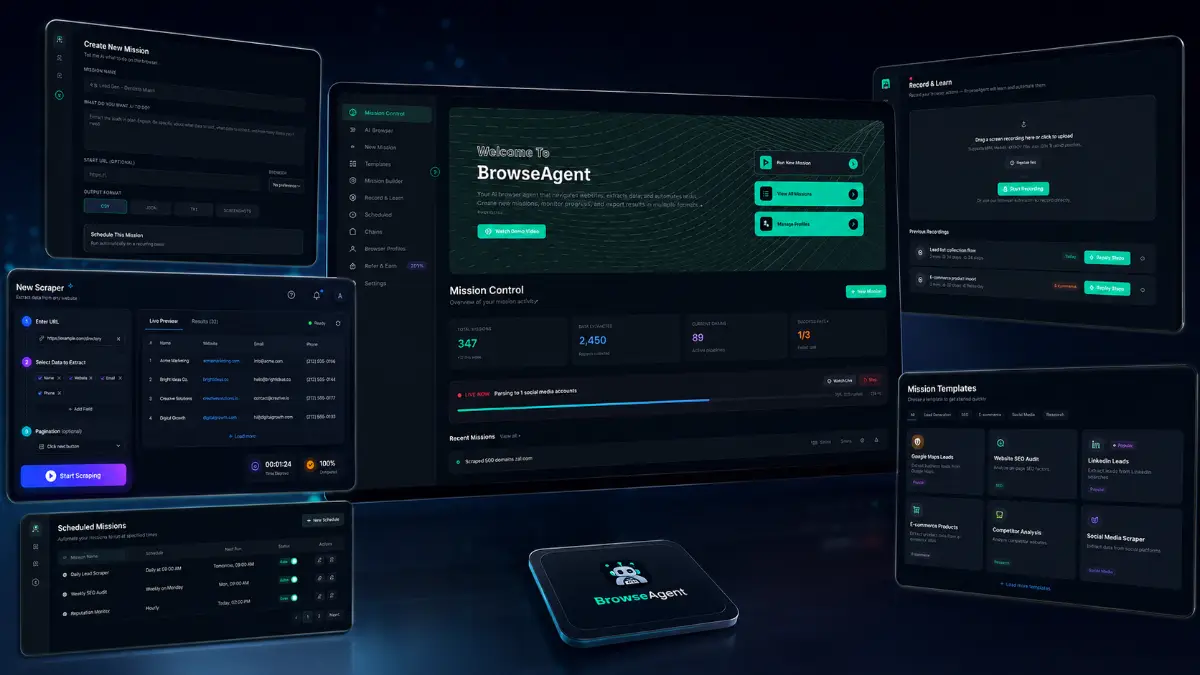
How it works (4 simple steps)
- Step 1 — Enter your task: Describe the job in plain English, such as finding leads, researching competitors, collecting product data, filling forms, or launching one of the ready-made missions.
- Step 2 — Let the AI operate the browser: BrowserAgent opens its cloud browser and performs the task by navigating pages, clicking buttons, typing text, scrolling, and gathering the required information.
- Step 3 — Watch the process live: Use the live browser view to see each action as it happens, check progress, and verify that the mission is moving through the right workflow.
- Step 4 — Receive and reuse the results: Review organized reports, spreadsheets, documents, or Google Sheets exports, then repeat the same task manually or schedule it to run automatically.
See how BrowserAgent works
Step-by-step walkthrough from my YouTube channel.

Key features that matter
BrowserAgent becomes interesting when you treat it as an online operations tool. It can take a repeatable browser process, run it through a cloud session, show the actions live, save the outcome, and turn the collected information into formats that are easier to review or hand off.
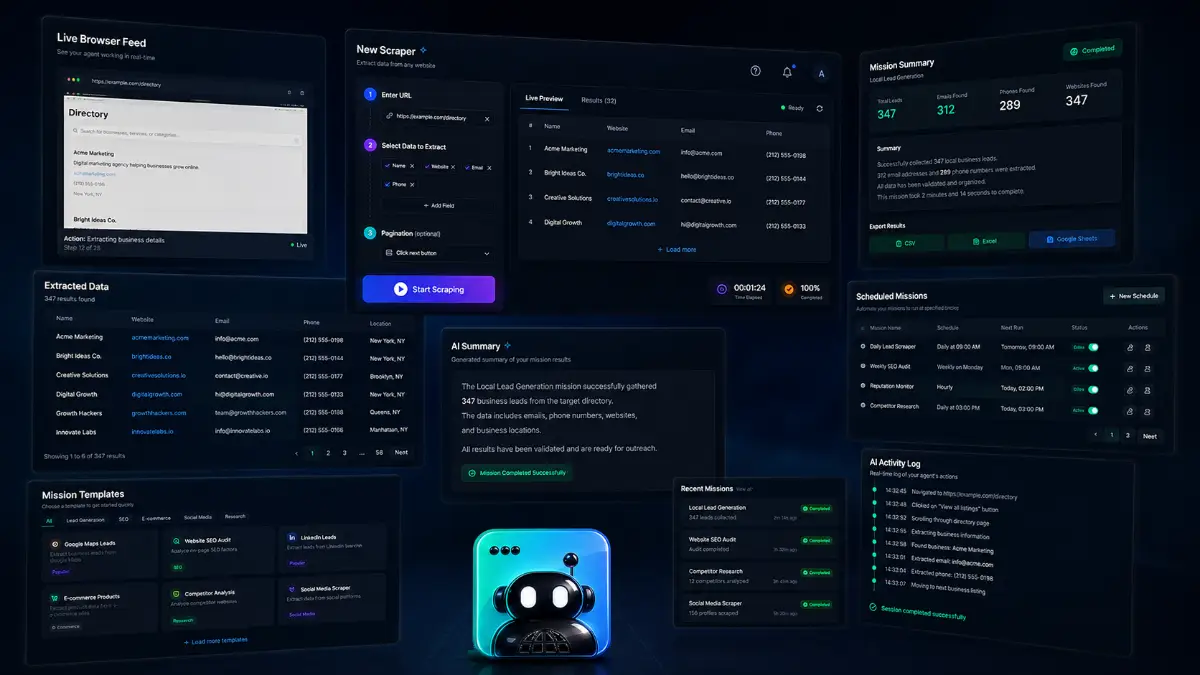
- Real browser automation: BrowserAgent uses a real cloud-based Chromium browser to visit sites, click, type, scroll, fill forms, and complete online actions.
- Plain-English task instructions: users can describe what they want done without writing code, building prompts from scratch, or connecting technical APIs.
- 500+ ready-made missions: launch pre-built workflows for lead generation, social media, competitor research, eCommerce, content tasks, job searches, data collection, and form submissions.
- Live task monitoring: watch the AI work in real time through a live screen, making the automation visible instead of hidden in the background.
- Cloud-based execution: tasks run on remote infrastructure, so users can start a mission and continue with other work while the browser agent keeps going.
- Automated scheduling: run important tasks hourly, daily, or weekly to keep recurring research, scraping, and outreach workflows moving.
- Multi-task processing: run several jobs at the same time for larger research projects, lead generation campaigns, or recurring business processes.
- Secure login management: save website credentials with encrypted storage and assign logins to specific missions when account access is needed.
- AI-powered data summaries: turn collected information into readable summaries so the user can identify trends and opportunities faster.
- Spreadsheet and document exports: export completed results to CSV, Excel, Google Sheets, documents, and other usable formats.
- Task recording and replays: review previous task runs, verify what happened, or share proof of work with clients and team members.
- Beginner-friendly setup: onboarding, training, and mission templates help non-technical users start without learning browser automation software.
- RepeatEngine scheduler: build recurring workflows so the same online task can run again without manually restarting the process every time.
- Browser Profile Manager: organize browser profiles and saved sessions for different websites, clients, or workflows.
- Smart Results summaries: let the AI clean up raw findings into easier-to-read outputs for decision-making or client reporting.
- Commercial rights: use BrowserAgent-powered workflows as part of client services, research packages, lead generation offers, or recurring retainers.
- Agency upgrade path: higher offers add client accounts, white-label dashboards, branded reports, workflow chains, and larger-scale automation.
Pros & Cons (realistic)
Pros
- Automates actual browser actions: it can interact with websites rather than only giving instructions or generating copy.
- Strong for repetitive research: lead lists, competitor checks, product research, form work, and routine data collection are natural use cases.
- Live visibility builds trust: being able to watch the task helps users catch issues and understand what the AI is doing.
- Useful export options: spreadsheets, documents, Google Sheets, summaries, and recordings make results easier to use outside the platform.
- Agency potential is clear: client reports, recurring missions, commercial rights, and automation retainers fit well together.
Cons
- Websites can change: automation may need review when a website updates its layout, blocks access, or adds unexpected steps.
- Instructions affect output quality: vague requests can produce vague results, so important missions should be described carefully.
- Compliance still matters: users should respect website terms, privacy rules, platform policies, and ethical data collection practices.
- Heavy users may need upgrades: agencies and power users will likely compare the front end with ChainBuilder Pro, Agency Pro, and Unlimited Ghost.
My personal angle (how I’d use it)
- For lead research: I would create a narrow mission first, collect a smaller sample, check the quality, then scale only after the export looks clean.
- For agency demos: I would record a task replay and use it as proof that the automation can handle a real client workflow.
- For recurring monitoring: I would schedule weekly competitor checks, marketplace scans, or local business research instead of repeating the same browsing routine manually.
- For client retainers: I would package missions around clear deliverables: lead lists, research reports, spreadsheet updates, outreach prep, or weekly opportunity summaries.
Bonuses
BrowserAgent is easier to monetize when the automation is connected to a simple business process: choose a mission, define the target, run a controlled test, export the results, summarize the findings, and repeat the workflow for yourself or for clients. For the full Tool Review Central bonus list and delivery details, use the internal page below:
Bonus details
See what’s included and how delivery works after purchase.
Quick buying decision (what I’d pick)
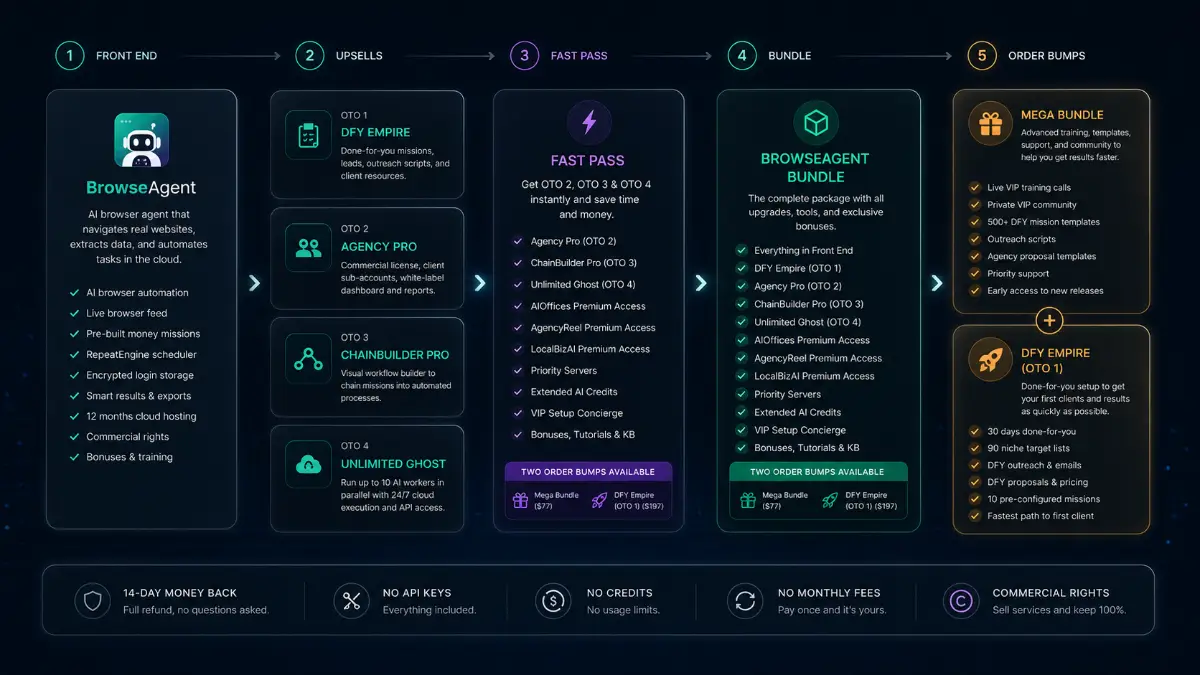
If I wanted the broadest practical setup, I would check the BrowserAgent Bundle first because it combines the core platform with Agency Pro, ChainBuilder Pro, Unlimited Ghost, premium access to related agency tools, priority servers, extended AI credits, VIP setup support, bonuses, tutorials, and knowledge-base access. The Front-End is the cleanest starting point for real browser automation, live browser feeds, pre-built missions, scheduling, encrypted logins, exports, hosting, and commercial rights. DFY Empire is the shortcut for users who want missions, outreach assets, target lists, and client materials prepared for them. Agency Pro is the better fit for client service delivery, ChainBuilder Pro is for multi-step workflow automation, and Unlimited Ghost is for higher-scale parallel execution. The Fast Pass unlocks OTO2 through OTO4 together, while the Mega Bundle adds coaching, templates, client assets, community access, priority support, and early releases.
Pricing & funnel breakdown
| Offer | Price | Best for |
|---|---|---|
| Bundle — BrowserAgent Bundle | $267 | Best overall route for buyers who want the main platform and key upgrade stack together. Includes BrowserAgent Standard, Agency Pro, ChainBuilder Pro, Unlimited Ghost, AIOffices Premium Access, AgencyReel Premium Access, LocalBizAI Premium Access, priority servers, extended AI credits, VIP setup concierge support, all bonuses, tutorials, and knowledge-base access. Coupon noted by vendor: BROWSER for $50 off the bundle. |
| Mega Bundle — BrowserAgent Mega Bundle | $77 | Optional value package with live VIP coaching sessions and replays, private community access, hundreds of done-for-you mission templates, client outreach materials, agency proposal templates, priority support, and early access to future releases. |
| Front-End — BrowserAgent | $37 | Main software for AI browser automation inside a real Chromium browser. Includes live browser feed, pre-built money-making missions, RepeatEngine task scheduler, Browser Profile Manager, AES-256 encrypted login storage, Smart Results summaries, CSV, Excel, and Google Sheets exports, 12 months cloud hosting, commercial rights, fast-start training, and business bonuses. |
| Fast Pass — BrowserAgent Fast Pass | $230 | One-purchase access to OTO2, OTO3, and OTO4. Useful for buyers who want Agency Pro, ChainBuilder Pro, and Unlimited Ghost together, plus related premium access, priority servers, extended AI credits, VIP setup support, bonuses, tutorials, and knowledge-base access. |
| Upsell 1 — BrowserAgent DFY Empire | $197 | Done-for-you package for users who want the fastest path to action. Includes the first 30 days built for you, 90 niche-specific target lists, DFY outreach scripts, email sequences, client proposals, pricing templates, 10 pre-configured client missions, and a reduced learning curve. |
| Upsell 2 — BrowserAgent Agency Pro | $97 | For freelancers and agencies selling BrowserAgent-powered services. Includes full commercial license, 25 client sub-accounts, white-label dashboard, custom agency branding, separate client workspaces, branded reports, client management tools, and support for monthly retainer services. |
| Upsell 3 — BrowserAgent ChainBuilder Pro | $67 | For users who want advanced workflow automation. Includes visual drag-and-drop builder, workflow automation, 100 DFY workflow chains, mission chaining, automated lead generation sequences, multi-step processes, end-to-end automation, and reduced manual intervention. |
| Upsell 4 — BrowserAgent Unlimited Ghost | $147 | For power users, agencies, and businesses needing larger-scale automation. Includes 10 simultaneous AI workers, parallel mission execution, 24/7 cloud operation, Ghost Mode stealth scraping, access to difficult websites, full API access, custom integrations, enterprise-level automation, and maximum scalability. |
Direct links (bundle first)
Open in a new tab. These are affiliate links.
FAQ
Is BrowserAgent just another AI chatbot?
No. BrowserAgent is focused on browser execution. It can open websites, click, type, scroll, fill forms, gather data, monitor tasks live, schedule recurring runs, and export results instead of only giving written instructions.
Can beginners use BrowserAgent without coding?
Yes. The workflow is built around plain-English task descriptions and ready-made missions. Users do not need to write scripts or configure API connections to start browser automation tasks.
Which upgrades are most relevant for agencies?
Agency Pro is the main client-service upgrade because it adds client sub-accounts, white-label dashboard features, branding, reports, and client workspaces. ChainBuilder Pro is useful for connecting missions into larger workflows, while Unlimited Ghost is for parallel execution and larger-scale automation.
Do you have a bonus page?
Yes — bonus info is here: /browseragent-bonus/.
About the reviewer

Samuel Marco
I publish practical reviews of AI software and online business tools, focusing on real workflows, buyer use cases, monetization potential, pricing decisions, and whether a tool can realistically help someone save time, increase output, or package a service around it.
Final verdict
BrowserAgent is built for a different kind of AI productivity: not just drafting content, but completing the browser-based work around research, lead generation, form activity, data collection, scheduled monitoring, and client deliverables. It combines real cloud browser automation, plain-English task instructions, 500+ ready-made missions, live task monitoring, cloud execution, automated scheduling, multi-task processing, encrypted login management, AI summaries, spreadsheet and document exports, task recordings, commercial rights, and agency-focused upgrade paths. The limitation is that browser automation still needs sensible instructions, human review, and respect for website rules. For agencies, affiliates, marketers, researchers, eCommerce operators, and service providers who repeatedly do the same online tasks, BrowserAgent has a clear practical use case.
Want an AI browser agent that can visit websites, click buttons, fill forms, collect data, schedule tasks, and export the results for you?
The Bundle gives the widest setup. Front-End is the easiest starting point. DFY Empire helps with prepared missions and client assets, Agency Pro supports service delivery, ChainBuilder Pro connects workflows, Unlimited Ghost raises automation scale, Fast Pass unlocks the main premium upgrades together, and Mega Bundle adds coaching, community, templates, outreach resources, and priority support.