Adastra Studio AI review: the quick answer
Adastra Studio AI is a sales-video production platform built around one very practical shortcut: give it a product page, and let AI turn that source material into a finished promotional video. Instead of starting with a blank timeline, you begin with a URL, a chat prompt, or your own copy. The system handles the first pass of product analysis, direct-response scripting, visuals, voiceover, music, and assembly, then gives you room to create alternate hooks, angles, formats, and calls to action. That makes it especially relevant to affiliates, vendors, ecommerce sellers, agencies, and marketers who publish promotional video frequently.
Sales videos become expensive when every campaign starts from zero
A single promotional video can involve product research, copywriting, storyboard planning, voice recording, asset sourcing, editing, resizing, and revision. That process is manageable for one flagship campaign. It becomes a bottleneck when an affiliate has several launches, an ecommerce seller rotates offers, or an agency needs multiple versions for several clients.
Typical production friction
- Someone has to extract the strongest selling points before scripting begins.
- Each new hook or angle can trigger another round of writing and editing.
- Voiceovers, visuals, music, captions, and aspect ratios add separate production steps.
- High creative volume can make outsourced video costs difficult to sustain.
Adastra Studio AI approach
- Paste a product page or supply your own source content.
- Let AI draft the sales narrative, scenes, voiceover, and supporting media.
- Create alternate hooks, tones, calls to action, and video styles from the same project.
- Export for YouTube, social feeds, ads, sales pages, or client delivery.
Where Adastra Studio AI can save the most time
Launch creative while the offer is still fresh
What changes: a product page can become the raw material for a full sales video instead of just a research reference. Business value: affiliates and vendors can move faster during short promotional windows. Best for: launch campaigns and fast-moving offers.
Produce more angles without rebuilding everything
What changes: hooks, emotional tone, calls to action, and script length can be varied from the same core project. Business value: more creative options for testing without multiplying production work. Best for: paid ads and conversion testing.
Create on-camera style content without filming
What changes: AI presenters and faceless scenes remove the need to record every promotion personally. Business value: campaigns can stay active even when filming time, equipment, or talent is limited. Best for: anonymous brands, agencies, and busy operators.
Repurpose one idea across several channels
What changes: landscape, square, and vertical outputs support multiple publishing environments. Business value: one campaign concept can be adapted for YouTube, Meta, Instagram, TikTok, and landing pages. Best for: omnichannel promotion.
How Adastra Studio AI turns an offer into a finished sales video
Provide the source
Paste a product URL, describe the campaign through the built-in AI assistant, or supply your own content and direction.
Generate the first creative
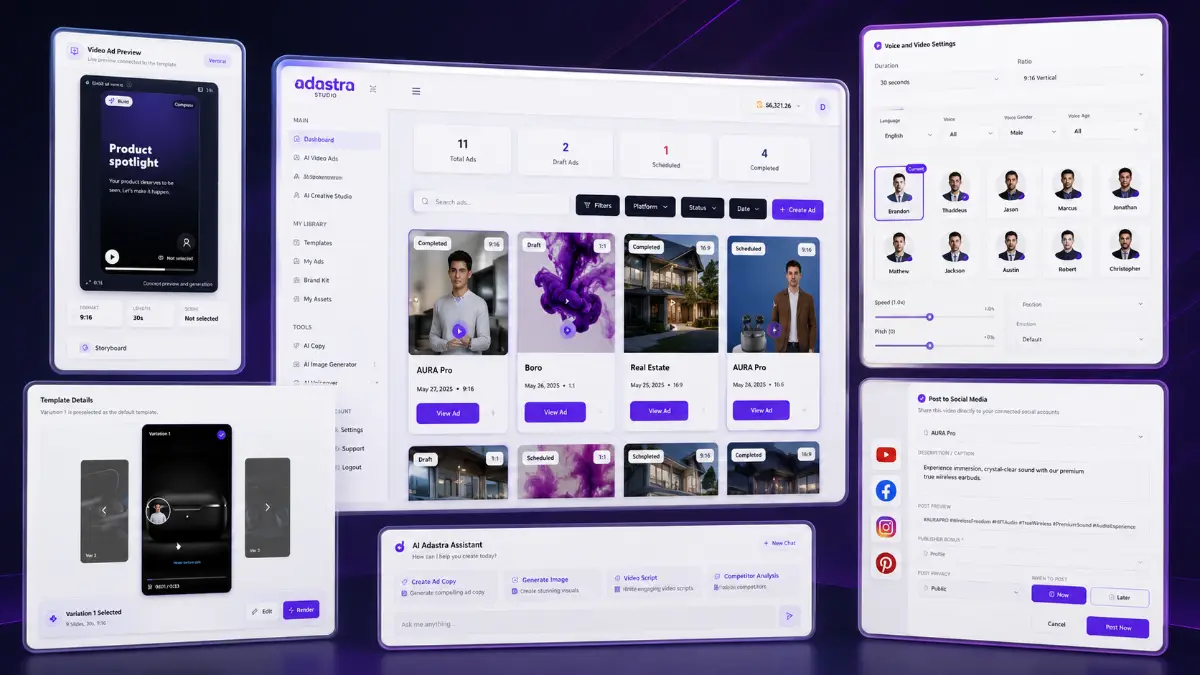
The platform analyzes the source, writes a direct-response script, creates matching scenes, adds voiceover and music, and assembles the video.
Refine the angle
Adjust the hook, emotional tone, call to action, presenter style, scene approach, or script length to create stronger variations.
Export for the channel
Render in landscape, square, or vertical format and publish to social platforms, ads, sales pages, affiliate campaigns, or client projects.
Watch the Adastra Studio AI demo
The walkthrough covers the link-to-video workflow, AI-generated sales creatives, core features, pricing structure, Bundle, and upgrade paths.

The Adastra Studio AI features with the biggest marketing impact
AI Link-to-Video Engine
Paste a product page and the system uses that source to identify selling points, shape the script, create scenes, add voice, and assemble a promotional video. It is the feature that most directly reduces production setup.
Best for fast launchesFlexible content inputs
You are not locked into URL-based creation. The built-in assistant and custom-content options make it possible to produce videos for services, local businesses, original products, or campaigns without a conventional sales page.
Best for broader campaignsDirect-response script generation
The AI creates scripts around hooks, benefits, persuasion, and calls to action rather than treating the video as a generic slideshow. That orientation is important for affiliates and performance marketers.
Best for conversion creativeSix promotional video types
Review videos, launch promotions, demos, bonus reveals, social content, and paid-ad creatives can be produced from the same platform, giving one offer several campaign formats.
Best for campaign varietySpy & Clone Engine
The research component is designed to surface successful advertising patterns and useful angles that can inspire new creatives. It is more valuable when used for structured research than blind imitation.
Best for creative researchPresenters, faceless scenes, and multilingual voice
AI presenters, faceless visual sequences, generated scenes, and voices in 20+ languages make it easier to create campaigns without filming or recording every variation manually.
Best for scalable production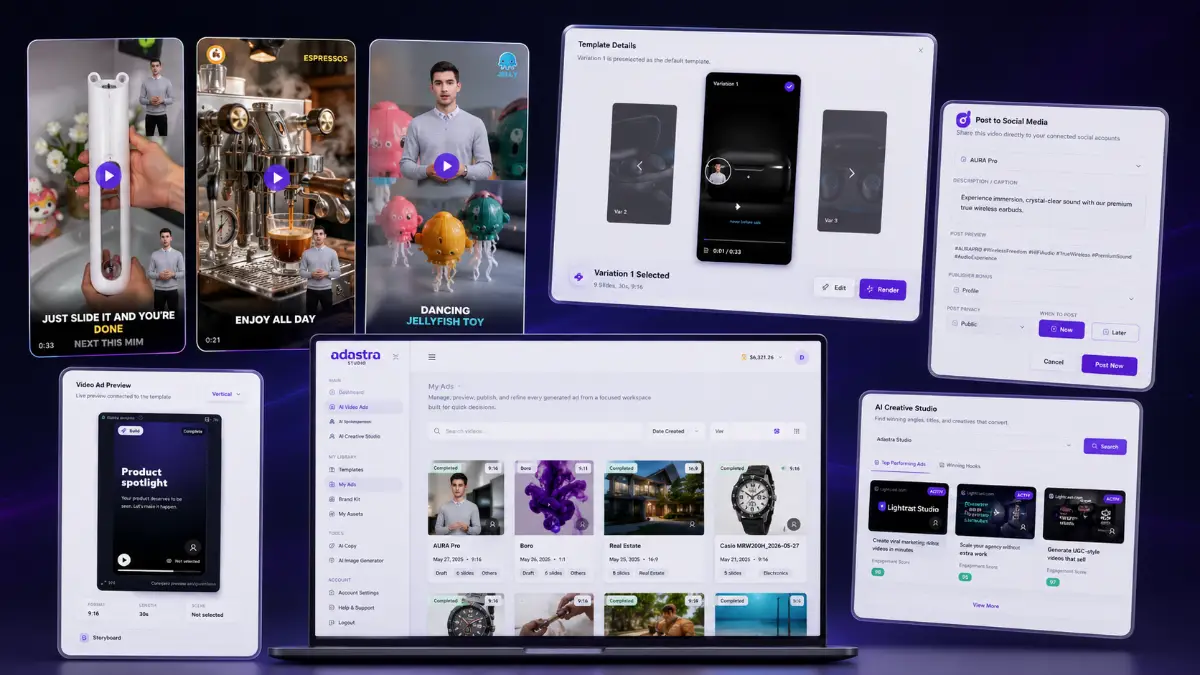
Four Adastra Studio AI use cases that make commercial sense
Affiliate launch videos
Turn a vendor page into a review-style or launch-promotion video quickly, then create alternate hooks for email traffic, YouTube, social posts, or bonus campaigns.
Ecommerce product creatives
Use a product listing as the source for short promotional videos in several aspect ratios, then test different benefits, angles, and calls to action.
Client video packages
Create promotional assets for local businesses, coaches, consultants, or online sellers and charge for campaign setup, creative production, or ongoing content delivery.
Paid-ad variation testing
Generate multiple versions around different hooks, emotional frames, and CTAs so media buyers have more creative combinations to test against the same offer.
Who Adastra Studio AI suits—and who may not need it
Affiliates promoting frequent offers
You regularly cover launches or evergreen products and need review videos, bonus creatives, demos, and social variations without rebuilding each asset manually.
Ecommerce sellers and product marketers
You want to turn product information into multiple video formats and test fresh creative angles across paid and organic channels.
Freelancers and agencies
You plan to sell video-production services and value commercial rights, faster turnaround, reusable templates, automation, and client-management upgrades.
Occasional video creators
If you publish only a few videos per year and already have a comfortable manual workflow, the speed advantage may not justify another platform.
Brands requiring bespoke cinema-level production
AI-assisted assembly is optimized for speed and marketing output, not highly customized commercial shoots with unique sets, actors, and complex post-production.
Regulated or claim-sensitive advertisers
Generated scripts and visuals must be reviewed carefully when compliance, substantiation, endorsements, or platform advertising rules are strict.
Adastra Studio AI pricing: Front End, Bundle, and OTOs explained
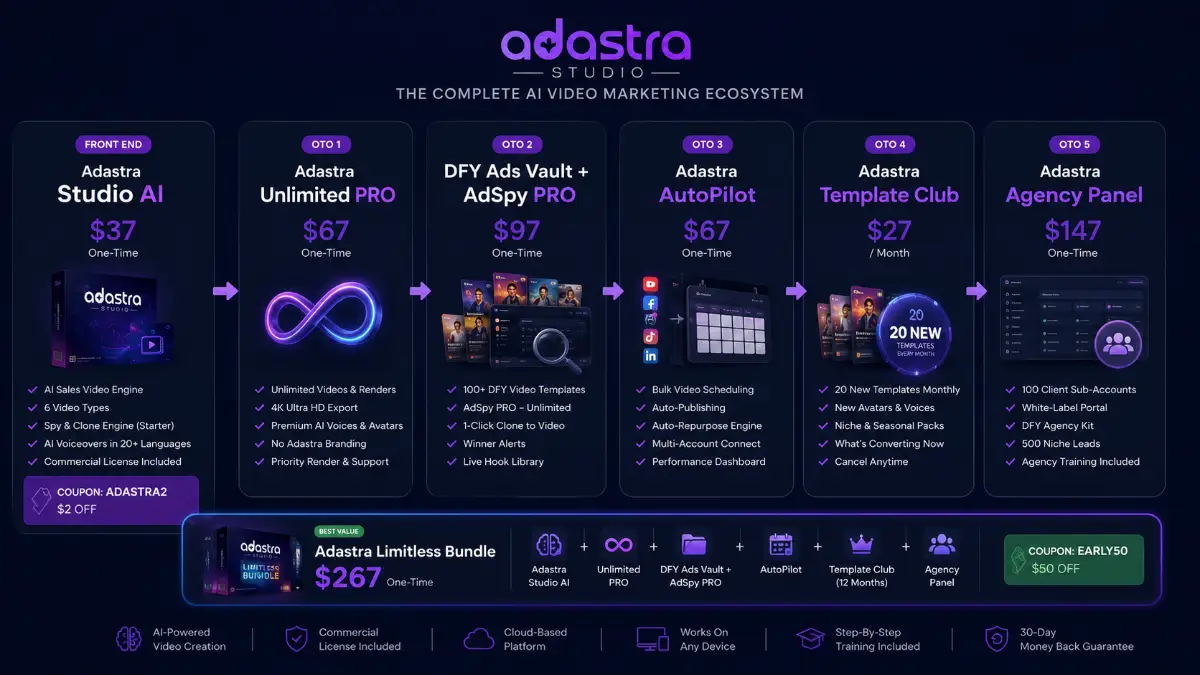
The launch funnel starts with the Front End at $37 and expands through five upgrades covering unlimited production, ad research, automation, fresh templates, and agency management. The Limitless Bundle is listed at $267 and packages the Front End with all five upgrades, including one year of Template Club. Coupons and launch pricing can change, so confirm the final checkout terms before ordering.
Adastra Studio AI Front End
- AI Link-to-Video Engine
- AI scripts, presenters, faceless scenes, voiceovers, and music
- Six video types plus landscape, square, and vertical exports
- Commercial license included
Adastra Studio AI Limitless Bundle
- Adastra Studio AI Front End
- Unlimited Pro and DFY Ads Vault + AdSpy Pro
- Autopilot and one year of Template Club
- Agency Panel
Individual Upgrades
- Unlimited production and premium assets
- Ad research, templates, and cloning workflow
- Scheduling, repurposing, and social publishing
- Agency operations and client management
Complete funnel comparison
| Offer | Price | What it adds | Best for | Action |
|---|---|---|---|---|
| Limitless Bundle | $267 | Front End plus Unlimited Pro, DFY Ads Vault + AdSpy Pro, Autopilot, one year of Template Club, and Agency Panel. Coupon: EARLY50. | Serious marketers and agencies wanting the complete production, research, publishing, and client stack. | Bundle |
| Front End | $37 | Link-to-video engine, flexible inputs, six video types, AI chat assistant, starter Spy & Clone, scripts, presenters or faceless videos, 20+ languages, generated scenes, CTA builder, exports, and commercial rights. Coupon: ADASTRA2. | Affiliates, sellers, and service providers testing the core workflow. | Front-End |
| OTO1 Unlimited Pro | $67 | Unlimited videos and render minutes, 4K exports, priority rendering, full language access, premium presenters and voices, branding removal, unlimited variations and downloads. | High-volume creators who need fewer production caps and premium output options. | OTO1 |
| OTO2 DFY Ads Vault + AdSpy Pro | $97 | 100+ DFY templates, launch and review assets, unlimited AdSpy searches, filtering, one-click cloning, winner alerts, swipe storage, and a live hook library. | Performance marketers who want faster creative research and proven angle discovery. | OTO2 |
| OTO3 Autopilot | $67 | Bulk scheduling, content calendar, auto-publishing, multi-account management, automatic repurposing, set-and-forget campaigns, and performance dashboard. | Teams publishing many creatives across multiple social platforms. | OTO3 |
| OTO4 Template Club | $27/mo | 20 new templates monthly, niche packs, hooks, CTAs, avatars, voices, seasonal assets, conversion insights, and commercial rights. One year is included in the Bundle. | Users who want a continuously refreshed creative library. | OTO4 |
| OTO5 Agency Panel | $147 | Agency dashboard, 100 client sub-accounts, white-label portal, team access, usage controls, DFY agency site, proposals, contracts, outreach scripts, marketplace gig templates, leads, and onboarding. | Agencies selling recurring video creation and campaign services. | OTO5 |
Adastra Studio AI bonuses: 400+ extras available through my links
If Adastra Studio AI matches your workflow and you purchase through my link, you can access the current 400+ bonus package. The dedicated bonus page lists what is included, who qualifies, and how delivery works, so you can review the details before choosing an offer.
Check the bonus package before checkout
Review the current bonus list and delivery instructions, then use the Adastra Studio AI offer link that matches your purchase plan.
Affiliate disclosure: this page may contain compensated links. You should evaluate the product, pricing, refund terms, and offer details independently before purchasing.
Adastra Studio AI pros and cons
Pros
- The link-to-video workflow can remove a large amount of research and setup from the first draft.
- Multiple video types make one platform useful across reviews, launches, demos, bonuses, social content, and ads.
- AI presenters and faceless production reduce dependence on filming equipment and personal on-camera time.
- Creative variations support systematic testing of hooks, angles, tone, and calls to action.
- Landscape, square, and vertical exports make repurposing easier across major publishing channels.
- The included commercial license creates a clear service opportunity for freelancers and agencies.
Cons and limitations
- AI-generated claims and product details still need manual verification before publication.
- The strongest scale features are distributed across paid upgrades rather than concentrated in the Front End.
- Automated videos can feel generic if the user accepts the first script and visual sequence without refinement.
- The Spy & Clone concept should be used for research and inspiration, not careless duplication of competitors.
- High-quality advertising still depends on offer strength, targeting, media buying, and testing—not video generation alone.
- Template Club adds recurring cost outside the Bundle after the included period ends.
My take: Adastra Studio AI is most useful when creative speed is tied to testing
The part I find most commercially interesting is not the promise of producing one video in about a minute. One fast video is convenient; a repeatable system for producing several credible variations is strategically more useful. Affiliates can test different hooks during a launch. Ecommerce sellers can rotate angles before fatigue sets in. Agencies can deliver more versions without multiplying editing hours. In that context, Adastra Studio AI behaves less like a novelty generator and more like a creative production layer between offer research and campaign distribution.
“Will the first generated video be ready to publish?”
Sometimes it may be close, but I would still review every claim, pronunciation, visual choice, transition, CTA, and timing decision before using it in a live campaign.
“Do I need the Bundle?”
Not to test the core product. The Front End is the logical entry point. The Bundle becomes more rational when unlimited production, AdSpy research, publishing automation, recurring templates, and agency management will all be used.
“Can it replace a professional editor?”
It can replace a lot of repetitive assembly for direct-response and social creatives. It does not replace a specialist when a campaign requires custom cinematography, advanced motion design, or tightly art-directed brand production.
“How would I monetize it?”
Potential models include affiliate campaigns, ecommerce ads, launch packages, monthly social-video retainers, local-business promotions, and outsourced creative production for agencies or vendors.
- You already promote products, services, or client offers with video.
- You can benefit from producing more variations in less time.
- You are willing to review AI-generated scripts and claims before publication.
- You know whether you need unlimited rendering, 4K, AdSpy, automation, templates, or agency tools.
- You have checked current pricing, coupon validity, billing terms, and checkout conditions.
Adastra Studio AI FAQ
What is Adastra Studio AI?
Adastra Studio AI is an AI-powered sales-video creator that can turn product links or supplied content into promotional videos with scripts, generated visuals, AI voiceovers, music, and export options for multiple channels.
Do I need to record myself?
No. You can use AI presenters or create fully faceless videos, so personal filming and voice recording are optional.
What kinds of videos can it create?
The product information lists six core categories: review videos, launch promotions, product demos, bonus reveal videos, social media content, and paid advertisements.
Does it support different languages?
Yes. The platform includes AI voiceovers in more than 20 languages, with additional voice and language access available through higher offer levels.
Can I sell videos to clients?
Yes. The Front End includes commercial rights. The Agency Panel adds a dashboard, client sub-accounts, a white-label portal, team access, sales assets, and agency-management tools.
What is the difference between the Front End and Bundle?
The Front End contains the core sales-video engine and commercial license. The Limitless Bundle combines it with Unlimited Pro, DFY Ads Vault + AdSpy Pro, Autopilot, one year of Template Club, and Agency Panel.
Does Adastra Studio AI guarantee better conversions?
No. It can speed up creative production and variation testing, but campaign performance still depends on the offer, message, audience, targeting, traffic quality, compliance, and testing process.
Where can I see the bonus details?
Bonus eligibility, the current package, and delivery instructions are available on the Tool Review Central Adastra Studio AI bonus page.
About the reviewer

Samuel Marco
Samuel Marco is a Top 1% JVZoo affiliate specializing in AI software and online-business tools. He provides practical, in-depth reviews that go beyond features to examine how products work in real-world use, who they are best suited for, their limitations, pricing and upgrade options, and their potential for monetization. His goal is simple: help buyers understand what they’re actually getting and make a more informed purchase decision.
Is Adastra Studio AI worth buying?
Adastra Studio AI is worth considering when video is already a meaningful part of how you promote offers and the real bottleneck is production speed. The link-to-video engine can remove a surprising amount of repetitive work from research, scripting, voiceover, scene creation, and formatting, while the variation tools make the platform more useful for marketers who test multiple messages instead of publishing one creative and stopping there.
I would be more cautious if you rarely create sales videos or expect AI to make strategic decisions for you. The platform can accelerate execution, but it cannot validate a weak offer, guarantee ad performance, or replace careful editorial review. For a first campaign, the $37 Front End is the lower-risk way to assess output quality. For high-volume marketers and agencies that expect to use unlimited production, ad intelligence, automation, fresh templates, and client management, the Bundle is the more complete route.
Fit score
Choose based on how many campaigns you actually produce
Start with the Front End to validate the core link-to-video workflow. Choose the Bundle when higher production volume, creative research, automated publishing, recurring templates, and agency delivery already match your business model.